


Shipping & Handling

How To Activate Your eSIM

Countries Covered

What countries your SIM works in

About Your SIM

SIM Features

YOUR SECRET 🤫
KING SIMS APP CODE 🎁

king-sims-experience

Copy your secret 20% off King Sims app code down below. Apply it in your cart or checkout

QR Code
Activation Guide

Step-1-iPhone-QR-code-2x

Open your 'Cellular' or 'Mobile Data' settings.

Tap 👆 "Add eSIM"

QR Code
Activation Guide

Step-2-iPhone-QR-Code-Activation-Guide

You'll be directed to a screen with multiple activation options.
For QR code activation, select the option: "Use QR code"

QR Code
Activation Guide

Step-3-iPhone-QR-Code-Activation-Guide

Position your phone's camera on the QR code we emailed you and found in the King Sims App.

💡King Tip: Travelling with a friend? Simply send your QR code to a friend and scan it off their phone!

QR Code
Activation Guide

Step-4-iPhone-QR-Code-Activation-Guide

Wait a moment for the eSIM to detect the local network.

Once successful, you'll get a message saying:
"Your new eSIM is ready to activate"

👆Tap Continue

QR Code
Activation Guide

Step-5-iPhone-QR-Code-Activation-Guide

Data Only eSIMs:
If your eSIM comes only with data
👆Tap "Data Only"

eSIMs with Calls & Texts:
If your eSIM comes with calls & texts like our other eSIM ranges
👆Tap "Voice and Data"

QR Code
Activation Guide

Step-6-iPhone-QR-Code-Activation-Guide

Wait a moment ⏳
Once you see this notice pop-up, it means your activation has successfully completed.

Last Step:
Once you see this notification, we need to name and finalise your eSIM setup.
👆Tap "Done" When your ready.

QR Code
Activation Guide

Step-7-iPhone-QR-Code-Activation-Guide

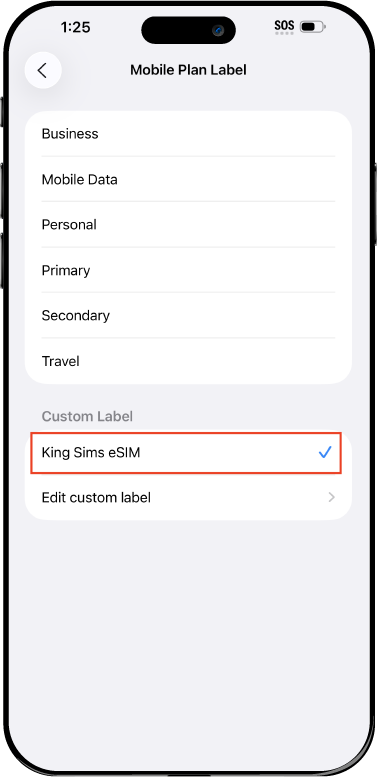
Name Your eSIM ✍️
Once you pass the last step, look for your newly activated eSIM and tap its "Name".

Mobile Plan Label:
Select "Custom Label"
Name it: "King Sims eSIM"

QR Code
Activation Guide

Step-8-iPhone-QR-Code-Activation-Guide

Final Step 👑
Turn on your line ✅

Turn Data Roaming to 'ON'
look for the option titled "Data Roaming"
then Tap 👆the option to turn it 'ON'

For Local eSIM plans with a mobile number, this step is not necessary.

You're Ready To Go 🎉

Step-9-iPhone-QR-Code-Activation-Guide

Welcome to the Kingdom 👑
Once you see the 4G or 5G symbol, test your mobile data.

Once your mobile data starts working without Wi-Fi it means your eSIM has successfully activated

Now you can start travelling with freedom
like a King 🤴 or 👸Queen.

✅ Step 1: Activate Your SIM Card

king-sims-experience.
📅 Add Your Arrival Date:
At checkout, let us know when you're landing in your destination — whether it's 🇺🇸 USA, 🇨🇦 Canada, or 🇲🇽 Mexico. We’ll schedule your SIM for seamless activation.
👑 Have King Sims Ready:
Make sure you have your King Sims packaging ready. It has all you need to get set up.
📲 Swap Your SIM cards:
Once you land, just pop the King Sims card into your phone. Use the "King Pin" in your packaging to swap your SIMs.
🔁 Restart Your Phone:
Give your device a quick restart to kickstart the activation magic.
📩 Get the Welcome Message: Depending on our partnered mobile network and which SIM card you ordered. You’ll get a welcome SMS from the Network with your brand new mobile number — you're officially connected! 🎉
💬 Need Help?
If you see SOS only or no signal, reach out via Live Chat — our support team can sort it in under 5 minutes. 👑
💡 King Tip:
If your King SIM works across multiple countries, don’t forget to turn Data Roaming ON to stay connected in every destination it covers. 🌍📶

Does My Device Have eSIM?

👑 King Tip: If your device isn't listed here simply search google with your phone model to find out if it is 💡

  • iPhone XS
  • iPhone XS Max
  • iPhone 11
  • iPhone 11 Pro
  • iPhone 11 Pro Max
  • iPhone SE (2020)
  • iPhone 12 Mini
  • iPhone 12
  • iPhone 12 Pro
  • iPhone 12 Pro Max
  • iPhone 13 mini
  • iPhone 13
  • iPhone 13 Pro
  • iPhone 13 Pro Max
  • iPhone SE (2022)
  • iPhone 14
  • iPhone 14 Plus
  • iPhone 14 Pro
  • iPhone 14 Pro Max
  • iPhone 15
  • iPhone 15 Plus
  • iPhone 15 Pro
  • iPhone 15 Pro Max
  • iPhone 16 (All Models)
  • iPad Pro (2018 and onwards)
  • iPad Air
  • iPad
  • Watch series 3
  • Watch series 4
  • Watch series 5
  • Watch series 6
  • Watch SE
  • Galaxy Z Flip
  • Galaxy Z Flip 5G
  • Galaxy Z Flip3 5G
  • Galaxy Z Flip4
  • Galaxy Z Flip5
  • Galaxy Fold
  • Galaxy Z Fold2 5G
  • Galaxy Z Fold3 5G
  • Galaxy Z Fold4
  • Galaxy Z Fold5 5G
  • Galaxy S20
  • Galaxy S21
  • Galaxy S21+ 5G
  • Galaxy S21 Ultra 5G
  • Galaxy S22
  • Galaxy S22+
  • Galaxy S22 Ultra
  • Galaxy Note 20 Ultra 5G
  • Galaxy Note 20
  • Galaxy S23
  • Galaxy S23+
  • Galaxy S23 Ultra
  • Galaxy S24
  • Galaxy S24+
  • Galaxy S24 Ultra
  • Galaxy S20 Ultra 5G
  • Gemini PDA
  • Pixel 3
  • Pixel 3a
  • Pixel 4
  • Pixel 4a
  • Pixel 5
  • Pixel 6
  • Pixel 6a
  • Pixel 6 Pro
  • Pixel 7
  • Pixel 7 Pro
  • Pixel 8
  • Pixel 8 Pro
  • P40
  • P40 Pro (not including the P40 Pro +)
  • Mate 40 Pro
  • Razr 2019
  • Razr 5G
  • Motorola Razr 40
  • Motorola Razr 40 Ultra
  • Razr+
  • Edge+
  • Edge 40
  • Edge 40 Pro
  • Edge 40 Neo
  • G52J 5G
  • G52J 5G Ⅱ
  • G53J 5G
  • Find X3 Pro
  • Reno 5 A
  • Find X5
  • Find X5 Pro
  • Reno6 Pro 5G
  • A55s 5G
  • Rakuten Mini
  • Big-S
  • Big
  • Hand
  • Hand 5G
  • Xperia 10 III Lite
  • Xperia 10 IV
  • Xperia 10V
  • Xperia Xperia 1 IV
  • Xperia 5 IV
  • Xperia 1 V
  • Xperia Ace III
  • Xperia 5 V
  • Honor
  • Magic 4 Pro
  • AQUOS Sense6s
  • AQUOS wish
  • AQUOS sense4 lite
  • AQUOS sense 7
  • AQUOS sense 7plus
  • AQUOS wish 2 SHG08
  • AQUOS wish3
  • AQUOS zero 6
  • Simple Sumaho6
  • AQUOS R7
  • AQUOS R8
  • AQUOS R8 Pro
  • V30
  • 12T Pro
  • 13
  • 13 Lite
  • 13 Pro
  • 13T Pro 
  • Honor Magic 4 Pro
  • Honor Magic 5 Pro
  • Honor 90
  • Honor X8
  • Oneplus Open
  • Oneplus 11
  • Oneplus 12 
  • Nokia XR21
  • Nokia X30
  • Nokia G60 5G
  • HAMMER Blade 3
  • HAMMER Explorer PRO
  • HAMMER Blade 5G
  • Vivo X90 Pro
  • Vivo V29 Lite 5G (Europe Only)

5 Important Tips You Should Know Before Visiting Bali

Travelling to Bali, Indonesia?

Bali! Bali is one of the most gorgeous Islands that you would ever see. ?

With its breathtaking sunsets, tropical beaches, magnificent waterfalls, and stunning mountain ranges with rich greenery…?☀️?

Unsure where to go? Bali is the place to go!?

But… You don’t know much about Bali, you’re afraid of doing something that goes against their morals, you have no idea where to go, and you have no idea what and where to eat.?

King Sims is here to offer advice!?
Mostly Bali’s Etiquette.?

So, read on because this will help you… Here are the 5 important tips you should know before visiting Bali.

He’ll show you the way! Ensuring that you’ve enough information and know how to get around in Bali!?

So, Here Are The 5 Most Important Tips You Should Know Before Travelling to Bali

Tip 1- Always Have CASH With You ?

Is it better to carry cash or credit cards in Bali?
Without a doubt, Cash!?

As the saying goes…. Cash is King?

YES! Most hotels, restaurants, and tour companies accept credit cards in Bali.?

But, cash is still a highly essential means of payment in Bali, especially in smaller establishments and when you need to pay for transportation or gasoline.?

As a tourist, you’ll want to visit Bali’s local cafes and marketplaces, beach bars, and even taxis that don’t accept credit cards at all.?

Tip 2- Never Drink Bali’s Tap Water ?

Even locals don’t drink Bali’s tap water, since it is not safe for drinking.?

Public tap water should only be drunk after it has been boiled and filtered.?
Bacteria and microbes are the main problem as a result of poor water pipe construction. ?

This will not harm or make you sick in the short run, but long-term exposure can contribute to several serious health problems such as cancer and kidney problems.⚠️

Tip 3- Avoid Using Your Left Hand ??

When shaking hands, driving, eating, delivering or receiving something, use your RIGHT HAND! ??

WHY? ?

In Bali, using the left hand is considered impolite. ?

The Balinese believe that the left hand is impure. ??‍?
Since, it is the hand used for cleanliness.???

This is a piece of their traditions and culture.✨
So, make use of your right hand. Preferably, use both hands.??
Balinese people are very aware of this practice and will notice and appreciate it if you adopt it.?

Tip 4- Leave Your Shoes Outside ?

It is considered disrespectful to wear shoes inside many eateries and, especially, Balinese homes.?

Furthermore, the occurrence of Foot and Mouth Disease in livestock in Bali has strengthened the practice of leaving your shoes outdoors.?

Wear shoes that are easy to slip on and off in case you are requested to remove them.?

Tip 5- BUY A KINGSIMS TRAVEL SIM CARD ??

king-packaging-island-resort-king-sims-travel-sim-cards

Imagine the feeling of landing in Bali, Indonesia.

Removing your sim card from home. Then, plugging in our Bali King Sims Travel Sim Card. Turning on data roaming in your devices settings, waiting for 2 to 5 minutes, and then… Getting connected to the local network in Bali. Just like that.

The best part? You’ve connected to the local network before leaving the plane.

Congratulations… You’ve connected to our best selling, highly rated Bali Travel Sim loaded with 30GB of high speed 4G data that lasts for 15 days.

Why this is our fifth and most important tip?

Because, travelling overseas is unpredictable. And having access to 4G data before you have even arrived is critical in travelling smarter. Not only did you save a lot of money, not needing to use expensive mobile roaming.

But you’ve also skipped the annoying step in looking for a local sim card in Bali and never needing to ask for the Wi-Fi password ever again.

Our 30GB 15 days Bali Travel Sim Card is the best way to get connected and secured when you arrive in Bali while being ahead of all other travellers who are forced to look for overpriced local sim cards at the airport.

King Sims ? has helped travellers all over the World ? save BIG on not using Mobile Roaming AND provided Travellers with Peace of Mind before arriving to Bali, Indonesia without ever having to worry about using: Wi-Fi, looking for a Pre-Paid Sim in the Airport, and getting hit up with an expensive Roaming Bill.

The best part of all of this? Is that King Sims delivers our 30GB 15 days Bali Travel Sim Card to you anywhere in Australia and Worldwide way before you arrive in Bali!

Welcome… to the Royal Travel Experience ?


Bali 15 Day Travel SIM

FOUND VALUE FROM THIS POST?

Subscribe to our Kingdom and be apart of the Royal Class of King Sims. Read the most interesting stories and experiences of the King. From stories that will make you laugh, cry, feel remorse, and most importantly… relate to.

All frequent Travellers have something to share, and the King definitely has a treasure chest of stories that will keep the drama lovers on the edge of their seat.

Travellers who subscribe and join the Royal Class will get 20% Off their first King Sims order.

Sign up today, this is no average boring email newsletter!
You’ll find out when you join our Royal Class…

0