


Shipping & Handling

How To Activate Your eSIM

Countries Covered

What countries your SIM works in

About Your SIM

SIM Features

YOUR SECRET ๐Ÿคซ
KING SIMS APP CODE ๐ŸŽ

king-sims-experience

Copy your secret 20% off King Sims app code down below. Apply it in your cart or checkout

QR Code
Activation Guide

Step-1-iPhone-QR-code-2x

Open your 'Cellular' or 'Mobile Data' settings.

Tap ๐Ÿ‘† "Add eSIM"

QR Code
Activation Guide

Step-2-iPhone-QR-Code-Activation-Guide

You'll be directed to a screen with multiple activation options.
For QR code activation, select the option: "Use QR code"

QR Code
Activation Guide

Step-3-iPhone-QR-Code-Activation-Guide

Position your phone's camera on the QR code we emailed you and found in the King Sims App.

๐Ÿ’กKing Tip: Travelling with a friend? Simply send your QR code to a friend and scan it off their phone!

QR Code
Activation Guide

Step-4-iPhone-QR-Code-Activation-Guide

Wait a moment for the eSIM to detect the local network.

Once successful, you'll get a message saying:
"Your new eSIM is ready to activate"

๐Ÿ‘†Tap Continue

QR Code
Activation Guide

Step-5-iPhone-QR-Code-Activation-Guide

Data Only eSIMs:
If your eSIM comes only with data
๐Ÿ‘†Tap "Data Only"

eSIMs with Calls & Texts:
If your eSIM comes with calls & texts like our other eSIM ranges
๐Ÿ‘†Tap "Voice and Data"

QR Code
Activation Guide

Step-6-iPhone-QR-Code-Activation-Guide

Wait a moment โณ
Once you see this notice pop-up, it means your activation has successfully completed.

โœ… Last Step:
Once you see this notification, we need to name and finalise your eSIM setup.
๐Ÿ‘†Tap "Done" When your ready.

QR Code
Activation Guide

Step-7-iPhone-QR-Code-Activation-Guide

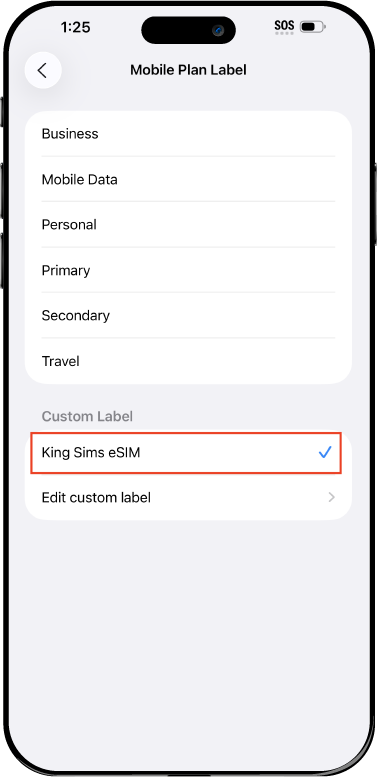
Name Your eSIM โœ๏ธ
Once you pass the last step, look for your newly activated eSIM and tap its "Name".

Mobile Plan Label:
Select "Custom Label"
Name it: "King Sims eSIM"

QR Code
Activation Guide

Step-8-iPhone-QR-Code-Activation-Guide

Final Step ๐Ÿ‘‘
Turn on your line โœ…

Turn Data Roaming to 'ON' โœ…
look for the option titled "Data Roaming"
then Tap ๐Ÿ‘†the option to turn it 'ON'

For Local eSIM plans with a mobile number, this step is not necessary.

You're Ready To Go ๐ŸŽ‰

Step-9-iPhone-QR-Code-Activation-Guide

Welcome to the Kingdom ๐Ÿ‘‘
Once you see the 4G or 5G symbol, test your mobile data.

Once your mobile data starts working without Wi-Fi it means your eSIM has successfully activated

Now you can start travelling with freedom
like a King ๐Ÿคด or ๐Ÿ‘ธQueen.

โœ… Step 1: Activate Your SIM Card

king-sims-experience.
๐Ÿ“…ย Add Your Arrival Date:
At checkout, let us know when you're landing in your destination โ€” whether it's ๐Ÿ‡บ๐Ÿ‡ธ USA, ๐Ÿ‡จ๐Ÿ‡ฆ Canada, or ๐Ÿ‡ฒ๐Ÿ‡ฝ Mexico. Weโ€™ll schedule your SIM for seamless activation.
๐Ÿ‘‘ Have King Sims Ready:
Make sure you have your King Sims packaging ready. It has all you need to get set up.
๐Ÿ“ฒย Swap Your SIM cards:
Once you land, just pop the King Sims card into your phone. Use the "King Pin" in your packaging to swap your SIMs.
๐Ÿ”ย Restart Your Phone:
Give your device a quick restart to kickstart the activation magic.
๐Ÿ“ฉย Get the Welcome Message: Depending on our partnered mobile network and which SIM card you ordered. Youโ€™ll get a welcome SMS fromย the Network with your brand new mobile number โ€” you're officially connected! ๐ŸŽ‰
๐Ÿ’ฌย Need Help?
If you seeย SOS onlyย or no signal, reach out viaย Live Chatย โ€” our support team can sort it in under 5 minutes. ๐Ÿ‘‘
๐Ÿ’กย King Tip:
If your King SIM works across multiple countries, donโ€™t forget toย turn Data Roaming ONย to stay connected in every destination it covers. ๐ŸŒ๐Ÿ“ถ

Does My Device Have eSIM?

๐Ÿ‘‘ King Tip: If your device isn't listed here simply search google with your phone model to find out if it is ๐Ÿ’ก

  • iPhone XS
  • iPhone XS Max
  • iPhone 11
  • iPhone 11 Pro
  • iPhone 11 Pro Max
  • iPhone SE (2020)
  • iPhone 12 Mini
  • iPhone 12
  • iPhone 12 Pro
  • iPhone 12 Pro Max
  • iPhone 13 mini
  • iPhone 13
  • iPhone 13 Pro
  • iPhone 13 Pro Max
  • iPhone SE (2022)
  • iPhone 14
  • iPhone 14 Plus
  • iPhone 14 Pro
  • iPhone 14 Pro Max
  • iPhone 15
  • iPhone 15 Plus
  • iPhone 15 Pro
  • iPhone 15 Pro Max
  • iPhone 16 (All Models)
  • iPad Pro (2018 and onwards)
  • iPad Air
  • iPad
  • Watch series 3
  • Watch series 4
  • Watch series 5
  • Watch series 6
  • Watch SE
  • Galaxy Z Flip
  • Galaxy Z Flip 5G
  • Galaxy Z Flip3 5G
  • Galaxy Z Flip4
  • Galaxy Z Flip5
  • Galaxy Fold
  • Galaxy Z Fold2 5G
  • Galaxy Z Fold3 5G
  • Galaxy Z Fold4
  • Galaxy Z Fold5 5G
  • Galaxy S20
  • Galaxy S21
  • Galaxy S21+ 5G
  • Galaxy S21 Ultra 5G
  • Galaxy S22
  • Galaxy S22+
  • Galaxy S22 Ultra
  • Galaxy Note 20 Ultra 5G
  • Galaxy Note 20
  • Galaxy S23
  • Galaxy S23+
  • Galaxy S23 Ultra
  • Galaxy S24
  • Galaxy S24+
  • Galaxy S24 Ultra
  • Galaxy S20 Ultra 5G
  • Gemini PDA
  • Pixel 3
  • Pixel 3a
  • Pixel 4
  • Pixel 4a
  • Pixel 5
  • Pixel 6
  • Pixel 6a
  • Pixel 6 Pro
  • Pixel 7
  • Pixel 7 Pro
  • Pixel 8
  • Pixel 8 Pro
  • P40
  • P40 Pro (not including the P40 Pro +)
  • Mate 40 Pro
  • Razr 2019
  • Razr 5G
  • Motorola Razr 40
  • Motorola Razr 40 Ultra
  • Razr+
  • Edge+
  • Edge 40
  • Edge 40 Pro
  • Edge 40 Neo
  • G52J 5G
  • G52J 5G โ…ก
  • G53J 5G
  • Find X3 Pro
  • Reno 5 A
  • Find X5
  • Find X5 Pro
  • Reno6 Pro 5G
  • A55s 5G
  • Rakuten Mini
  • Big-S
  • Big
  • Hand
  • Hand 5G
  • Xperia 10 III Lite
  • Xperia 10 IV
  • Xperia 10V
  • Xperia Xperia 1 IV
  • Xperia 5 IV
  • Xperia 1 V
  • Xperia Ace III
  • Xperia 5 V
  • Honor
  • Magic 4 Pro
  • AQUOS Sense6s
  • AQUOS wish
  • AQUOS sense4 lite
  • AQUOS sense 7
  • AQUOS sense 7plus
  • AQUOS wish 2 SHG08
  • AQUOS wish3
  • AQUOS zero 6
  • Simple Sumaho6
  • AQUOS R7
  • AQUOS R8
  • AQUOS R8 Pro
  • V30
  • 12T Pro
  • 13
  • 13 Lite
  • 13 Pro
  • 13T Pro 
  • Honor Magic 4 Pro
  • Honor Magic 5 Pro
  • Honor 90
  • Honor X8
  • Oneplus Open
  • Oneplus 11
  • Oneplus 12 
  • Nokia XR21
  • Nokia X30
  • Nokia G60 5G
  • HAMMER Blade 3
  • HAMMER Explorer PRO
  • HAMMER Blade 5G
  • Vivo X90 Pro
  • Vivo V29 Lite 5G (Europe Only)

All About eSIMs: What Are They & How Do They Work? ๐ŸŒ๐Ÿ“ฒ

All About eSIMs: What Are They & How Do They Work? ๐ŸŒ๐Ÿ“ฒ

Traveling abroad? Say goodbye to physical SIM cards and hello to eSIMs! ๐Ÿš€ Whether you’re a frequent flyer or a digital nomad, understanding what an eSIM is and how it works can save you time, money, and hassle. Letโ€™s dive in!

What Is an eSIM? ๐Ÿค”

An eSIM is a digital SIM card built into your phone, eliminating the need for a physical SIM. ๐Ÿ“ฑ No more swapping tiny chips or hunting for local storesโ€”your phoneโ€™s eSIM compatible? Youโ€™re good to go!

How Does an eSIM Work? ๐Ÿ”„

Unlike traditional SIMs, eSIMs work by downloading a carrier profile directly to your device. ๐ŸŒ Simply scan a QR code or enter details manually, and voilร โ€”instant network access! Perfect for travelers who need the best eSIM for international travel.

eSIM vs Physical SIM: Which Is Better? โš–๏ธ

The most asked question!

โœ… No physical swapping โ€“ Change carriers digitally.
โœ… Multiple profiles โ€“ Store several numbers on one device.
โœ… Faster activation โ€“ Get connected in minutes, not hours.
๐Ÿšซ Not all phones support eSIM โ€“ Check if yours is eSIM compatible before buying.

How to Set Up an eSIM ๐Ÿ› ๏ธ

  1. Buy an eSIM online from a trusted provider – like us! ๐Ÿ˜‰
  2. Receive a QR code or activation details via email. ๐Ÿ“ง
  3. Go to Settings > Mobile Data > Add eSIM on your phone.
  4. Scan the QR code or enter details manually. โœ…
  5. Enjoy instant connectivity! ๐ŸŒŸ

Why Use an eSIM for Travel? โœˆ๏ธ

  1. Avoid expensive roaming charges ๐Ÿ’ธ
  2. Switch carriers without changing SIMs ๐Ÿ”„
  3. Instant activation upon arrival ๐Ÿ›ฌ
  4. Ideal for multi-country trips ๐Ÿ—บ๏ธ

Where to Buy an eSIM Online? ๐Ÿ›’

Looking for the best eSIM for international travel?ย  ย  ย  ย  ย  ย  ย  Our travel eSIMs offer:
โœ” Affordable global data plans
โœ” Fast and easy activation (QR code delivery)
โœ” 24/7 customer support

Final Thoughts: Is an eSIM Right for You? ๐Ÿค”

If you own an eSIM-compatible phone and love seamless travel, switching to an eSIM is a no-brainer!ย  No more hunting for SIM cardsโ€”just pure, uninterrupted connectivity.

Stay Connected Smarter! ๐ŸŒโœˆ๏ธ
Want more travel tech tips? Subscribe to our newsletter for exclusive eSIM deals, guides, and travel hacks! ๐Ÿš€

Check us and sign up now!


Click here

0