

Shipping & Handling

How To Activate Your eSIM

📲 eSIM Compatible Devices

Activating your Japan eSIM is simple — just make sure you have an eSIM-compatible mobile device.

📩 After Purchase
You’ll instantly receive your QR code via email and on the Order Confirmation Page — both in the King Sims app and website.

🛬 When You Land
🤳 Open your camera and point it at the QR code from your email, order page, King Sims app, or another screen
✅ Tap “Add eSIM” or “Add Mobile Plan”
🛜 Then head to your Mobile Data settings, turn “Data Roaming” ON
🚀 Start using your data instantly!

💡 Not sure if your device supports eSIM?
👇 Tap the button below to check 👇

Countries Covered

What countries your SIM works in

Countries Covered 🌍

This eSIM, works in Japan 🇯🇵 Only
Just make sure you turn “Data Roaming” to “On” in your
device settings for it to work automatically when you land.

About Your SIM

📦 Instant QR Code Delivery: Once your order is placed and verified, your eSIM QR code is delivered immediately via email and also accessible inside the King Sims App.

🗓️ Plan Validity: Your plan starts from the moment you activate the eSIM, not from the purchase date. It lasts for the full duration you selected — from 7 to 90 days.

🔓 Unlocked Phones Only: Ensure your device is carrier-unlocked to install and use the eSIM. If you’re unsure, check with your current provider.

🛜 Data Only eSIM: This eSIM is data-only. Use your favorite apps (WhatsApp, Telegram, iMessage, etc.) for messaging and calls.

📲 eSIM Compatible Device: Not all phones support eSIM. Be sure to check device compatibility before purchasing.
📌 Tap the “eSIM Device List 📱” tab on this page to see if your phone is supported.

🔁 Extend Plan: If you’re staying longer than expected, contact our support team to top up your plan or extend your coverage.

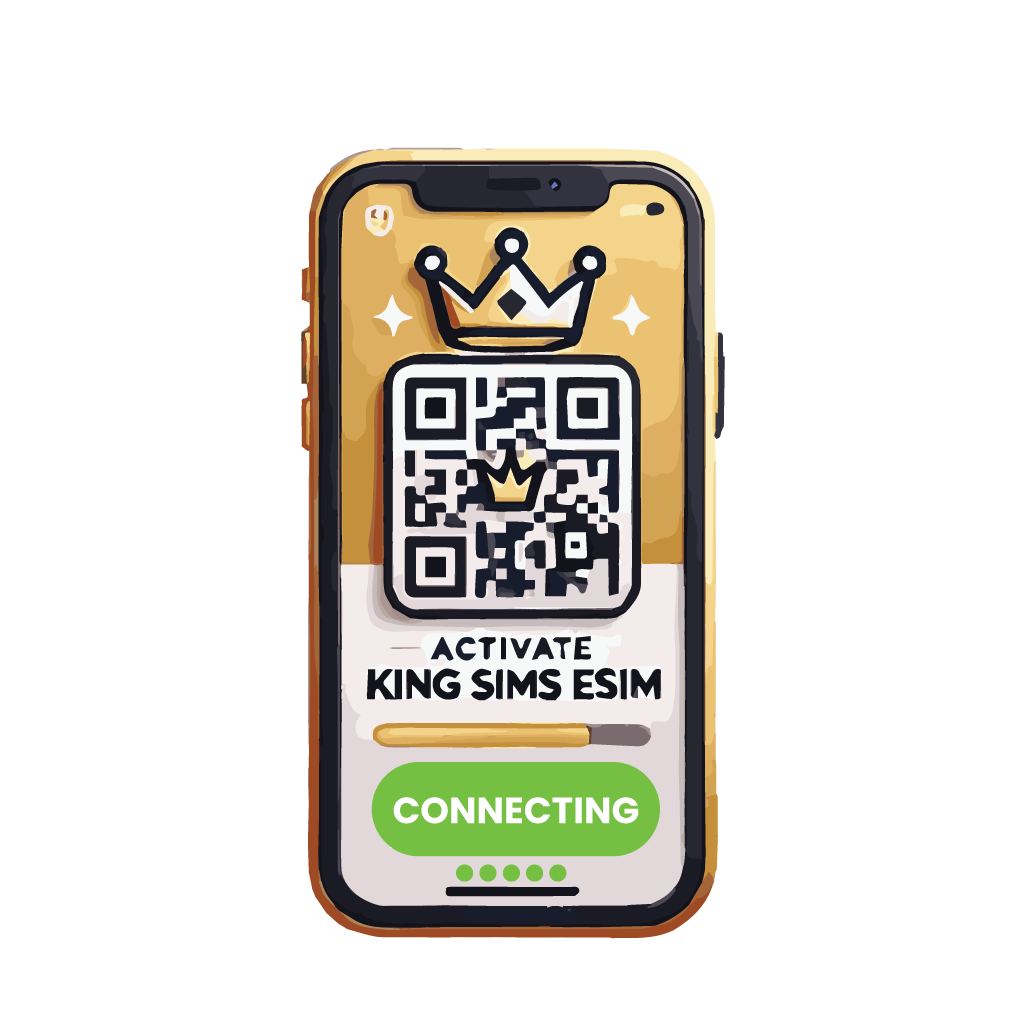
📲 Scan & Activate:
Here’s how to get connected in under 2 minutes:

  1. 🛜 Connect to Airport Wi-Fi or any Wi-Fi network

  2. 🤳 Open your camera and scan the QR code (from your email, order page, or King Sims app)

  3. ✅ Tap “Add eSIM” or “Add Mobile Plan”

  4. 📶 Go to your eSIM’s Mobile Data settings, and turn “Data Roaming” ON
    🚀 That’s it! Welcome to King Sims my King or Queen, you’re now connected to Japan’s fastest mobile network.

SIM Features

🛜 Unlimited High-Speed 5G Data: Stay connected with uncapped access to ultra-fast 5G throughout Japan 🇯🇵

🗓️ Flexible Plans: Choose from 7, 15, 20, 30, 45, 60, or 90 days — ideal for short stays, long holidays, or extended digital nomad adventures.

📶 Powered by Tier 1 Japanese Network: Your eSIM connects to SoftBank, one of Japan’s most reliable 5G carriers, for full-speed access across cities, countryside, and transit hubs.

📤 Instant QR Code Delivery: Once approved, your eSIM is delivered instantly by email and available inside the King Sims app under “My eSIMs.”

📱 Data-Only eSIM: This plan is designed for internet use only. Voice calls and SMS are not included, but WhatsApp, FaceTime, iMessage, and all VoIP services work perfectly.

📶 Hotspot Enabled: Share your high-speed connection with other devices — laptops, tablets, or your travel companions.

🔓 Compatible with All eSIM-Enabled Devices: Comes as a digital QR code — no physical SIM card needed.

👑 King Sims Packaging (Digital Royal Edition): Includes activation instructions, full coverage details, and priority access to our support team.

YOUR SECRET 🤫
KING SIMS APP CODE 🎁

king-sims-experience

Copy your secret 20% off King Sims app code down below. Apply it in your cart or checkout

QR Code
Activation Guide

Step-1-iPhone-QR-code-2x

Open your 'Cellular' or 'Mobile Data' settings.

Tap 👆 "Add eSIM"

QR Code
Activation Guide

Step-2-iPhone-QR-Code-Activation-Guide

You'll be directed to a screen with multiple activation options.
For QR code activation, select the option: "Use QR code"

QR Code
Activation Guide

Step-3-iPhone-QR-Code-Activation-Guide

Position your phone's camera on the QR code we emailed you and found in the King Sims App.

💡King Tip: Travelling with a friend? Simply send your QR code to a friend and scan it off their phone!

QR Code
Activation Guide

Step-4-iPhone-QR-Code-Activation-Guide

Wait a moment for the eSIM to detect the local network.

Once successful, you'll get a message saying:
"Your new eSIM is ready to activate"

👆Tap Continue

QR Code
Activation Guide

Step-5-iPhone-QR-Code-Activation-Guide

Data Only eSIMs:
If your eSIM comes only with data
👆Tap "Data Only"

eSIMs with Calls & Texts:
If your eSIM comes with calls & texts like our other eSIM ranges
👆Tap "Voice and Data"

QR Code
Activation Guide

Step-6-iPhone-QR-Code-Activation-Guide

Wait a moment ⏳
Once you see this notice pop-up, it means your activation has successfully completed.

Last Step:
Once you see this notification, we need to name and finalise your eSIM setup.
👆Tap "Done" When your ready.

QR Code
Activation Guide

Step-7-iPhone-QR-Code-Activation-Guide

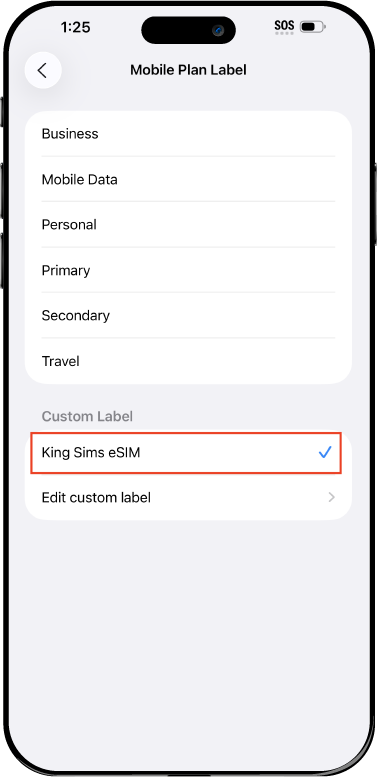
Name Your eSIM ✍️
Once you pass the last step, look for your newly activated eSIM and tap its "Name".

Mobile Plan Label:
Select "Custom Label"
Name it: "King Sims eSIM"

QR Code
Activation Guide

Step-8-iPhone-QR-Code-Activation-Guide

Final Step 👑
Turn on your line ✅

Turn Data Roaming to 'ON'
look for the option titled "Data Roaming"
then Tap 👆the option to turn it 'ON'

For Local eSIM plans with a mobile number, this step is not necessary.

You're Ready To Go 🎉

Step-9-iPhone-QR-Code-Activation-Guide

Welcome to the Kingdom 👑
Once you see the 4G or 5G symbol, test your mobile data.

Once your mobile data starts working without Wi-Fi it means your eSIM has successfully activated

Now you can start travelling with freedom
like a King 🤴 or 👸Queen.

✅ Step 1: Activate Your SIM Card

king-sims-experience.
📅 Add Your Arrival Date:
At checkout, let us know when you're landing in your destination — whether it's 🇺🇸 USA, 🇨🇦 Canada, or 🇲🇽 Mexico. We’ll schedule your SIM for seamless activation.
👑 Have King Sims Ready:
Make sure you have your King Sims packaging ready. It has all you need to get set up.
📲 Swap Your SIM cards:
Once you land, just pop the King Sims card into your phone. Use the "King Pin" in your packaging to swap your SIMs.
🔁 Restart Your Phone:
Give your device a quick restart to kickstart the activation magic.
📩 Get the Welcome Message: Depending on our partnered mobile network and which SIM card you ordered. You’ll get a welcome SMS from the Network with your brand new mobile number — you're officially connected! 🎉
💬 Need Help?
If you see SOS only or no signal, reach out via Live Chat — our support team can sort it in under 5 minutes. 👑
💡 King Tip:
If your King SIM works across multiple countries, don’t forget to turn Data Roaming ON to stay connected in every destination it covers. 🌍📶

Does My Device Have eSIM?

👑 King Tip: If your device isn't listed here simply search google with your phone model to find out if it is 💡

  • iPhone XS
  • iPhone XS Max
  • iPhone 11
  • iPhone 11 Pro
  • iPhone 11 Pro Max
  • iPhone SE (2020)
  • iPhone 12 Mini
  • iPhone 12
  • iPhone 12 Pro
  • iPhone 12 Pro Max
  • iPhone 13 mini
  • iPhone 13
  • iPhone 13 Pro
  • iPhone 13 Pro Max
  • iPhone SE (2022)
  • iPhone 14
  • iPhone 14 Plus
  • iPhone 14 Pro
  • iPhone 14 Pro Max
  • iPhone 15
  • iPhone 15 Plus
  • iPhone 15 Pro
  • iPhone 15 Pro Max
  • iPhone 16 (All Models)
  • iPad Pro (2018 and onwards)
  • iPad Air
  • iPad
  • Watch series 3
  • Watch series 4
  • Watch series 5
  • Watch series 6
  • Watch SE
  • Galaxy Z Flip
  • Galaxy Z Flip 5G
  • Galaxy Z Flip3 5G
  • Galaxy Z Flip4
  • Galaxy Z Flip5
  • Galaxy Fold
  • Galaxy Z Fold2 5G
  • Galaxy Z Fold3 5G
  • Galaxy Z Fold4
  • Galaxy Z Fold5 5G
  • Galaxy S20
  • Galaxy S21
  • Galaxy S21+ 5G
  • Galaxy S21 Ultra 5G
  • Galaxy S22
  • Galaxy S22+
  • Galaxy S22 Ultra
  • Galaxy Note 20 Ultra 5G
  • Galaxy Note 20
  • Galaxy S23
  • Galaxy S23+
  • Galaxy S23 Ultra
  • Galaxy S24
  • Galaxy S24+
  • Galaxy S24 Ultra
  • Galaxy S20 Ultra 5G
  • Gemini PDA
  • Pixel 3
  • Pixel 3a
  • Pixel 4
  • Pixel 4a
  • Pixel 5
  • Pixel 6
  • Pixel 6a
  • Pixel 6 Pro
  • Pixel 7
  • Pixel 7 Pro
  • Pixel 8
  • Pixel 8 Pro
  • P40
  • P40 Pro (not including the P40 Pro +)
  • Mate 40 Pro
  • Razr 2019
  • Razr 5G
  • Motorola Razr 40
  • Motorola Razr 40 Ultra
  • Razr+
  • Edge+
  • Edge 40
  • Edge 40 Pro
  • Edge 40 Neo
  • G52J 5G
  • G52J 5G Ⅱ
  • G53J 5G
  • Find X3 Pro
  • Reno 5 A
  • Find X5
  • Find X5 Pro
  • Reno6 Pro 5G
  • A55s 5G
  • Rakuten Mini
  • Big-S
  • Big
  • Hand
  • Hand 5G
  • Xperia 10 III Lite
  • Xperia 10 IV
  • Xperia 10V
  • Xperia Xperia 1 IV
  • Xperia 5 IV
  • Xperia 1 V
  • Xperia Ace III
  • Xperia 5 V
  • Honor
  • Magic 4 Pro
  • AQUOS Sense6s
  • AQUOS wish
  • AQUOS sense4 lite
  • AQUOS sense 7
  • AQUOS sense 7plus
  • AQUOS wish 2 SHG08
  • AQUOS wish3
  • AQUOS zero 6
  • Simple Sumaho6
  • AQUOS R7
  • AQUOS R8
  • AQUOS R8 Pro
  • V30
  • 12T Pro
  • 13
  • 13 Lite
  • 13 Pro
  • 13T Pro 
  • Honor Magic 4 Pro
  • Honor Magic 5 Pro
  • Honor 90
  • Honor X8
  • Oneplus Open
  • Oneplus 11
  • Oneplus 12 
  • Nokia XR21
  • Nokia X30
  • Nokia G60 5G
  • HAMMER Blade 3
  • HAMMER Explorer PRO
  • HAMMER Blade 5G
  • Vivo X90 Pro
  • Vivo V29 Lite 5G (Europe Only)

Japan Unlimited 5G Data eSIM – SoftBank Network

From USD $28.48
- +

eSIM Features

About Your eSIM

Where Does it Work

How To Activate eSIM

Check eSIM Devices

Guaranteed Safe Checkout

How To Activate
Your eSIM

IN 3 EASY STEPS
how-to-use-eSIM-icon-1-king-sims

1. Check If Your Phone Works

Before you buy your eSIM. Make sure your device supports eSIM technology. Tap below to see our complete list of compatible eSIM devices.

how-to-use-eSIM-icon-2-king-sims

2. Buy Your eSIM

When you decide on the eSIM plan you want. Complete your purchase. Once purchased, you'll receive 2 emails, an order confirmation email and a seperate email containing a QR code with simple activation instructions.

how-to-use-eSIM-icon-3-king-sims-final

3. Scan & Activate

When you land in any Airport overseas. Connect to the free Airport Wi-Fi. Once connected, scan the QR code in your eSIM email, turn on data roaming and start using your eSIM right away!

Give Your Roaming Bill
The Royal Flush

Welcome To The King Sims Experience

Step 1: It All Starts With The King's Travel eSIM

Convenience is King 👑

The King has made your travel experience smooth and easy with new technology. With a click of a button and a simple QR code scan, you can say goodbye to waiting for a prepaid SIM card before leaving for Japan or searching for one at the airport. Say hello to a new way of traveling like a King 🤴 and 👸Queen in 🇯🇵 Japan.
Step 2: *Ding* You’ve got an email! It looks like it’s from the King 👑

Don't Keep The King Waiting…

Open it up… Do you like what you see? It may not be as exciting as our physical King SIMs, but this neat little QR code has HUGE benefits. Save it and don’t forget to open your email or King Sims app with this QR code when you land overseas. Trust us, you’ll need it.

Step 3: Land OverseasScan & Play 🤳 Be On Your Way!

"TOUCH DOWN!" 🛬

When the plane lands, connect to the free airport Wi-Fi. Open your email with your King Sims eSIM and scan the QR code. Go to your "Mobile Data Roaming" settings and turn your "data roaming" to 'ON' Before you even leave the Airport, your eSIM should be up and running, and your phone buzzing 📲 from all the missed notifications on your flight ✈️ 
Step 4: Walk out of the Airport Like a King & Queen

You've Earned Your Crown, Now Wear It! 👑

Congratulations, Royal Traveller! You’ve just unlocked the ultimate Japan eSIM. No plastic SIM card, no stress, instant connection, just pure 5G power in the palm of your hand. This eSIM gives you unlimited high-speed data, from your first day in Japan until your last. Whether you’re here for 7, 15, 30, or even 90 days, you’re always connected like a King or Queen.
Powered by SoftBank, Japan’s leading network
📲 No physical SIM needed — activate in seconds
⛩️ Works everywhere in Japan — cities, trains, temples
💸 Save hundreds in roaming fees, and skip the airport waiting.

You scanned your QR code. You activated. You landed connected. Now go enjoy your trip and remember…

Welcome to the King Sims Experience 👑

Royal Reviews

Connected 100K + Travellers 🎉
Customer Reviews
4.9 Based on 119 Reviews
5 ★
97% 
115
4 ★
1% 
1
3 ★
0% 
0
2 ★
1% 
1
1 ★
1% 
2
Write a Review Ask a Question

Thank you for submitting a review!

Your input is very much appreciated. Share it with your friends so they can enjoy it too!

Filter Reviews:
AM
04 March 2026
alana m.
AU AU

Reliable Connection for My Entire Stay 😎

I got the 30 day plan and it delivered fast data everywhere,Tokyo, Nagoya, and Kyoto. Used it for translations, restaurant searches, and uploading photos daily. Really appreciated how effortless the setup was after a long flight.

EL
04 March 2026
Erin L.
AU AU

Reliable Unlimited Data 👍

Used it every day for maps, messaging, and browsing with no slowdowns.

AH
04 March 2026
Alan H.
AU AU

This eSIM Fought Every Battle With Me 😎

Whether I was pushing through crowds in Shibuya or deep inside Kyoto’s markets, the unlimited 5G held strong like a champ. Maps, videos, google translations, everything loaded instantly. This thing doesn’t tap out.

GR
04 March 2026
Greg R.
AU AU

Smooth Hotspot Sharing 👍

Shared the connection with my laptop for work no lag at all.

Frequently Asked Questions

The Most Common Questions
Answered
0