



Shipping & Handling

How To Activate Your eSIM

Countries Covered

What countries your SIM works in

About Your SIM

SIM Features

YOUR SECRET 🤫
KING SIMS APP CODE 🎁

king-sims-experience

Copy your secret 20% off King Sims app code down below. Apply it in your cart or checkout

QR Code
Activation Guide

Step-1-iPhone-QR-code-2x

Open your 'Cellular' or 'Mobile Data' settings.

Tap 👆 "Add eSIM"

QR Code
Activation Guide

Step-2-iPhone-QR-Code-Activation-Guide

You'll be directed to a screen with multiple activation options.
For QR code activation, select the option: "Use QR code"

QR Code
Activation Guide

Step-3-iPhone-QR-Code-Activation-Guide

Position your phone's camera on the QR code we emailed you and found in the King Sims App.

💡King Tip: Travelling with a friend? Simply send your QR code to a friend and scan it off their phone!

QR Code
Activation Guide

Step-4-iPhone-QR-Code-Activation-Guide

Wait a moment for the eSIM to detect the local network.

Once successful, you'll get a message saying:
"Your new eSIM is ready to activate"

👆Tap Continue

QR Code
Activation Guide

Step-5-iPhone-QR-Code-Activation-Guide

Data Only eSIMs:
If your eSIM comes only with data
👆Tap "Data Only"

eSIMs with Calls & Texts:
If your eSIM comes with calls & texts like our other eSIM ranges
👆Tap "Voice and Data"

QR Code
Activation Guide

Step-6-iPhone-QR-Code-Activation-Guide

Wait a moment ⏳
Once you see this notice pop-up, it means your activation has successfully completed.

Last Step:
Once you see this notification, we need to name and finalise your eSIM setup.
👆Tap "Done" When your ready.

QR Code
Activation Guide

Step-7-iPhone-QR-Code-Activation-Guide

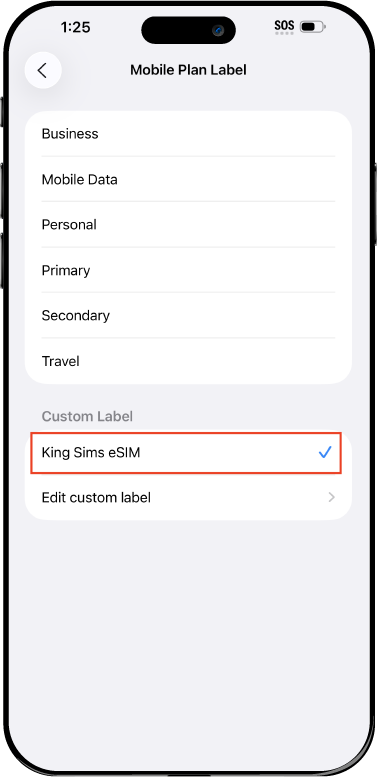
Name Your eSIM ✍️
Once you pass the last step, look for your newly activated eSIM and tap its "Name".

Mobile Plan Label:
Select "Custom Label"
Name it: "King Sims eSIM"

QR Code
Activation Guide

Step-8-iPhone-QR-Code-Activation-Guide

Final Step 👑
Turn on your line ✅

Turn Data Roaming to 'ON'
look for the option titled "Data Roaming"
then Tap 👆the option to turn it 'ON'

For Local eSIM plans with a mobile number, this step is not necessary.

You're Ready To Go 🎉

Step-9-iPhone-QR-Code-Activation-Guide

Welcome to the Kingdom 👑
Once you see the 4G or 5G symbol, test your mobile data.

Once your mobile data starts working without Wi-Fi it means your eSIM has successfully activated

Now you can start travelling with freedom
like a King 🤴 or 👸Queen.

✅ Step 1: Activate Your SIM Card

king-sims-experience.
📅 Add Your Arrival Date:
At checkout, let us know when you're landing in your destination — whether it's 🇺🇸 USA, 🇨🇦 Canada, or 🇲🇽 Mexico. We’ll schedule your SIM for seamless activation.
👑 Have King Sims Ready:
Make sure you have your King Sims packaging ready. It has all you need to get set up.
📲 Swap Your SIM cards:
Once you land, just pop the King Sims card into your phone. Use the "King Pin" in your packaging to swap your SIMs.
🔁 Restart Your Phone:
Give your device a quick restart to kickstart the activation magic.
📩 Get the Welcome Message: Depending on our partnered mobile network and which SIM card you ordered. You’ll get a welcome SMS from the Network with your brand new mobile number — you're officially connected! 🎉
💬 Need Help?
If you see SOS only or no signal, reach out via Live Chat — our support team can sort it in under 5 minutes. 👑
💡 King Tip:
If your King SIM works across multiple countries, don’t forget to turn Data Roaming ON to stay connected in every destination it covers. 🌍📶

Does My Device Have eSIM?

👑 King Tip: If your device isn't listed here simply search google with your phone model to find out if it is 💡

  • iPhone XS
  • iPhone XS Max
  • iPhone 11
  • iPhone 11 Pro
  • iPhone 11 Pro Max
  • iPhone SE (2020)
  • iPhone 12 Mini
  • iPhone 12
  • iPhone 12 Pro
  • iPhone 12 Pro Max
  • iPhone 13 mini
  • iPhone 13
  • iPhone 13 Pro
  • iPhone 13 Pro Max
  • iPhone SE (2022)
  • iPhone 14
  • iPhone 14 Plus
  • iPhone 14 Pro
  • iPhone 14 Pro Max
  • iPhone 15
  • iPhone 15 Plus
  • iPhone 15 Pro
  • iPhone 15 Pro Max
  • iPhone 16 (All Models)
  • iPad Pro (2018 and onwards)
  • iPad Air
  • iPad
  • Watch series 3
  • Watch series 4
  • Watch series 5
  • Watch series 6
  • Watch SE
  • Galaxy Z Flip
  • Galaxy Z Flip 5G
  • Galaxy Z Flip3 5G
  • Galaxy Z Flip4
  • Galaxy Z Flip5
  • Galaxy Fold
  • Galaxy Z Fold2 5G
  • Galaxy Z Fold3 5G
  • Galaxy Z Fold4
  • Galaxy Z Fold5 5G
  • Galaxy S20
  • Galaxy S21
  • Galaxy S21+ 5G
  • Galaxy S21 Ultra 5G
  • Galaxy S22
  • Galaxy S22+
  • Galaxy S22 Ultra
  • Galaxy Note 20 Ultra 5G
  • Galaxy Note 20
  • Galaxy S23
  • Galaxy S23+
  • Galaxy S23 Ultra
  • Galaxy S24
  • Galaxy S24+
  • Galaxy S24 Ultra
  • Galaxy S20 Ultra 5G
  • Gemini PDA
  • Pixel 3
  • Pixel 3a
  • Pixel 4
  • Pixel 4a
  • Pixel 5
  • Pixel 6
  • Pixel 6a
  • Pixel 6 Pro
  • Pixel 7
  • Pixel 7 Pro
  • Pixel 8
  • Pixel 8 Pro
  • P40
  • P40 Pro (not including the P40 Pro +)
  • Mate 40 Pro
  • Razr 2019
  • Razr 5G
  • Motorola Razr 40
  • Motorola Razr 40 Ultra
  • Razr+
  • Edge+
  • Edge 40
  • Edge 40 Pro
  • Edge 40 Neo
  • G52J 5G
  • G52J 5G Ⅱ
  • G53J 5G
  • Find X3 Pro
  • Reno 5 A
  • Find X5
  • Find X5 Pro
  • Reno6 Pro 5G
  • A55s 5G
  • Rakuten Mini
  • Big-S
  • Big
  • Hand
  • Hand 5G
  • Xperia 10 III Lite
  • Xperia 10 IV
  • Xperia 10V
  • Xperia Xperia 1 IV
  • Xperia 5 IV
  • Xperia 1 V
  • Xperia Ace III
  • Xperia 5 V
  • Honor
  • Magic 4 Pro
  • AQUOS Sense6s
  • AQUOS wish
  • AQUOS sense4 lite
  • AQUOS sense 7
  • AQUOS sense 7plus
  • AQUOS wish 2 SHG08
  • AQUOS wish3
  • AQUOS zero 6
  • Simple Sumaho6
  • AQUOS R7
  • AQUOS R8
  • AQUOS R8 Pro
  • V30
  • 12T Pro
  • 13
  • 13 Lite
  • 13 Pro
  • 13T Pro 
  • Honor Magic 4 Pro
  • Honor Magic 5 Pro
  • Honor 90
  • Honor X8
  • Oneplus Open
  • Oneplus 11
  • Oneplus 12 
  • Nokia XR21
  • Nokia X30
  • Nokia G60 5G
  • HAMMER Blade 3
  • HAMMER Explorer PRO
  • HAMMER Blade 5G
  • Vivo X90 Pro
  • Vivo V29 Lite 5G (Europe Only)

Mamma Mia, No Roaming Fees In Italy? Italy SIMs Reviewed by The King

You’ve just landed in Rome ✈️
Jet-lagged. Hungry. Emotional.

The Colosseum is right there 🏛️
Your Airbnb host sent directions on WhatsApp 📲
Google Maps is… loading… loading… 😬

Then your phone buzzes.

“Welcome to Italy! Roaming is $10/day.” 💸🔥

Mamma. Freaking. Mia.

Italy is supposed to be about pasta, piazzas, and perfect chaos — not fighting your phone or getting robbed by roaming fees.

By Royal Decree 👑, there is a better way.
Welcome to the King’s Guide to Italy Travel SIMs & Italy eSIMs 🇮🇹📶

📶 Italy Is Magical… Until You Lose Signal

Italy looks romantic in photos.
In real life? It’s fast, loud, confusing, and incredible.

You’ll need mobile data constantly for:

  • 🗺️ Navigating Rome’s maze-like streets
  • 🚆 Checking train times from Rome → Florence → Venice
  • 🍕 Finding restaurants locals actually eat at
  • 🎟️ Mobile tickets & reservations
  • 📸 Posting photos your friends are sick of seeing

Sure, hotels have Wi-Fi.
Sure, cafés might.

But once you step outside?
📵 You’re on your own.

👑 King Tip:
If Google Maps stops working in Italy, your stress level triples instantly.

💸 The Roaming Racket (Italy Edition)

Let’s talk about the villain.

Your home carrier loves Italy 🇮🇹
Why? Because they can charge you $10 per day for roaming.

  • 7-day trip = $70
  • 10-day trip = $100
  • Two weeks = 😭

And speeds?
Usually slower than expected.

That’s not premium travel.
That’s the Roaming Racket — and the Kingdom does not approve ⚔️👑

✈️👑 Buy Before You Fly (The Golden Rule)

Italy’s airports are stunning.

SIM kiosks?
Not so much.

Landing in Rome or Milan and then:

  • Standing in line 😩
  • Comparing confusing plans 🤯
  • Handing over your passport 📄
  • Paying tourist prices 💸

After a long flight? Absolutely not.

👑 The King’s Decree:

Always Buy Before You Fly™

When your Italy SIM or eSIM is ready before departure, you land connected instantly.

No queues.
No scams.
No stress.

⚔️ Italy SIM vs Italy eSIM — What’s Better?

Let’s settle this like royalty.

📱 Italy Travel SIM (Physical)

  • Works on all phones
  • Requires swapping SIM cards
  • Easy to lose if you’re chaotic 😅
  • Great if you want a local number

📲 Italy eSIM

  • No physical SIM
  • Activates instantly
  • Perfect for modern phones
  • Zero hassle

👑 King Tip:
If your phone supports eSIM, it’s the smartest choice. If not, a physical Italy SIM still beats roaming.

👑 Why Italy Travelers Choose King Sims

Italy deserves smooth, reliable connectivity — without luxury pricing.

That’s where King Sims Italy Travel SIMs & Italy eSIMs rule the Kingdom.

👉 Explore Italy SIMs & eSIMs here:
https://kingsims.com/product-category/europe-uk-travel-sims/italy/

⚡📲 Instant Activation via the King Sims App

No paperwork.
No waiting.
No drama.

With the King Sims App (iOS & Android), you can:

  • Activate instantly ⚡
  • Track usage 📊
  • Manage your plan 🧠
  • Access royal support 👑

Your signal turns on the moment you land 🇮🇹

📞 Real Phone Numbers (Not Just Data)

This matters in Italy more than you think.

  • Hotels call you 🏨
  • Apartment hosts call you 🏠
  • Tour guides call you 🎟️

Many eSIMs are data-only.

King Sims offers plans with real phone numbers + call/text abilities, not just data.

That’s real travel — done properly.

📡 Top-Tier Networks Across Italy

Italy has excellent coverage… if you’re on the right network.

King Sims uses top-tier European networks (including Orange-backed infrastructure), giving you:

  • Strong city coverage
  • Reliable speeds on trains 🚆
  • Solid signal in Rome, Florence, Venice & beyond

Even in Tuscany 🌄
Even on the move.

💰🛡️ Money-Back Guarantee

Travel plans change.
Your SIM shouldn’t stress you out.

If your Italy SIM or eSIM doesn’t perform like royalty, the King makes it right.

Simple. Fair. Royal.

🇮🇹 Staying Connected City by City

🏛️ Rome

Rome is beautiful chaos.

You’ll use data for:

  • Navigation
  • Transit updates
  • Booking attractions
  • Avoiding tourist traps

Strong mobile data = smoother days

🎨 Florence

Florence is walkable — but data still matters.

  • Museum reservations
  • Restaurant searches
  • Day trips by train
  • Uploading Renaissance-level photos 📸

Italy eSIM = zero interruptions.

🚤 Venice

Venice without data is a labyrinth.

Bridges. Alleys. Water taxis.
Google Maps is not optional here.

Lose signal in Venice and suddenly you’re starring in a survival show 😅

☕📡 Public Wi-Fi vs Italy SIM

Public Wi-Fi sounds cute.

Reality?

  • Slow speeds 🐢
  • Login pages
  • Random disconnects
  • Security risks

Mobile data wins every time.

👑 King Tip:
Never rely on café Wi-Fi for directions.

🌍 Bonus: Italy SIMs That Work Across Europe

Here’s the flex 💪

Many Italy travel SIMs & Italy eSIMs also work across Europe:

  • France 🇫🇷
  • Spain 🇪🇸
  • Germany 🇩🇪
  • Yes, even the UK 🇬🇧

Perfect if Italy is just one stop on your Euro tour.

🚫 Pocket Wi-Fi? Not the Italian Way

Extra device.
Extra charger.
Extra stress.

Italy is about traveling light 🧳

Your phone + an eSIM = perfection.

👑✨ Conclusion: Travel Italy Like Royalty

Italy is unforgettable.
Your connectivity should be invisible.

No roaming fees 💸
No airport scams 🚫
No signal panic 📵

Just smooth data from Rome to Florence to Venice.

👉 Choose your Italy Travel SIM or eSIM:
https://kingsims.com/product-category/europe-uk-travel-sims/italy/

✈️ Buy before you fly
⚡ Activate instantly
🗺️ Explore freely

And when you Join the Royal Class?

🎉 Get 15% off your first order when you sign up.

Travel like a King.
Pay like a pauper. 👑💸Mamma mia… that’s good travel. 🇮🇹✨

0