


Shipping & Handling

How To Activate Your eSIM

Countries Covered

What countries your SIM works in

About Your SIM

SIM Features

YOUR SECRET 🤫
KING SIMS APP CODE 🎁

king-sims-experience

Copy your secret 20% off King Sims app code down below. Apply it in your cart or checkout

QR Code
Activation Guide

Step-1-iPhone-QR-code-2x

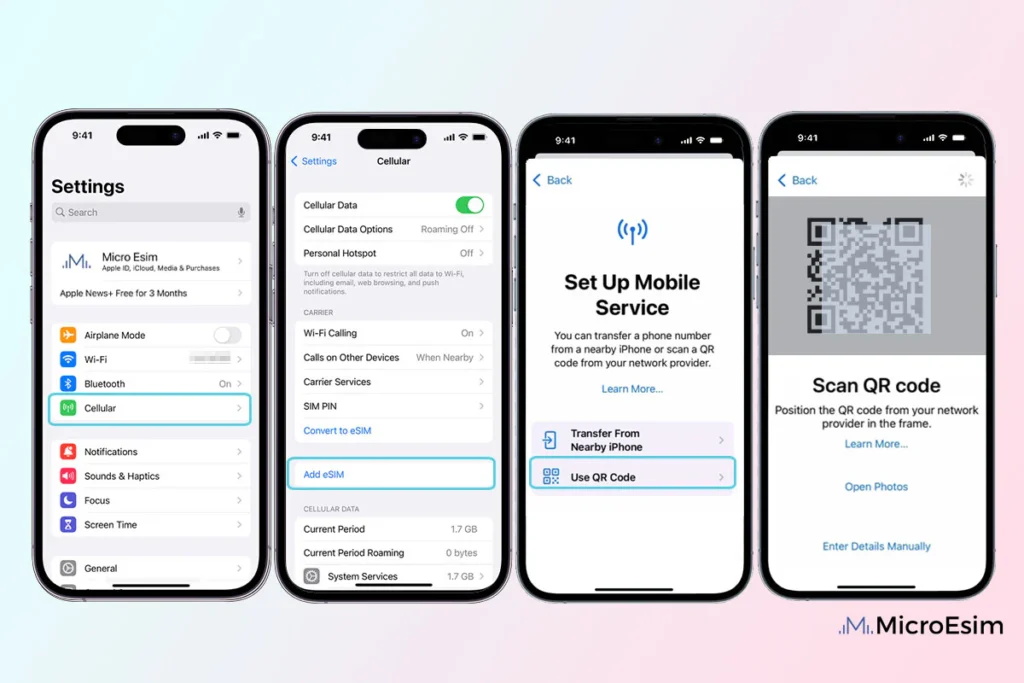
Open your 'Cellular' or 'Mobile Data' settings.

Tap 👆 "Add eSIM"

QR Code
Activation Guide

Step-2-iPhone-QR-Code-Activation-Guide

You'll be directed to a screen with multiple activation options.
For QR code activation, select the option: "Use QR code"

QR Code
Activation Guide

Step-3-iPhone-QR-Code-Activation-Guide

Position your phone's camera on the QR code we emailed you and found in the King Sims App.

💡King Tip: Travelling with a friend? Simply send your QR code to a friend and scan it off their phone!

QR Code
Activation Guide

Step-4-iPhone-QR-Code-Activation-Guide

Wait a moment for the eSIM to detect the local network.

Once successful, you'll get a message saying:
"Your new eSIM is ready to activate"

👆Tap Continue

QR Code
Activation Guide

Step-5-iPhone-QR-Code-Activation-Guide

Data Only eSIMs:
If your eSIM comes only with data
👆Tap "Data Only"

eSIMs with Calls & Texts:
If your eSIM comes with calls & texts like our other eSIM ranges
👆Tap "Voice and Data"

QR Code
Activation Guide

Step-6-iPhone-QR-Code-Activation-Guide

Wait a moment ⏳
Once you see this notice pop-up, it means your activation has successfully completed.

Last Step:
Once you see this notification, we need to name and finalise your eSIM setup.
👆Tap "Done" When your ready.

QR Code
Activation Guide

Step-7-iPhone-QR-Code-Activation-Guide

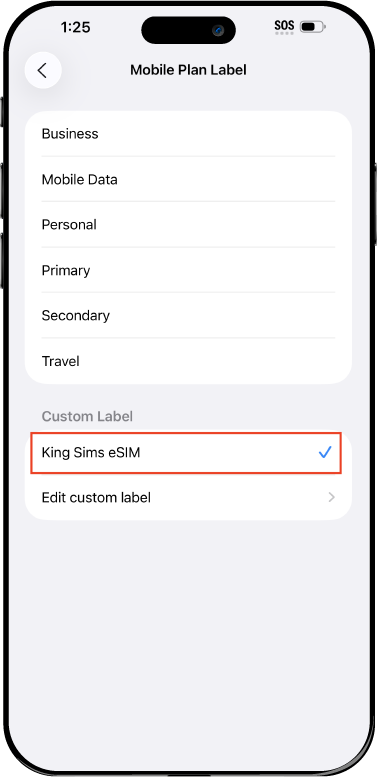
Name Your eSIM ✍️
Once you pass the last step, look for your newly activated eSIM and tap its "Name".

Mobile Plan Label:
Select "Custom Label"
Name it: "King Sims eSIM"

QR Code
Activation Guide

Step-8-iPhone-QR-Code-Activation-Guide

Final Step 👑
Turn on your line ✅

Turn Data Roaming to 'ON'
look for the option titled "Data Roaming"
then Tap 👆the option to turn it 'ON'

For Local eSIM plans with a mobile number, this step is not necessary.

You're Ready To Go 🎉

Step-9-iPhone-QR-Code-Activation-Guide

Welcome to the Kingdom 👑
Once you see the 4G or 5G symbol, test your mobile data.

Once your mobile data starts working without Wi-Fi it means your eSIM has successfully activated

Now you can start travelling with freedom
like a King 🤴 or 👸Queen.

✅ Step 1: Activate Your SIM Card

king-sims-experience.
📅 Add Your Arrival Date:
At checkout, let us know when you're landing in your destination — whether it's 🇺🇸 USA, 🇨🇦 Canada, or 🇲🇽 Mexico. We’ll schedule your SIM for seamless activation.
👑 Have King Sims Ready:
Make sure you have your King Sims packaging ready. It has all you need to get set up.
📲 Swap Your SIM cards:
Once you land, just pop the King Sims card into your phone. Use the "King Pin" in your packaging to swap your SIMs.
🔁 Restart Your Phone:
Give your device a quick restart to kickstart the activation magic.
📩 Get the Welcome Message: Depending on our partnered mobile network and which SIM card you ordered. You’ll get a welcome SMS from the Network with your brand new mobile number — you're officially connected! 🎉
💬 Need Help?
If you see SOS only or no signal, reach out via Live Chat — our support team can sort it in under 5 minutes. 👑
💡 King Tip:
If your King SIM works across multiple countries, don’t forget to turn Data Roaming ON to stay connected in every destination it covers. 🌍📶

Does My Device Have eSIM?

👑 King Tip: If your device isn't listed here simply search google with your phone model to find out if it is 💡

  • iPhone XS
  • iPhone XS Max
  • iPhone 11
  • iPhone 11 Pro
  • iPhone 11 Pro Max
  • iPhone SE (2020)
  • iPhone 12 Mini
  • iPhone 12
  • iPhone 12 Pro
  • iPhone 12 Pro Max
  • iPhone 13 mini
  • iPhone 13
  • iPhone 13 Pro
  • iPhone 13 Pro Max
  • iPhone SE (2022)
  • iPhone 14
  • iPhone 14 Plus
  • iPhone 14 Pro
  • iPhone 14 Pro Max
  • iPhone 15
  • iPhone 15 Plus
  • iPhone 15 Pro
  • iPhone 15 Pro Max
  • iPhone 16 (All Models)
  • iPad Pro (2018 and onwards)
  • iPad Air
  • iPad
  • Watch series 3
  • Watch series 4
  • Watch series 5
  • Watch series 6
  • Watch SE
  • Galaxy Z Flip
  • Galaxy Z Flip 5G
  • Galaxy Z Flip3 5G
  • Galaxy Z Flip4
  • Galaxy Z Flip5
  • Galaxy Fold
  • Galaxy Z Fold2 5G
  • Galaxy Z Fold3 5G
  • Galaxy Z Fold4
  • Galaxy Z Fold5 5G
  • Galaxy S20
  • Galaxy S21
  • Galaxy S21+ 5G
  • Galaxy S21 Ultra 5G
  • Galaxy S22
  • Galaxy S22+
  • Galaxy S22 Ultra
  • Galaxy Note 20 Ultra 5G
  • Galaxy Note 20
  • Galaxy S23
  • Galaxy S23+
  • Galaxy S23 Ultra
  • Galaxy S24
  • Galaxy S24+
  • Galaxy S24 Ultra
  • Galaxy S20 Ultra 5G
  • Gemini PDA
  • Pixel 3
  • Pixel 3a
  • Pixel 4
  • Pixel 4a
  • Pixel 5
  • Pixel 6
  • Pixel 6a
  • Pixel 6 Pro
  • Pixel 7
  • Pixel 7 Pro
  • Pixel 8
  • Pixel 8 Pro
  • P40
  • P40 Pro (not including the P40 Pro +)
  • Mate 40 Pro
  • Razr 2019
  • Razr 5G
  • Motorola Razr 40
  • Motorola Razr 40 Ultra
  • Razr+
  • Edge+
  • Edge 40
  • Edge 40 Pro
  • Edge 40 Neo
  • G52J 5G
  • G52J 5G Ⅱ
  • G53J 5G
  • Find X3 Pro
  • Reno 5 A
  • Find X5
  • Find X5 Pro
  • Reno6 Pro 5G
  • A55s 5G
  • Rakuten Mini
  • Big-S
  • Big
  • Hand
  • Hand 5G
  • Xperia 10 III Lite
  • Xperia 10 IV
  • Xperia 10V
  • Xperia Xperia 1 IV
  • Xperia 5 IV
  • Xperia 1 V
  • Xperia Ace III
  • Xperia 5 V
  • Honor
  • Magic 4 Pro
  • AQUOS Sense6s
  • AQUOS wish
  • AQUOS sense4 lite
  • AQUOS sense 7
  • AQUOS sense 7plus
  • AQUOS wish 2 SHG08
  • AQUOS wish3
  • AQUOS zero 6
  • Simple Sumaho6
  • AQUOS R7
  • AQUOS R8
  • AQUOS R8 Pro
  • V30
  • 12T Pro
  • 13
  • 13 Lite
  • 13 Pro
  • 13T Pro 
  • Honor Magic 4 Pro
  • Honor Magic 5 Pro
  • Honor 90
  • Honor X8
  • Oneplus Open
  • Oneplus 11
  • Oneplus 12 
  • Nokia XR21
  • Nokia X30
  • Nokia G60 5G
  • HAMMER Blade 3
  • HAMMER Explorer PRO
  • HAMMER Blade 5G
  • Vivo X90 Pro
  • Vivo V29 Lite 5G (Europe Only)

Pocket WiFi vs eSIM in Japan – What Actually Works in 2026?

Don’t Get Lost in Tokyo With 1% Battery 🔋😱

Picture this.
You’ve just landed in Tokyo. Neon lights everywhere. Trains moving like clockwork. You pull out Google Maps… and nothing loads.

Why?

  • Your Pocket WiFi battery is dead
  • Or worse — you’re still in line at the airport rental counter
  • Or your home carrier just charged you $10/day for “international roaming” 🤡

Welcome to the Roaming Racket.

But fear not. There is a Royal Solution — and it doesn’t involve carrying another gadget like it’s 2015.

The Old Guard: Pocket WiFi in Japan 📦📡

Japan became famous for Pocket WiFi for one simple reason:
Tourists needed internet, and SIM cards used to be annoying.

That era is over.

What Pocket WiFi Used to Do Well

To be fair (the King is merciful):

  • Strong coverage in cities
  • Can connect multiple devices
  • Easy concept for first-timers

But in 2026? The cracks are showing.

Why Pocket WiFi Is a Royal Pain 👎

Let’s count the crimes.

❌ Deposit Fees

Many Pocket WiFi rentals demand:

  • Credit card deposits
  • “Damage fees”
  • Return penalties if you’re late

Travel like a King — not like you’re renting a forklift.

❌ Another Device to Charge

Phone battery?
Camera battery?
Power bank?

Now add:

  • Pocket WiFi battery 🔋
  • Charging cable
  • Anxiety

When it dies, all devices lose internet. One battery to ruin them all.

❌ Airport Pickup & Return Drama

Missed flight? Late return? Different airport?

Congratulations — you’ve unlocked extra fees 🎉

❌ Heavy & Easy to Lose

Pocket WiFi lives in bags, not pockets.
And bags get:

  • Lost
  • Stolen
  • Forgotten in taxis

The Kingdom disapproves.

Enter the New King: eSIMs in Japan 👑📱
Now let’s talk about what actually works in Japan 2026.

An eSIM is a digital SIM built into your phone.
No plastic. No devices. No nonsense.

And when done right… it’s unstoppable.

Why eSIMs Beat Pocket WiFi (By King’s Decree)

✅ Instant Activation

With the King Sims Japan eSIM, you:

  • Buy before you fly ✈️
  • Scan a QR code
  • Activate via the King Sims App (iOS & Android)

No airport queues. No counters. No scams.

✅ Unlimited Data Options

Stream, navigate, translate, TikTok — all you want.

No:

  • Daily caps
  • Throttled “unlimited” lies
  • Surprise slowdowns

✅ No Extra Device

Your phone already exists.
Why add baggage?

Less weight = more freedom = better trip.

Coverage That Actually Matters in Japan 🇯🇵📶

King Sims doesn’t mess with bargain-bin networks.

Our Japan eSIMs connect to top-tier local carriers, including SoftBank, ensuring:

  • Strong coverage in Tokyo, Osaka, Kyoto
  • Reliable speeds on trains 🚄
  • Stable signal in hotels, cafés, and shrines

This isn’t café Wi-Fi roulette.

Pocket WiFi vs eSIM Japan: The Royal Comparison ⚔️

Pocket WiFi

  • ❌ Deposit fees
  • ❌ Extra device
  • ❌ Needs charging
  • ❌ Airport pickup & return
  • ❌ Easy to lose

King Sims Japan eSIM

  • ✅ Instant activation
  • ✅ Unlimited data options
  • ✅ No hardware
  • ✅ Buy before you fly
  • ✅ Money-back guarantee

The verdict?
eSIM wins by knockout.

“But I Travel With Friends!” 🤔

Pocket WiFi fans love this argument.

Here’s the truth:

  • Modern travelers all have phones
  • eSIMs can be installed on each device
  • Everyone gets full speed, not shared speed

No more “Who’s hogging the WiFi?” arguments in Shibuya.

Peace restored to the Kingdom.

What About Phone Numbers & Calls? ☎️

Here’s where King Sims separates itself from the peasants.

Many eSIM brands offer:

  • Data only
  • No calls
  • No texts
  • No real number

King Sims?
Some of our SIM solutions include real phone numbers and call/text abilities — something Pocket WiFi can never do.

Need:

  • Restaurant reservations?
  • Hotel calls?
  • Delivery confirmations?

A real number still rules.

The Buy Before You Fly Rule ✈️👑

Repeat it with me:

Never buy connectivity at the airport.

Airport WiFi counters thrive on:

  • Confused travelers
  • Language barriers
  • Overpriced plans

With King Sims:

  • You activate before landing
  • You walk off the plane connected
  • You skip the scams entirely

That’s royal behavior.

Who Should Still Use Pocket WiFi? (Rare Cases)

The King is honest.

Pocket WiFi might make sense if:

  • You’re traveling with a large group sharing one device
  • Everyone refuses to install an eSIM
  • You enjoy charging accessories and paying deposits

For everyone else?
Welcome to the future.

The King’s Final Verdict 👑

In Pocket WiFi vs eSIM Japan, the winner is clear.

Pocket WiFi is:

  • Bulky
  • Outdated
  • Fee-heavy

King Sims Japan eSIM is:

  • Lightweight
  • Instant
  • Built for modern travel

No gadgets. No stress. No Bill Shock.

0