



Shipping & Handling

How To Activate Your eSIM

Countries Covered

What countries your SIM works in

About Your SIM

SIM Features

YOUR SECRET 🤫
KING SIMS APP CODE 🎁

king-sims-experience

Copy your secret 20% off King Sims app code down below. Apply it in your cart or checkout

QR Code
Activation Guide

Step-1-iPhone-QR-code-2x

Open your 'Cellular' or 'Mobile Data' settings.

Tap 👆 "Add eSIM"

QR Code
Activation Guide

Step-2-iPhone-QR-Code-Activation-Guide

You'll be directed to a screen with multiple activation options.
For QR code activation, select the option: "Use QR code"

QR Code
Activation Guide

Step-3-iPhone-QR-Code-Activation-Guide

Position your phone's camera on the QR code we emailed you and found in the King Sims App.

💡King Tip: Travelling with a friend? Simply send your QR code to a friend and scan it off their phone!

QR Code
Activation Guide

Step-4-iPhone-QR-Code-Activation-Guide

Wait a moment for the eSIM to detect the local network.

Once successful, you'll get a message saying:
"Your new eSIM is ready to activate"

👆Tap Continue

QR Code
Activation Guide

Step-5-iPhone-QR-Code-Activation-Guide

Data Only eSIMs:
If your eSIM comes only with data
👆Tap "Data Only"

eSIMs with Calls & Texts:
If your eSIM comes with calls & texts like our other eSIM ranges
👆Tap "Voice and Data"

QR Code
Activation Guide

Step-6-iPhone-QR-Code-Activation-Guide

Wait a moment ⏳
Once you see this notice pop-up, it means your activation has successfully completed.

Last Step:
Once you see this notification, we need to name and finalise your eSIM setup.
👆Tap "Done" When your ready.

QR Code
Activation Guide

Step-7-iPhone-QR-Code-Activation-Guide

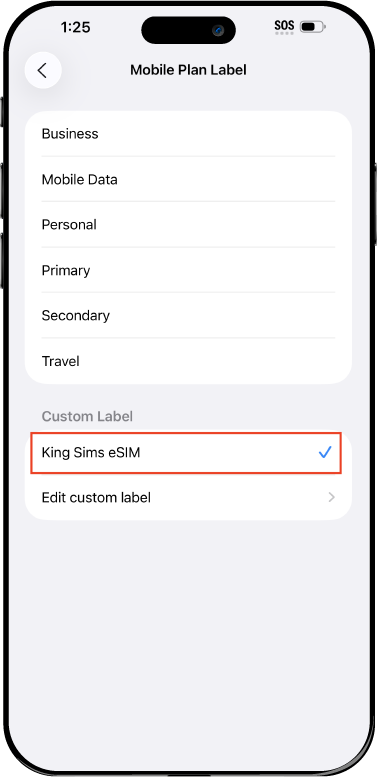
Name Your eSIM ✍️
Once you pass the last step, look for your newly activated eSIM and tap its "Name".

Mobile Plan Label:
Select "Custom Label"
Name it: "King Sims eSIM"

QR Code
Activation Guide

Step-8-iPhone-QR-Code-Activation-Guide

Final Step 👑
Turn on your line ✅

Turn Data Roaming to 'ON'
look for the option titled "Data Roaming"
then Tap 👆the option to turn it 'ON'

For Local eSIM plans with a mobile number, this step is not necessary.

You're Ready To Go 🎉

Step-9-iPhone-QR-Code-Activation-Guide

Welcome to the Kingdom 👑
Once you see the 4G or 5G symbol, test your mobile data.

Once your mobile data starts working without Wi-Fi it means your eSIM has successfully activated

Now you can start travelling with freedom
like a King 🤴 or 👸Queen.

✅ Step 1: Activate Your SIM Card

king-sims-experience.
📅 Add Your Arrival Date:
At checkout, let us know when you're landing in your destination — whether it's 🇺🇸 USA, 🇨🇦 Canada, or 🇲🇽 Mexico. We’ll schedule your SIM for seamless activation.
👑 Have King Sims Ready:
Make sure you have your King Sims packaging ready. It has all you need to get set up.
📲 Swap Your SIM cards:
Once you land, just pop the King Sims card into your phone. Use the "King Pin" in your packaging to swap your SIMs.
🔁 Restart Your Phone:
Give your device a quick restart to kickstart the activation magic.
📩 Get the Welcome Message: Depending on our partnered mobile network and which SIM card you ordered. You’ll get a welcome SMS from the Network with your brand new mobile number — you're officially connected! 🎉
💬 Need Help?
If you see SOS only or no signal, reach out via Live Chat — our support team can sort it in under 5 minutes. 👑
💡 King Tip:
If your King SIM works across multiple countries, don’t forget to turn Data Roaming ON to stay connected in every destination it covers. 🌍📶

Does My Device Have eSIM?

👑 King Tip: If your device isn't listed here simply search google with your phone model to find out if it is 💡

  • iPhone XS
  • iPhone XS Max
  • iPhone 11
  • iPhone 11 Pro
  • iPhone 11 Pro Max
  • iPhone SE (2020)
  • iPhone 12 Mini
  • iPhone 12
  • iPhone 12 Pro
  • iPhone 12 Pro Max
  • iPhone 13 mini
  • iPhone 13
  • iPhone 13 Pro
  • iPhone 13 Pro Max
  • iPhone SE (2022)
  • iPhone 14
  • iPhone 14 Plus
  • iPhone 14 Pro
  • iPhone 14 Pro Max
  • iPhone 15
  • iPhone 15 Plus
  • iPhone 15 Pro
  • iPhone 15 Pro Max
  • iPhone 16 (All Models)
  • iPad Pro (2018 and onwards)
  • iPad Air
  • iPad
  • Watch series 3
  • Watch series 4
  • Watch series 5
  • Watch series 6
  • Watch SE
  • Galaxy Z Flip
  • Galaxy Z Flip 5G
  • Galaxy Z Flip3 5G
  • Galaxy Z Flip4
  • Galaxy Z Flip5
  • Galaxy Fold
  • Galaxy Z Fold2 5G
  • Galaxy Z Fold3 5G
  • Galaxy Z Fold4
  • Galaxy Z Fold5 5G
  • Galaxy S20
  • Galaxy S21
  • Galaxy S21+ 5G
  • Galaxy S21 Ultra 5G
  • Galaxy S22
  • Galaxy S22+
  • Galaxy S22 Ultra
  • Galaxy Note 20 Ultra 5G
  • Galaxy Note 20
  • Galaxy S23
  • Galaxy S23+
  • Galaxy S23 Ultra
  • Galaxy S24
  • Galaxy S24+
  • Galaxy S24 Ultra
  • Galaxy S20 Ultra 5G
  • Gemini PDA
  • Pixel 3
  • Pixel 3a
  • Pixel 4
  • Pixel 4a
  • Pixel 5
  • Pixel 6
  • Pixel 6a
  • Pixel 6 Pro
  • Pixel 7
  • Pixel 7 Pro
  • Pixel 8
  • Pixel 8 Pro
  • P40
  • P40 Pro (not including the P40 Pro +)
  • Mate 40 Pro
  • Razr 2019
  • Razr 5G
  • Motorola Razr 40
  • Motorola Razr 40 Ultra
  • Razr+
  • Edge+
  • Edge 40
  • Edge 40 Pro
  • Edge 40 Neo
  • G52J 5G
  • G52J 5G Ⅱ
  • G53J 5G
  • Find X3 Pro
  • Reno 5 A
  • Find X5
  • Find X5 Pro
  • Reno6 Pro 5G
  • A55s 5G
  • Rakuten Mini
  • Big-S
  • Big
  • Hand
  • Hand 5G
  • Xperia 10 III Lite
  • Xperia 10 IV
  • Xperia 10V
  • Xperia Xperia 1 IV
  • Xperia 5 IV
  • Xperia 1 V
  • Xperia Ace III
  • Xperia 5 V
  • Honor
  • Magic 4 Pro
  • AQUOS Sense6s
  • AQUOS wish
  • AQUOS sense4 lite
  • AQUOS sense 7
  • AQUOS sense 7plus
  • AQUOS wish 2 SHG08
  • AQUOS wish3
  • AQUOS zero 6
  • Simple Sumaho6
  • AQUOS R7
  • AQUOS R8
  • AQUOS R8 Pro
  • V30
  • 12T Pro
  • 13
  • 13 Lite
  • 13 Pro
  • 13T Pro 
  • Honor Magic 4 Pro
  • Honor Magic 5 Pro
  • Honor 90
  • Honor X8
  • Oneplus Open
  • Oneplus 11
  • Oneplus 12 
  • Nokia XR21
  • Nokia X30
  • Nokia G60 5G
  • HAMMER Blade 3
  • HAMMER Explorer PRO
  • HAMMER Blade 5G
  • Vivo X90 Pro
  • Vivo V29 Lite 5G (Europe Only)

Japan eSIM With Unlimited Data? Yes, It Exists

Picture this: you land in Tokyo after a long flight.

You’re tired, hungry, and your Google Maps won’t load.

Airport Wi-Fi? Slower than a samurai turtle.

Your home carrier? Already sharpening its $10-a-day roaming sword.

Welcome to the chaos… unless you’ve heard of the Royal Solution.

By Royal Decree, Japan eSIM unlimited data DOES exist, and it doesn’t require shady airport kiosks, tiny SIM cards, or selling your soul to your phone company.

Enter the King Sims Japan eSIM — built for travelers who refuse to be victims of the roaming racket.

Travel like a King. Pay like a pauper. 👑💸

The Real Enemy: Roaming Fees & Fake “Free” Wi-Fi ⚔️

Let’s call it what it is:

  • $10/day roaming from your home carrier = legalized theft
  • Public Wi-Fi = spotty, unsafe, and disappears when you need it most
  • Airport SIM booths = overpriced panic purchases

The Kingdom of King Sims exists to protect travelers from Bill Shock, one country at a time.

Japan is no exception.

What Is a Japan eSIM With Unlimited Data? 🤔

An eSIM is a digital SIM — no plastic, no swapping cards, no losing that tiny tray tool forever.

With Japan eSIM unlimited data, you get:

  • Always-on internet across Japan
  • No data caps to babysit
  • No surprise slowdowns after “3GB” (we see you, competitors 👀)

And with King Sims, it’s not just unlimited — it’s royally fast

Why King Sims’ Japan eSIM Is Different (And Better) 👑🔥

Plenty of brands say unlimited. Few deliver it like royalty.

👑 The King’s Decree: What You Actually Get

  • Unlimited Data in Japan – Stream, scroll, map, upload freely
  • 5G SoftBank Network – One of Japan’s strongest, fastest networks
  • Instant Delivery – Buy online, get your eSIM immediately
  • Activate via the King Sims App (iOS & Android)
  • Works the moment you land ✈️
  • Money-Back Guarantee – No royal scams here

We run on top-tier networks only — SoftBank in Japan, Orange, T-Mobile elsewhere. The throne demands quality.

SoftBank 5G: Fast Enough for Tokyo, Strong Enough for Kyoto 📡

Japan is famous for speed — trains, cities, vending machines that sell everything. Your internet should keep up.

The King Sims Japan eSIM connects to:

  • SoftBank’s 5G/LTE network
  • Excellent coverage in:
    • Tokyo 🗼
    • Osaka 🍜
    • Kyoto 🏯
    • Hiroshima
    • Airports, subways, and bullet trains

Translation?
Your Google Maps won’t freeze.
Your Instagram Stories won’t buffer.
Your ride-share app won’t betray you at midnight.

Buy Before You Fly (The Royal Rule) ✈️👑

Repeat after me: do not wait until the airport.

Airport SIM sellers thrive on panic. Their prices? Criminal. Their support? Gone once you walk away.

The King Sims Way:

  • Buy your Japan eSIM before you leave
  • Land connected
  • Walk past the SIM booths like royalty ignoring peasants

This is the Buy Before You Fly Rule, and it has saved the Kingdom millions.

How to Activate Your Japan eSIM at the Airport (Easy Mode) 🛫📲

No tech degree required. No ancient scrolls to read.

Activation Steps (60 seconds, max):

  1. Buy the Japan eSIM online
    👉 https://kingsims.com/product/japan-esim/
  2. Download the King Sims App (iOS or Android)
  3. Scan the QR code (or auto-install in-app)
  4. Turn on the eSIM when you land in Japan
  5. Boom. You’re online 👑

No swapping SIMs. No store visits. No crying in Narita Airport.

Unlimited Data Means… Actually Unlimited 😌📊

Let’s be honest — “unlimited” is one of the most abused words in travel tech.

With King Sims, unlimited means:

  • No daily caps
  • No surprise throttling after a few TikToks
  • No warning texts saying “you’ve used 80% of your data”

Use your phone like you do at home:

  • Google Maps all day
  • Translate menus 🍣
  • Upload photos 📸
  • Stream music on the Shinkansen

The throne approves.

Calls & Texts? Yes, We’re Built Different 📞👑

Here’s where King Sims flexes.

Unlike many data-only eSIM brands, many King Sims SIMs include real phone numbers with calls & texts — not just internet.

Why that matters:

  • Booking restaurants 🍜
  • Hotel confirmations 🏨
  • Ride services & local contacts

We’re not just another data pipe. We’re a real travel connection.

Who Is This Japan eSIM Perfect For? 🎒👨‍💼👩‍❤️‍👨

This royal setup is ideal if you’re:

  • Visiting Japan for the first time
  • Traveling for business
  • Backpacking across cities
  • Content creators needing nonstop upload
  • Anyone who hates surprise phone bills

If you hate roaming fees… congratulations. You’re one of us.

The King’s Verdict 👑⚖️

Japan eSIM unlimited data isn’t a myth.
It’s not a trap.
And it definitely doesn’t require a shady kiosk.

With King Sims, you get:

  • Unlimited data
  • 5G SoftBank power
  • Instant activation
  • App-based control
  • Money-back guarantee

All without feeding the roaming racket.

Join the Royal Class 👑

Ready to rule Japan with full bars and zero stress?

👉 Get your Japan eSIM here:
https://kingsims.com/product/japan-esim/

Royal Bonus:
Sign up and get 15% off your first order — because the Kingdom rewards smart travelers.

Travel like a King.
Pay like a pauper.
And let roaming fees remain… banished from the realm ⚔️📵

0