



Shipping & Handling

How To Activate Your eSIM

Countries Covered

What countries your SIM works in

About Your SIM

SIM Features

YOUR SECRET 🤫
KING SIMS APP CODE 🎁

king-sims-experience

Copy your secret 20% off King Sims app code down below. Apply it in your cart or checkout

QR Code
Activation Guide

Step-1-iPhone-QR-code-2x

Open your 'Cellular' or 'Mobile Data' settings.

Tap 👆 "Add eSIM"

QR Code
Activation Guide

Step-2-iPhone-QR-Code-Activation-Guide

You'll be directed to a screen with multiple activation options.
For QR code activation, select the option: "Use QR code"

QR Code
Activation Guide

Step-3-iPhone-QR-Code-Activation-Guide

Position your phone's camera on the QR code we emailed you and found in the King Sims App.

💡King Tip: Travelling with a friend? Simply send your QR code to a friend and scan it off their phone!

QR Code
Activation Guide

Step-4-iPhone-QR-Code-Activation-Guide

Wait a moment for the eSIM to detect the local network.

Once successful, you'll get a message saying:
"Your new eSIM is ready to activate"

👆Tap Continue

QR Code
Activation Guide

Step-5-iPhone-QR-Code-Activation-Guide

Data Only eSIMs:
If your eSIM comes only with data
👆Tap "Data Only"

eSIMs with Calls & Texts:
If your eSIM comes with calls & texts like our other eSIM ranges
👆Tap "Voice and Data"

QR Code
Activation Guide

Step-6-iPhone-QR-Code-Activation-Guide

Wait a moment ⏳
Once you see this notice pop-up, it means your activation has successfully completed.

Last Step:
Once you see this notification, we need to name and finalise your eSIM setup.
👆Tap "Done" When your ready.

QR Code
Activation Guide

Step-7-iPhone-QR-Code-Activation-Guide

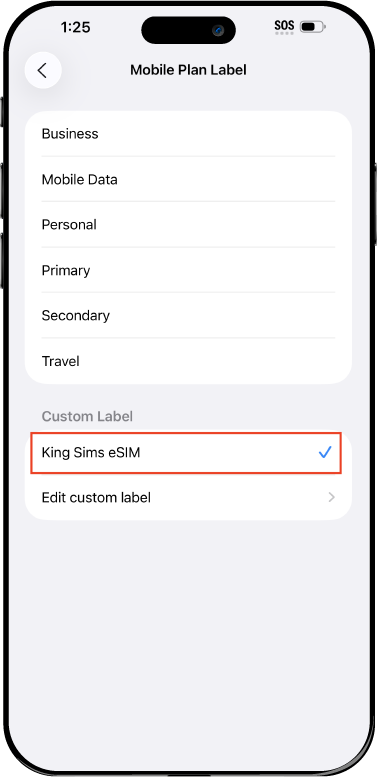
Name Your eSIM ✍️
Once you pass the last step, look for your newly activated eSIM and tap its "Name".

Mobile Plan Label:
Select "Custom Label"
Name it: "King Sims eSIM"

QR Code
Activation Guide

Step-8-iPhone-QR-Code-Activation-Guide

Final Step 👑
Turn on your line ✅

Turn Data Roaming to 'ON'
look for the option titled "Data Roaming"
then Tap 👆the option to turn it 'ON'

For Local eSIM plans with a mobile number, this step is not necessary.

You're Ready To Go 🎉

Step-9-iPhone-QR-Code-Activation-Guide

Welcome to the Kingdom 👑
Once you see the 4G or 5G symbol, test your mobile data.

Once your mobile data starts working without Wi-Fi it means your eSIM has successfully activated

Now you can start travelling with freedom
like a King 🤴 or 👸Queen.

✅ Step 1: Activate Your SIM Card

king-sims-experience.
📅 Add Your Arrival Date:
At checkout, let us know when you're landing in your destination — whether it's 🇺🇸 USA, 🇨🇦 Canada, or 🇲🇽 Mexico. We’ll schedule your SIM for seamless activation.
👑 Have King Sims Ready:
Make sure you have your King Sims packaging ready. It has all you need to get set up.
📲 Swap Your SIM cards:
Once you land, just pop the King Sims card into your phone. Use the "King Pin" in your packaging to swap your SIMs.
🔁 Restart Your Phone:
Give your device a quick restart to kickstart the activation magic.
📩 Get the Welcome Message: Depending on our partnered mobile network and which SIM card you ordered. You’ll get a welcome SMS from the Network with your brand new mobile number — you're officially connected! 🎉
💬 Need Help?
If you see SOS only or no signal, reach out via Live Chat — our support team can sort it in under 5 minutes. 👑
💡 King Tip:
If your King SIM works across multiple countries, don’t forget to turn Data Roaming ON to stay connected in every destination it covers. 🌍📶

Does My Device Have eSIM?

👑 King Tip: If your device isn't listed here simply search google with your phone model to find out if it is 💡

  • iPhone XS
  • iPhone XS Max
  • iPhone 11
  • iPhone 11 Pro
  • iPhone 11 Pro Max
  • iPhone SE (2020)
  • iPhone 12 Mini
  • iPhone 12
  • iPhone 12 Pro
  • iPhone 12 Pro Max
  • iPhone 13 mini
  • iPhone 13
  • iPhone 13 Pro
  • iPhone 13 Pro Max
  • iPhone SE (2022)
  • iPhone 14
  • iPhone 14 Plus
  • iPhone 14 Pro
  • iPhone 14 Pro Max
  • iPhone 15
  • iPhone 15 Plus
  • iPhone 15 Pro
  • iPhone 15 Pro Max
  • iPhone 16 (All Models)
  • iPad Pro (2018 and onwards)
  • iPad Air
  • iPad
  • Watch series 3
  • Watch series 4
  • Watch series 5
  • Watch series 6
  • Watch SE
  • Galaxy Z Flip
  • Galaxy Z Flip 5G
  • Galaxy Z Flip3 5G
  • Galaxy Z Flip4
  • Galaxy Z Flip5
  • Galaxy Fold
  • Galaxy Z Fold2 5G
  • Galaxy Z Fold3 5G
  • Galaxy Z Fold4
  • Galaxy Z Fold5 5G
  • Galaxy S20
  • Galaxy S21
  • Galaxy S21+ 5G
  • Galaxy S21 Ultra 5G
  • Galaxy S22
  • Galaxy S22+
  • Galaxy S22 Ultra
  • Galaxy Note 20 Ultra 5G
  • Galaxy Note 20
  • Galaxy S23
  • Galaxy S23+
  • Galaxy S23 Ultra
  • Galaxy S24
  • Galaxy S24+
  • Galaxy S24 Ultra
  • Galaxy S20 Ultra 5G
  • Gemini PDA
  • Pixel 3
  • Pixel 3a
  • Pixel 4
  • Pixel 4a
  • Pixel 5
  • Pixel 6
  • Pixel 6a
  • Pixel 6 Pro
  • Pixel 7
  • Pixel 7 Pro
  • Pixel 8
  • Pixel 8 Pro
  • P40
  • P40 Pro (not including the P40 Pro +)
  • Mate 40 Pro
  • Razr 2019
  • Razr 5G
  • Motorola Razr 40
  • Motorola Razr 40 Ultra
  • Razr+
  • Edge+
  • Edge 40
  • Edge 40 Pro
  • Edge 40 Neo
  • G52J 5G
  • G52J 5G Ⅱ
  • G53J 5G
  • Find X3 Pro
  • Reno 5 A
  • Find X5
  • Find X5 Pro
  • Reno6 Pro 5G
  • A55s 5G
  • Rakuten Mini
  • Big-S
  • Big
  • Hand
  • Hand 5G
  • Xperia 10 III Lite
  • Xperia 10 IV
  • Xperia 10V
  • Xperia Xperia 1 IV
  • Xperia 5 IV
  • Xperia 1 V
  • Xperia Ace III
  • Xperia 5 V
  • Honor
  • Magic 4 Pro
  • AQUOS Sense6s
  • AQUOS wish
  • AQUOS sense4 lite
  • AQUOS sense 7
  • AQUOS sense 7plus
  • AQUOS wish 2 SHG08
  • AQUOS wish3
  • AQUOS zero 6
  • Simple Sumaho6
  • AQUOS R7
  • AQUOS R8
  • AQUOS R8 Pro
  • V30
  • 12T Pro
  • 13
  • 13 Lite
  • 13 Pro
  • 13T Pro 
  • Honor Magic 4 Pro
  • Honor Magic 5 Pro
  • Honor 90
  • Honor X8
  • Oneplus Open
  • Oneplus 11
  • Oneplus 12 
  • Nokia XR21
  • Nokia X30
  • Nokia G60 5G
  • HAMMER Blade 3
  • HAMMER Explorer PRO
  • HAMMER Blade 5G
  • Vivo X90 Pro
  • Vivo V29 Lite 5G (Europe Only)

In an Uncertain World, Your Plan B Is a Worldwide eSIM

15d3ae30-ef33-406e-971f-9520c03f1089.jpg-scaled.webp

You’re mid-journey.

Boarding pass in hand. Coffee in the other. Everything running smoothly…

Until it’s not.

Flight delayed.
Connection missed.
Route changed.

Now you’re stuck in a country you didn’t even plan to visit — with no signal, no Wi-Fi, and your home carrier waiting to hit you with the Roaming Racket.

Sound familiar?

Here’s the truth most travelers learn the hard way:

Travel plans are flexible. Your connectivity should be too.

That’s where the Royal solution comes in — the uworldwide esim.

👑 What Is a Worldwide eSIM (And Why You Need One)?

A worldwide eSIM is a single digital SIM that works across dozens of countries.

No switching SIM cards.
No buying new plans every time you land.
No scrambling for airport kiosks.

You install it once… and it works wherever your journey takes you.

With King Sims’ Worldwide eSIM, you get:

  • Coverage across multiple continents
  • Seamless switching between countries
  • Reliable connections on top-tier networks
  • Instant activation via the app

It’s not just a SIM.

It’s travel insurance for your connectivity.

✈️ Real Travel Chaos
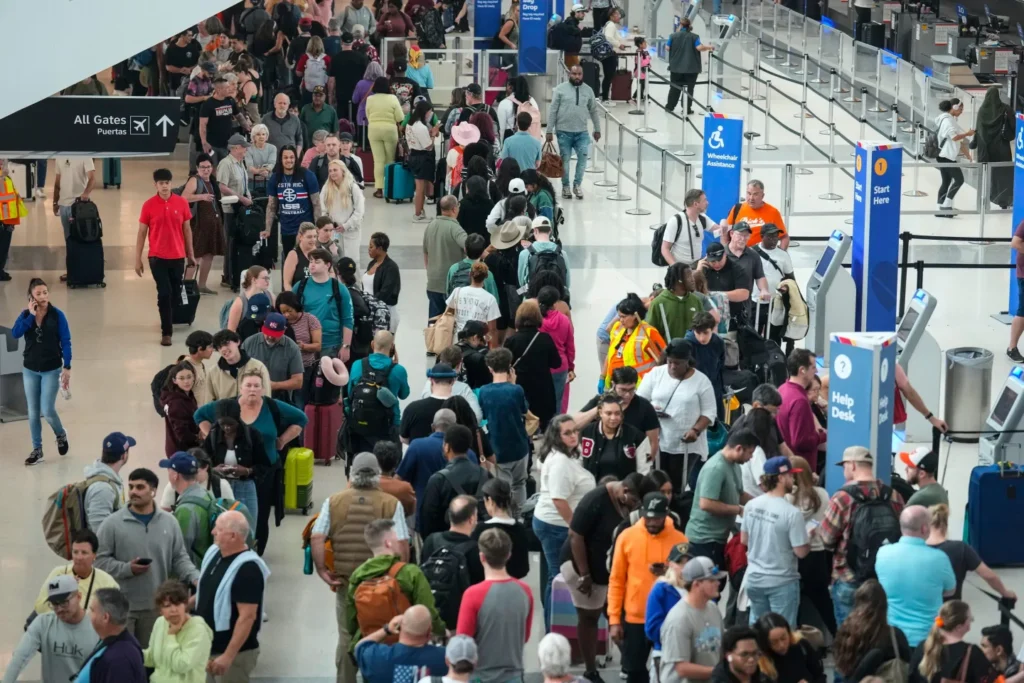
(And How a Worldwide eSIM Saves You)

Let’s talk real scenarios.

Because this isn’t theory — this is what actually happens.

🛑 Scenario 1: Missed Connection in Dubai

You were flying:

Sydney → Dubai → London

But your first flight is delayed.

You land late. Connection gone.

Now you’re stuck in Dubai for 12 hours.

Without a worldwide eSIM:

  • You hunt for Wi-Fi
  • You can’t contact your hotel
  • You can’t rebook easily
  • You’re stuck

With a uworldwide esim:

  • You land connected instantly
  • You rebook your flight
  • You message your hotel
  • You order a ride

Problem handled. Kingdom intact 👑

🌆 Scenario 2: Unexpected Layover in Singapore

Your airline reroutes you.

You weren’t supposed to be here.

Now what?

Without data:

  • No maps
  • No Grab/Uber
  • No communication

With King Sims:

  • Instant connection
  • Full access to apps
  • Navigation sorted
  • Stress gone

You didn’t plan Singapore.
But you handled it like royalty.

🌍 Scenario 3: Last-Minute Reroute via Europe

Flights get cancelled. Routes change overnight.

Now instead of going straight to New York, you’re stopping in:

  • Paris
  • Amsterdam
  • Frankfurt

If you’re using a single-country SIM?

You’re done.

If you’re relying on roaming?

Your wallet is done.

But with a uworldwide esim?

  • Your connection follows you
  • Country to country
  • No setup needed
  • No interruptions

That’s power.

⚔️ The Real Enemy: Roaming Fees & Wi-Fi Gambling

Let’s expose the villains again.

💸 Roaming Fees

Your home carrier says:

“Just $10 a day.”

Multiply that across multiple countries?

That’s chaos pricing.

And sometimes:

  • Slower speeds
  • Limited data
  • Hidden charges

📶 Public Wi-Fi

Airports. Cafes. Hotels.

Sounds convenient.

Reality?

  • Slow
  • Unstable
  • Not secure
  • Sometimes not even available

Depending on Wi-Fi is like flipping a coin with your travel plans.

By Royal Decree: We do not gamble with connectivity.

👑 Why King Sims Worldwide eSIM Is Different

Let’s talk about why this isn’t just another eSIM.

📲 Instant Activation via the App

Before you even leave home:

  • Buy your plan
  • Install via the King Sims App
  • Activate instantly

You land connected.

No QR code panic at the airport.
No setup stress.

🌐 One eSIM, Dozens of Countries

This is the real power.

Instead of juggling multiple SIMs:

  • One eSIM
  • Multiple countries
  • Seamless transitions

Perfect for:

  • Multi-stop trips
  • Digital nomads
  • Frequent flyers

📞 Real Phone Numbers (Not Just Data)

Most global eSIMs? Data only.

King Sims? Built different.

Many plans include:

  • Real phone numbers
  • Calls
  • SMS

So you can:

  • Receive verification codes
  • Make bookings
  • Stay reachable

You’re not just online. You’re connected to the real world.

🏆 Top-Tier Networks Only

We don’t play with weak signals.

You connect to:

  • Orange
  • SoftBank
  • T-Mobile

That means:

  • Reliable speeds
  • Strong coverage
  • Better performance in major cities

💰 Money-Back Guarantee

Trying something new?

No stress.

If it doesn’t work as expected, you’re covered.

That’s Royal confidence.

🧠 Who Needs a Worldwide eSIM?

If any of these sound like you… you need it.

  • ✈️ Frequent flyers
  • 🌍 Multi-country travelers
  • 💻 Remote workers
  • 🎒 Backpackers
  • 🧳 Business travelers

If your plans can change… your SIM should adapt.

🛬 The King’s Decree: Buy Before You Fly

Let’s make it official.

Never land unprepared.

Airport SIM kiosks are:

  • Overpriced
  • Confusing
  • Time-consuming

Instead:

✔ Install your worldwide eSIM before departure
✔ Activate it in advance
✔ Land connected anywhere

You don’t wait for signal.

Signal waits for you.

💬 So… Why Is a Worldwide eSIM Your Plan B?

Because travel is unpredictable.

Flights change.
Routes shift.
Plans fall apart.

But your connection?

That should never fail.

A uworldwide esim gives you:

  • Flexibility
  • Reliability
  • Peace of mind

It’s not just about convenience.

It’s about control.

👑 The Royal Wrap-Up
In 2026, smart travelers don’t rely on:

  • Roaming
  • Airport kiosks
  • Public Wi-Fi

They travel prepared.

They travel connected.

They travel like Kings.

🏰 Join the Royal Class

Ready to upgrade your travel game?

Before your next trip:

1️⃣ Visit the King Sims Worldwide eSIM page
2️⃣ Choose your plan
3️⃣ Install via the app
4️⃣ Activate before departure

And when you sign up?

Enjoy 15% off your first order 👑

No roaming racket.
No signal panic.
No last-minute scrambling.

Just global connectivity — wherever the world takes you.

Your Plan B is ready.

Now travel like royalty 🌍👑📶

0