



Shipping & Handling

How To Activate Your eSIM

Countries Covered

What countries your SIM works in

About Your SIM

SIM Features

YOUR SECRET 🤫
KING SIMS APP CODE 🎁

king-sims-experience

Copy your secret 20% off King Sims app code down below. Apply it in your cart or checkout

QR Code
Activation Guide

Step-1-iPhone-QR-code-2x

Open your 'Cellular' or 'Mobile Data' settings.

Tap 👆 "Add eSIM"

QR Code
Activation Guide

Step-2-iPhone-QR-Code-Activation-Guide

You'll be directed to a screen with multiple activation options.
For QR code activation, select the option: "Use QR code"

QR Code
Activation Guide

Step-3-iPhone-QR-Code-Activation-Guide

Position your phone's camera on the QR code we emailed you and found in the King Sims App.

💡King Tip: Travelling with a friend? Simply send your QR code to a friend and scan it off their phone!

QR Code
Activation Guide

Step-4-iPhone-QR-Code-Activation-Guide

Wait a moment for the eSIM to detect the local network.

Once successful, you'll get a message saying:
"Your new eSIM is ready to activate"

👆Tap Continue

QR Code
Activation Guide

Step-5-iPhone-QR-Code-Activation-Guide

Data Only eSIMs:
If your eSIM comes only with data
👆Tap "Data Only"

eSIMs with Calls & Texts:
If your eSIM comes with calls & texts like our other eSIM ranges
👆Tap "Voice and Data"

QR Code
Activation Guide

Step-6-iPhone-QR-Code-Activation-Guide

Wait a moment ⏳
Once you see this notice pop-up, it means your activation has successfully completed.

Last Step:
Once you see this notification, we need to name and finalise your eSIM setup.
👆Tap "Done" When your ready.

QR Code
Activation Guide

Step-7-iPhone-QR-Code-Activation-Guide

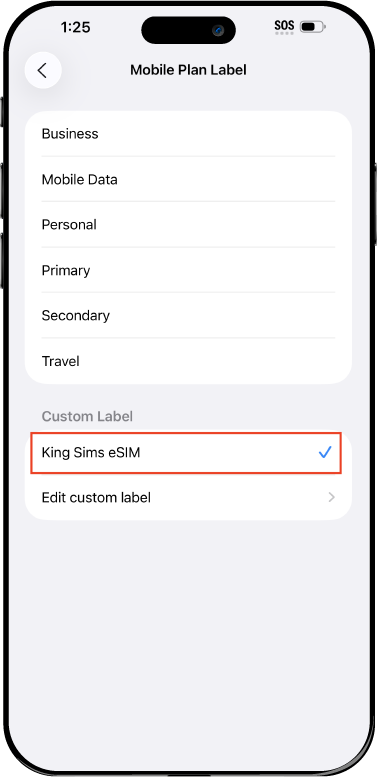
Name Your eSIM ✍️
Once you pass the last step, look for your newly activated eSIM and tap its "Name".

Mobile Plan Label:
Select "Custom Label"
Name it: "King Sims eSIM"

QR Code
Activation Guide

Step-8-iPhone-QR-Code-Activation-Guide

Final Step 👑
Turn on your line ✅

Turn Data Roaming to 'ON'
look for the option titled "Data Roaming"
then Tap 👆the option to turn it 'ON'

For Local eSIM plans with a mobile number, this step is not necessary.

You're Ready To Go 🎉

Step-9-iPhone-QR-Code-Activation-Guide

Welcome to the Kingdom 👑
Once you see the 4G or 5G symbol, test your mobile data.

Once your mobile data starts working without Wi-Fi it means your eSIM has successfully activated

Now you can start travelling with freedom
like a King 🤴 or 👸Queen.

✅ Step 1: Activate Your SIM Card

king-sims-experience.
📅 Add Your Arrival Date:
At checkout, let us know when you're landing in your destination — whether it's 🇺🇸 USA, 🇨🇦 Canada, or 🇲🇽 Mexico. We’ll schedule your SIM for seamless activation.
👑 Have King Sims Ready:
Make sure you have your King Sims packaging ready. It has all you need to get set up.
📲 Swap Your SIM cards:
Once you land, just pop the King Sims card into your phone. Use the "King Pin" in your packaging to swap your SIMs.
🔁 Restart Your Phone:
Give your device a quick restart to kickstart the activation magic.
📩 Get the Welcome Message: Depending on our partnered mobile network and which SIM card you ordered. You’ll get a welcome SMS from the Network with your brand new mobile number — you're officially connected! 🎉
💬 Need Help?
If you see SOS only or no signal, reach out via Live Chat — our support team can sort it in under 5 minutes. 👑
💡 King Tip:
If your King SIM works across multiple countries, don’t forget to turn Data Roaming ON to stay connected in every destination it covers. 🌍📶

Does My Device Have eSIM?

👑 King Tip: If your device isn't listed here simply search google with your phone model to find out if it is 💡

  • iPhone XS
  • iPhone XS Max
  • iPhone 11
  • iPhone 11 Pro
  • iPhone 11 Pro Max
  • iPhone SE (2020)
  • iPhone 12 Mini
  • iPhone 12
  • iPhone 12 Pro
  • iPhone 12 Pro Max
  • iPhone 13 mini
  • iPhone 13
  • iPhone 13 Pro
  • iPhone 13 Pro Max
  • iPhone SE (2022)
  • iPhone 14
  • iPhone 14 Plus
  • iPhone 14 Pro
  • iPhone 14 Pro Max
  • iPhone 15
  • iPhone 15 Plus
  • iPhone 15 Pro
  • iPhone 15 Pro Max
  • iPhone 16 (All Models)
  • iPad Pro (2018 and onwards)
  • iPad Air
  • iPad
  • Watch series 3
  • Watch series 4
  • Watch series 5
  • Watch series 6
  • Watch SE
  • Galaxy Z Flip
  • Galaxy Z Flip 5G
  • Galaxy Z Flip3 5G
  • Galaxy Z Flip4
  • Galaxy Z Flip5
  • Galaxy Fold
  • Galaxy Z Fold2 5G
  • Galaxy Z Fold3 5G
  • Galaxy Z Fold4
  • Galaxy Z Fold5 5G
  • Galaxy S20
  • Galaxy S21
  • Galaxy S21+ 5G
  • Galaxy S21 Ultra 5G
  • Galaxy S22
  • Galaxy S22+
  • Galaxy S22 Ultra
  • Galaxy Note 20 Ultra 5G
  • Galaxy Note 20
  • Galaxy S23
  • Galaxy S23+
  • Galaxy S23 Ultra
  • Galaxy S24
  • Galaxy S24+
  • Galaxy S24 Ultra
  • Galaxy S20 Ultra 5G
  • Gemini PDA
  • Pixel 3
  • Pixel 3a
  • Pixel 4
  • Pixel 4a
  • Pixel 5
  • Pixel 6
  • Pixel 6a
  • Pixel 6 Pro
  • Pixel 7
  • Pixel 7 Pro
  • Pixel 8
  • Pixel 8 Pro
  • P40
  • P40 Pro (not including the P40 Pro +)
  • Mate 40 Pro
  • Razr 2019
  • Razr 5G
  • Motorola Razr 40
  • Motorola Razr 40 Ultra
  • Razr+
  • Edge+
  • Edge 40
  • Edge 40 Pro
  • Edge 40 Neo
  • G52J 5G
  • G52J 5G Ⅱ
  • G53J 5G
  • Find X3 Pro
  • Reno 5 A
  • Find X5
  • Find X5 Pro
  • Reno6 Pro 5G
  • A55s 5G
  • Rakuten Mini
  • Big-S
  • Big
  • Hand
  • Hand 5G
  • Xperia 10 III Lite
  • Xperia 10 IV
  • Xperia 10V
  • Xperia Xperia 1 IV
  • Xperia 5 IV
  • Xperia 1 V
  • Xperia Ace III
  • Xperia 5 V
  • Honor
  • Magic 4 Pro
  • AQUOS Sense6s
  • AQUOS wish
  • AQUOS sense4 lite
  • AQUOS sense 7
  • AQUOS sense 7plus
  • AQUOS wish 2 SHG08
  • AQUOS wish3
  • AQUOS zero 6
  • Simple Sumaho6
  • AQUOS R7
  • AQUOS R8
  • AQUOS R8 Pro
  • V30
  • 12T Pro
  • 13
  • 13 Lite
  • 13 Pro
  • 13T Pro 
  • Honor Magic 4 Pro
  • Honor Magic 5 Pro
  • Honor 90
  • Honor X8
  • Oneplus Open
  • Oneplus 11
  • Oneplus 12 
  • Nokia XR21
  • Nokia X30
  • Nokia G60 5G
  • HAMMER Blade 3
  • HAMMER Explorer PRO
  • HAMMER Blade 5G
  • Vivo X90 Pro
  • Vivo V29 Lite 5G (Europe Only)

Best USA Cities for First Time Visitors in 2026

Santa Monica beach in Los Angeles with travelers enjoying the California coastline

Let’s be honest.

Your first trip to the USA can feel… overwhelming.

Massive cities. Different rules. New transport systems. And your phone?

Not working.

You’re standing in a new country, trying to load maps, book a ride, and message your hotel… all while your carrier prepares a $10/day roaming surprise.

Ah yes. The Roaming Racket strikes again ⚔️📵

But here’s the Royal truth:

The USA is still one of the best travel experiences on Earth — if you pick the right cities and stay connected.

So here it is 👇
The King’s list of the best usa cities for first time visitors in 2026.

👑 What Makes a City “First-Timer Friendly”?

Before we rank, here’s what matters:

  • ✔ Easy navigation
  • ✔ Good transport or ride-share access
  • ✔ Tourist-friendly areas
  • ✔ Safe, well-visited neighborhoods
  • ✔ Plenty of must-see attractions

And one more thing…

👉 Reliable mobile data is essential.

Because everything in the US runs through your phone:

  • Maps
  • Uber/Lyft
  • Tickets
  • Bookings
  • Payments

No signal = no control.

🗽 1. New York City – The Ultimate First Stop

New York City skyline with tourists exploring Manhattan using mobile maps

If it’s your first time, start here.

Why it works:

  • Walkable
  • 24/7 energy
  • Public transport everywhere

Must-do:

  • Times Square
  • Central Park
  • Statue of Liberty

Getting Around:

  • Subway + Google Maps
  • Walking

📱 You’ll rely heavily on your phone for directions underground.

🌴 2. Los Angeles – Big, Spread Out, Worth It

LA is huge — but iconic.

Why first-timers love it:

  • Beaches
  • Hollywood
  • Road trip vibes

Must-do:

  • Santa Monica Pier
  • Hollywood Sign
  • Venice Beach

Getting Around:

  • Uber/Lyft (essential)
  • Driving optional

📱 No data? You’re lost. LA is not walkable.

🌉 3. San Francisco – Compact & Scenic

Golden Gate Bridge in San Francisco with scenic views for first time visitors

Perfect for a relaxed first trip.

Why it works:

  • Smaller than LA
  • Easy to explore
  • Stunning views

Must-do:

  • Golden Gate Bridge
  • Alcatraz
  • Cable cars

Getting Around:

  • Walking + public transport

📱 Navigation apps make hills and routes manageable.

🎰 4. Las Vegas – Easy Fun, Zero Stress

Vegas is built for visitors.

Why it’s great:

  • Everything is centralized
  • Hotels, food, entertainment in one place

Must-do:

  • The Strip
  • Shows
  • Day trip to Grand Canyon

Getting Around:

  • Walking + short rides

📱 Data helps with bookings, reservations, and navigation inside massive resorts.

🌺 5. Honolulu – Chill + Safe + Beautiful

Perfect for a softer intro to the US.

Why it works:

  • Beach lifestyle
  • Relaxed pace
  • Friendly vibe

Must-do:

  • Waikiki Beach
  • Diamond Head
  • Pearl Harbor

Getting Around:

  • Bus + Uber

📱 You’ll use your phone for directions and bookings.

🎢 6. Orlando – Theme Park Capital

If you want pure fun, this is it.

Why first-timers love it:

  • Disney World
  • Universal Studios
  • Easy tourist infrastructure

Getting Around:

  • Shuttle buses
  • Uber

📱 Mobile tickets, ride times, and park apps are essential.

☕ 7. Seattle – Clean, Calm, Easy

Underrated and beginner-friendly.

Why it works:

  • Walkable downtown
  • Scenic waterfront
  • Less chaotic than NYC/LA

Must-do:

  • Pike Place Market
  • Space Needle
  • Coffee culture ☕

Getting Around:

  • Walking + light rail

📱 Navigation apps keep everything smooth.

⚔️ The Real Challenge: Staying Connected

All these cities have one thing in common:

👉 You need your phone.

Without data:

  • You can’t navigate
  • You can’t book rides
  • You can’t access tickets
  • You can’t communicate easily

And roaming?

Still expensive.

👑 The Royal Fix: King Sims USA eSIM

👉 https://kingsims.com/product/usa-unlimited-data-esim/

Here’s how you travel like royalty.

⚡ Instant Activation via the App

  • Buy online
  • Install via King Sims App (iOS & Android)
  • Activate before departure

You land connected instantly.

No airport SIM queues. No stress.

📡 Unlimited Data on T-Mobile Network

You get:

  • Strong 4G/5G coverage
  • Reliable speeds in major cities
  • Smooth app usage

From NYC to LA — you’re covered.

🔥 Hotspot Capability

Traveling with friends?

  • Share your data
  • Connect laptops
  • Stay online together

One plan. Multiple devices.

📞 Real Phone Numbers (Big Advantage)

Most eSIMs = data only.

King Sims offers (on many plans):

  • Real phone numbers
  • Calls
  • SMS

Perfect for:

  • Bookings
  • Ride-share verification
  • Staying reachable

💰 Money-Back Guarantee

New to eSIM?

No worries.

If something doesn’t work, you’re covered.

That’s Royal confidence 👑

🧠 Safety & Travel Tips for First-Timers

Las Vegas Strip at night with bright lights and famous hotel resorts

Keep it simple:

✔️ Stay in Tourist-Friendly Areas

Central locations = safer + easier.

✔️ Use Ride Apps

Avoid random taxis. Use Uber/Lyft.

✔️ Keep Your Phone Charged

Your phone is your travel lifeline.

✔️ Avoid Late-Night Wandering in Unknown Areas

Common sense goes a long way.

✔️ Stay Connected at All Times

No signal = unnecessary risk.

💸 Roaming vs eSIM

(Quick Reality Check)

Roaming

$10/day × 14 days = $140
Limited speeds.

Airport SIM

  • Overpriced
  • Time wasted

King Sims eSIM

  • Unlimited data
  • Instant activation
  • Reliable coverage

Travel like a King.
Pay like a pauper.

👑 The Royal Verdict

The USA isn’t “too chaotic.”

It’s just big.

Pick the right cities. Stay connected. Travel smart.

These best usa cities for first time visitors give you:

  • Easy navigation
  • Amazing experiences
  • Safe, tourist-friendly environments

And with the right connectivity?

Your trip becomes effortless.

🏰 Join the Royal Class

Santa Monica beach in Los Angeles with travelers enjoying the California coastline

Before your trip:

👉 https://kingsims.com/product/usa-unlimited-data-esim/

1️⃣ Choose your plan
2️⃣ Install via the app
3️⃣ Activate before flying
4️⃣ Land connected

And when you sign up?

Enjoy 15% off your first order 👑

No roaming racket.
No getting lost.
No stress.

Just smooth, unforgettable USA travel.

Travel like a King. Always 👑🇺🇸📶

0