



Shipping & Handling

How To Activate Your eSIM

Countries Covered

What countries your SIM works in

About Your SIM

SIM Features

YOUR SECRET 🤫
KING SIMS APP CODE 🎁

king-sims-experience

Copy your secret 20% off King Sims app code down below. Apply it in your cart or checkout

QR Code
Activation Guide

Step-1-iPhone-QR-code-2x

Open your 'Cellular' or 'Mobile Data' settings.

Tap 👆 "Add eSIM"

QR Code
Activation Guide

Step-2-iPhone-QR-Code-Activation-Guide

You'll be directed to a screen with multiple activation options.
For QR code activation, select the option: "Use QR code"

QR Code
Activation Guide

Step-3-iPhone-QR-Code-Activation-Guide

Position your phone's camera on the QR code we emailed you and found in the King Sims App.

💡King Tip: Travelling with a friend? Simply send your QR code to a friend and scan it off their phone!

QR Code
Activation Guide

Step-4-iPhone-QR-Code-Activation-Guide

Wait a moment for the eSIM to detect the local network.

Once successful, you'll get a message saying:
"Your new eSIM is ready to activate"

👆Tap Continue

QR Code
Activation Guide

Step-5-iPhone-QR-Code-Activation-Guide

Data Only eSIMs:
If your eSIM comes only with data
👆Tap "Data Only"

eSIMs with Calls & Texts:
If your eSIM comes with calls & texts like our other eSIM ranges
👆Tap "Voice and Data"

QR Code
Activation Guide

Step-6-iPhone-QR-Code-Activation-Guide

Wait a moment ⏳
Once you see this notice pop-up, it means your activation has successfully completed.

Last Step:
Once you see this notification, we need to name and finalise your eSIM setup.
👆Tap "Done" When your ready.

QR Code
Activation Guide

Step-7-iPhone-QR-Code-Activation-Guide

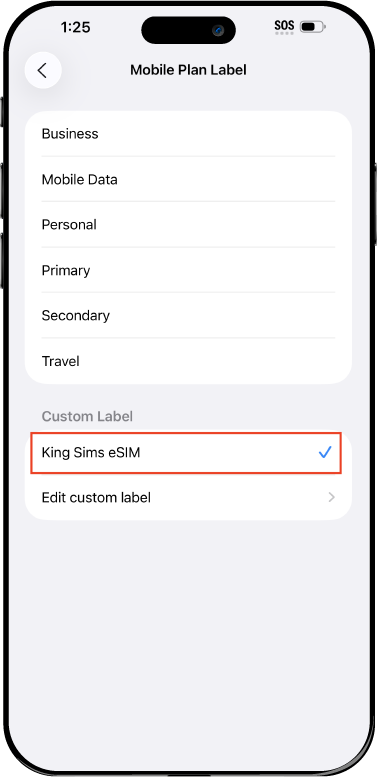
Name Your eSIM ✍️
Once you pass the last step, look for your newly activated eSIM and tap its "Name".

Mobile Plan Label:
Select "Custom Label"
Name it: "King Sims eSIM"

QR Code
Activation Guide

Step-8-iPhone-QR-Code-Activation-Guide

Final Step 👑
Turn on your line ✅

Turn Data Roaming to 'ON'
look for the option titled "Data Roaming"
then Tap 👆the option to turn it 'ON'

For Local eSIM plans with a mobile number, this step is not necessary.

You're Ready To Go 🎉

Step-9-iPhone-QR-Code-Activation-Guide

Welcome to the Kingdom 👑
Once you see the 4G or 5G symbol, test your mobile data.

Once your mobile data starts working without Wi-Fi it means your eSIM has successfully activated

Now you can start travelling with freedom
like a King 🤴 or 👸Queen.

✅ Step 1: Activate Your SIM Card

king-sims-experience.
📅 Add Your Arrival Date:
At checkout, let us know when you're landing in your destination — whether it's 🇺🇸 USA, 🇨🇦 Canada, or 🇲🇽 Mexico. We’ll schedule your SIM for seamless activation.
👑 Have King Sims Ready:
Make sure you have your King Sims packaging ready. It has all you need to get set up.
📲 Swap Your SIM cards:
Once you land, just pop the King Sims card into your phone. Use the "King Pin" in your packaging to swap your SIMs.
🔁 Restart Your Phone:
Give your device a quick restart to kickstart the activation magic.
📩 Get the Welcome Message: Depending on our partnered mobile network and which SIM card you ordered. You’ll get a welcome SMS from the Network with your brand new mobile number — you're officially connected! 🎉
💬 Need Help?
If you see SOS only or no signal, reach out via Live Chat — our support team can sort it in under 5 minutes. 👑
💡 King Tip:
If your King SIM works across multiple countries, don’t forget to turn Data Roaming ON to stay connected in every destination it covers. 🌍📶

Does My Device Have eSIM?

👑 King Tip: If your device isn't listed here simply search google with your phone model to find out if it is 💡

  • iPhone XS
  • iPhone XS Max
  • iPhone 11
  • iPhone 11 Pro
  • iPhone 11 Pro Max
  • iPhone SE (2020)
  • iPhone 12 Mini
  • iPhone 12
  • iPhone 12 Pro
  • iPhone 12 Pro Max
  • iPhone 13 mini
  • iPhone 13
  • iPhone 13 Pro
  • iPhone 13 Pro Max
  • iPhone SE (2022)
  • iPhone 14
  • iPhone 14 Plus
  • iPhone 14 Pro
  • iPhone 14 Pro Max
  • iPhone 15
  • iPhone 15 Plus
  • iPhone 15 Pro
  • iPhone 15 Pro Max
  • iPhone 16 (All Models)
  • iPad Pro (2018 and onwards)
  • iPad Air
  • iPad
  • Watch series 3
  • Watch series 4
  • Watch series 5
  • Watch series 6
  • Watch SE
  • Galaxy Z Flip
  • Galaxy Z Flip 5G
  • Galaxy Z Flip3 5G
  • Galaxy Z Flip4
  • Galaxy Z Flip5
  • Galaxy Fold
  • Galaxy Z Fold2 5G
  • Galaxy Z Fold3 5G
  • Galaxy Z Fold4
  • Galaxy Z Fold5 5G
  • Galaxy S20
  • Galaxy S21
  • Galaxy S21+ 5G
  • Galaxy S21 Ultra 5G
  • Galaxy S22
  • Galaxy S22+
  • Galaxy S22 Ultra
  • Galaxy Note 20 Ultra 5G
  • Galaxy Note 20
  • Galaxy S23
  • Galaxy S23+
  • Galaxy S23 Ultra
  • Galaxy S24
  • Galaxy S24+
  • Galaxy S24 Ultra
  • Galaxy S20 Ultra 5G
  • Gemini PDA
  • Pixel 3
  • Pixel 3a
  • Pixel 4
  • Pixel 4a
  • Pixel 5
  • Pixel 6
  • Pixel 6a
  • Pixel 6 Pro
  • Pixel 7
  • Pixel 7 Pro
  • Pixel 8
  • Pixel 8 Pro
  • P40
  • P40 Pro (not including the P40 Pro +)
  • Mate 40 Pro
  • Razr 2019
  • Razr 5G
  • Motorola Razr 40
  • Motorola Razr 40 Ultra
  • Razr+
  • Edge+
  • Edge 40
  • Edge 40 Pro
  • Edge 40 Neo
  • G52J 5G
  • G52J 5G Ⅱ
  • G53J 5G
  • Find X3 Pro
  • Reno 5 A
  • Find X5
  • Find X5 Pro
  • Reno6 Pro 5G
  • A55s 5G
  • Rakuten Mini
  • Big-S
  • Big
  • Hand
  • Hand 5G
  • Xperia 10 III Lite
  • Xperia 10 IV
  • Xperia 10V
  • Xperia Xperia 1 IV
  • Xperia 5 IV
  • Xperia 1 V
  • Xperia Ace III
  • Xperia 5 V
  • Honor
  • Magic 4 Pro
  • AQUOS Sense6s
  • AQUOS wish
  • AQUOS sense4 lite
  • AQUOS sense 7
  • AQUOS sense 7plus
  • AQUOS wish 2 SHG08
  • AQUOS wish3
  • AQUOS zero 6
  • Simple Sumaho6
  • AQUOS R7
  • AQUOS R8
  • AQUOS R8 Pro
  • V30
  • 12T Pro
  • 13
  • 13 Lite
  • 13 Pro
  • 13T Pro 
  • Honor Magic 4 Pro
  • Honor Magic 5 Pro
  • Honor 90
  • Honor X8
  • Oneplus Open
  • Oneplus 11
  • Oneplus 12 
  • Nokia XR21
  • Nokia X30
  • Nokia G60 5G
  • HAMMER Blade 3
  • HAMMER Explorer PRO
  • HAMMER Blade 5G
  • Vivo X90 Pro
  • Vivo V29 Lite 5G (Europe Only)

Island Hopping in Thailand on a Budget: Data, Ferries & Safety Tips 🇹🇭🏝️👑

thailand island hopping travel esim helping tourists stay connected across Phuket Phi Phi and Koh Samui

You’ve just landed in Thailand.

Sun out. Backpack ready. First stop? Phuket. Then Phi Phi. Then maybe Krabi… or Koh Samui… or wherever the vibe takes you.

You walk into a small travel shop to book a ferry.

They quote one price. Then another. Then add “extra fees.”

Your phone?

No signal. No way to compare prices. No clue if you’re getting ripped off.

And just like that… your budget trip starts leaking money.

Meanwhile, your home carrier is warming up the Roaming Racket.

By Royal Decree, we fix this before it even begins.

Let’s talk about the real travel hack: the thailand island hopping travel esim.

👑 Why Thailand Is Perfect for Budget Island Hopping

Thailand is one of the best places on Earth to travel cheap — if you do it right.

You get:

  • 🏝️ World-class islands
  • 🚤 Affordable transport
  • 🍜 Cheap food
  • 🏨 Budget-friendly stays

And best of all?

You can move freely between islands without locking into rigid plans.

But here’s the catch…

👉 Island hopping requires real-time decisions.

And that means you need data.

📍 The Classic Thailand Island Route

Let’s break down the hotspots.

🌴 Phuket – The Starting Point

Big, busy, and easy to navigate.

You’ll use your phone for:

  • Booking ferries
  • Finding accommodation
  • Using Grab for transport

🏝️ Phi Phi Islands – The Postcard Spot

No roads. No cars. Just boats and beaches.

Here, your phone helps you:

  • Check ferry schedules
  • Find tours
  • Locate food spots

🌊 Krabi – Chill & Scenic

Think cliffs, beaches, and laid-back vibes.

You’ll rely on:

  • Booking apps
  • Maps for hidden beaches
  • Transport between Ao Nang & Railay

🎉 Koh Phangan – Party & Chill

Home of the Full Moon Party… and surprisingly peaceful beaches.

You’ll need data for:

  • Event updates
  • Taxi coordination
  • Group communication

🌅 Koh Samui – Comfort Island

More developed. Easier travel.

Perfect for:

  • Resorts
  • Remote work
  • Relaxed travel

🚤 How You Actually Move Between Islands

thailand island hopping travel esim helping tourists stay connected across Phuket Phi Phi and Koh Samui
Asian woman traveller take a photo and travel in Bangkok grand palace and wat phra kaew in Bangkok city, Thailand

Let’s keep it real.

You’ll be using:

⛴️ Ferries

  • Cheapest option
  • Slower but reliable

🚤 Speedboats

  • Faster
  • More expensive
  • Weather-dependent

🎟️ Booking Methods

You’ll book via:

  • Local travel shops
  • Hotel desks
  • Online platforms

👉 And THIS is where people lose money.

⚔️ The Scams & Mistakes to Avoid

❌ Overpriced Ferry Tickets

Without internet, you can’t compare prices.

Result? You overpay.

❌ “Package Deals” With Hidden Fees

Sounds cheap… until:

  • Extra transport charges
  • Luggage fees
  • Surprise upgrades

❌ Fake or Low-Quality Tours

No reviews = risky decisions.

❌ Cash-Only Pressure

Some vendors push cash to avoid accountability.

👑 The solution?

Stay connected so you can verify everything in real time.

📱 The Real MVP: Your Phone (With Data)

Island hopping = constant decisions.

You’ll use your phone for:

  • Google Maps
  • Booking ferries
  • Checking reviews
  • Messaging hotels
  • Ordering rides
  • Splitting costs with friends

Without data?

You’re guessing.

With data?

You’re in control.

👑 The Royal Fix: King Sims Thailand eSIM

👉 https://kingsims.com/product/thailand-esim/

This is your backbone for the entire trip.

⚡ Instant Activation via the App

  • Buy online
  • Install via King Sims App (iOS & Android)
  • Activate before departure

Land in Thailand → already connected.

No airport SIM chaos. No confusion.

📡 Fast, Reliable Data Across Islands

We connect you to top-tier networks, so you get:

  • Strong signal in major islands
  • Reliable speeds for maps & bookings
  • Smooth connection on ferries & coastal areas

🔥 Hotspot = Group Travel Hack

Traveling with friends?

You can:

  • Share your connection
  • Keep everyone online
  • Split one plan

You become the group’s Wi-Fi King 👑

📞 Real Phone Numbers (Game Changer)

Most eSIMs?

Data only.

King Sims?

Built different.

Many plans include:

  • Real phone numbers
  • Calls
  • SMS

Perfect for:

  • Booking tours
  • Contacting hotels
  • Handling emergencies

💰 Money-Back Guarantee

Trying eSIM for the first time?

Relax.

If something doesn’t work, you’re covered.

Royal confidence 👑

💸 Budget Breakdown (Why eSIM Saves You Money)

Phi Phi Islands aerial view with turquoise water and boats popular for island hopping

Let’s compare.

Roaming

$10/day × 14 days = $140
Slow speeds. Limited data.

Local SIM Confusion

  • Time wasted
  • Risk of overpaying
  • Setup issues

King Sims eSIM

  • Affordable
  • Instant
  • Reliable

More money for:

  • Island tours
  • Food
  • Experiences

Travel like a King. Pay like a pauper.

🧠 Pro Tips for Smooth Island Hopping

✔️ Book Transport 1 Day Ahead

Avoid last-minute panic pricing.

✔️ Check Weather Before Boats

Speedboats cancel often in rough seas.

✔️ Use Reviews for Tours

Don’t trust random sellers.

✔️ Stay Flexible

Plans change — that’s part of the fun.

✔️ Keep Your Phone Charged

Your phone = your travel control center.

👑 The Royal Verdict

Thailand island hopping is one of the best travel experiences in the world.

But it only feels easy when:

  • You can check routes
  • You can compare prices
  • You can book instantly
  • You stay connected

thailand island hopping travel esim isn’t optional.

It’s essential.

🏰 Join the Royal Class

Travelers boarding ferry for island hopping between Thailand islands

Before your trip:

👉 https://kingsims.com/product/thailand-esim/

1️⃣ Choose your plan
2️⃣ Install via the app
3️⃣ Activate before flying
4️⃣ Land connected

And when you sign up?

Enjoy 15% off your first order 👑

No roaming racket.
No ferry scams.
No travel stress.

Just smooth island hopping — the Royal way 🇹🇭🏝️👑

0