


Shipping & Handling

How To Activate Your eSIM

Countries Covered

What countries your SIM works in

About Your SIM

SIM Features

YOUR SECRET 🤫
KING SIMS APP CODE 🎁

king-sims-experience

Copy your secret 20% off King Sims app code down below. Apply it in your cart or checkout

QR Code
Activation Guide

Step-1-iPhone-QR-code-2x

Open your 'Cellular' or 'Mobile Data' settings.

Tap 👆 "Add eSIM"

QR Code
Activation Guide

Step-2-iPhone-QR-Code-Activation-Guide

You'll be directed to a screen with multiple activation options.
For QR code activation, select the option: "Use QR code"

QR Code
Activation Guide

Step-3-iPhone-QR-Code-Activation-Guide

Position your phone's camera on the QR code we emailed you and found in the King Sims App.

💡King Tip: Travelling with a friend? Simply send your QR code to a friend and scan it off their phone!

QR Code
Activation Guide

Step-4-iPhone-QR-Code-Activation-Guide

Wait a moment for the eSIM to detect the local network.

Once successful, you'll get a message saying:
"Your new eSIM is ready to activate"

👆Tap Continue

QR Code
Activation Guide

Step-5-iPhone-QR-Code-Activation-Guide

Data Only eSIMs:
If your eSIM comes only with data
👆Tap "Data Only"

eSIMs with Calls & Texts:
If your eSIM comes with calls & texts like our other eSIM ranges
👆Tap "Voice and Data"

QR Code
Activation Guide

Step-6-iPhone-QR-Code-Activation-Guide

Wait a moment ⏳
Once you see this notice pop-up, it means your activation has successfully completed.

Last Step:
Once you see this notification, we need to name and finalise your eSIM setup.
👆Tap "Done" When your ready.

QR Code
Activation Guide

Step-7-iPhone-QR-Code-Activation-Guide

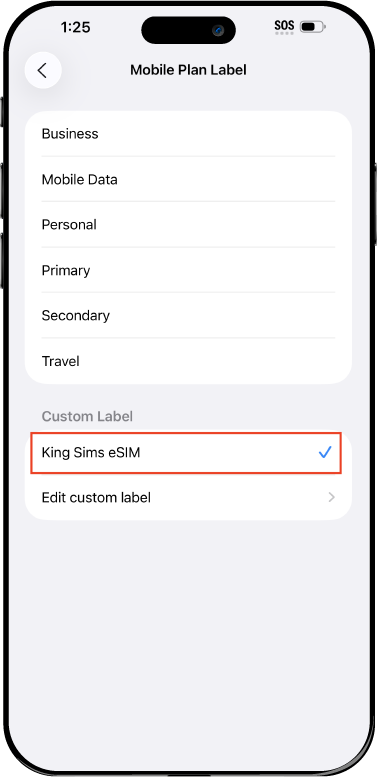
Name Your eSIM ✍️
Once you pass the last step, look for your newly activated eSIM and tap its "Name".

Mobile Plan Label:
Select "Custom Label"
Name it: "King Sims eSIM"

QR Code
Activation Guide

Step-8-iPhone-QR-Code-Activation-Guide

Final Step 👑
Turn on your line ✅

Turn Data Roaming to 'ON'
look for the option titled "Data Roaming"
then Tap 👆the option to turn it 'ON'

For Local eSIM plans with a mobile number, this step is not necessary.

You're Ready To Go 🎉

Step-9-iPhone-QR-Code-Activation-Guide

Welcome to the Kingdom 👑
Once you see the 4G or 5G symbol, test your mobile data.

Once your mobile data starts working without Wi-Fi it means your eSIM has successfully activated

Now you can start travelling with freedom
like a King 🤴 or 👸Queen.

✅ Step 1: Activate Your SIM Card

king-sims-experience.
📅 Add Your Arrival Date:
At checkout, let us know when you're landing in your destination — whether it's 🇺🇸 USA, 🇨🇦 Canada, or 🇲🇽 Mexico. We’ll schedule your SIM for seamless activation.
👑 Have King Sims Ready:
Make sure you have your King Sims packaging ready. It has all you need to get set up.
📲 Swap Your SIM cards:
Once you land, just pop the King Sims card into your phone. Use the "King Pin" in your packaging to swap your SIMs.
🔁 Restart Your Phone:
Give your device a quick restart to kickstart the activation magic.
📩 Get the Welcome Message: Depending on our partnered mobile network and which SIM card you ordered. You’ll get a welcome SMS from the Network with your brand new mobile number — you're officially connected! 🎉
💬 Need Help?
If you see SOS only or no signal, reach out via Live Chat — our support team can sort it in under 5 minutes. 👑
💡 King Tip:
If your King SIM works across multiple countries, don’t forget to turn Data Roaming ON to stay connected in every destination it covers. 🌍📶

Does My Device Have eSIM?

👑 King Tip: If your device isn't listed here simply search google with your phone model to find out if it is 💡

  • iPhone XS
  • iPhone XS Max
  • iPhone 11
  • iPhone 11 Pro
  • iPhone 11 Pro Max
  • iPhone SE (2020)
  • iPhone 12 Mini
  • iPhone 12
  • iPhone 12 Pro
  • iPhone 12 Pro Max
  • iPhone 13 mini
  • iPhone 13
  • iPhone 13 Pro
  • iPhone 13 Pro Max
  • iPhone SE (2022)
  • iPhone 14
  • iPhone 14 Plus
  • iPhone 14 Pro
  • iPhone 14 Pro Max
  • iPhone 15
  • iPhone 15 Plus
  • iPhone 15 Pro
  • iPhone 15 Pro Max
  • iPhone 16 (All Models)
  • iPad Pro (2018 and onwards)
  • iPad Air
  • iPad
  • Watch series 3
  • Watch series 4
  • Watch series 5
  • Watch series 6
  • Watch SE
  • Galaxy Z Flip
  • Galaxy Z Flip 5G
  • Galaxy Z Flip3 5G
  • Galaxy Z Flip4
  • Galaxy Z Flip5
  • Galaxy Fold
  • Galaxy Z Fold2 5G
  • Galaxy Z Fold3 5G
  • Galaxy Z Fold4
  • Galaxy Z Fold5 5G
  • Galaxy S20
  • Galaxy S21
  • Galaxy S21+ 5G
  • Galaxy S21 Ultra 5G
  • Galaxy S22
  • Galaxy S22+
  • Galaxy S22 Ultra
  • Galaxy Note 20 Ultra 5G
  • Galaxy Note 20
  • Galaxy S23
  • Galaxy S23+
  • Galaxy S23 Ultra
  • Galaxy S24
  • Galaxy S24+
  • Galaxy S24 Ultra
  • Galaxy S20 Ultra 5G
  • Gemini PDA
  • Pixel 3
  • Pixel 3a
  • Pixel 4
  • Pixel 4a
  • Pixel 5
  • Pixel 6
  • Pixel 6a
  • Pixel 6 Pro
  • Pixel 7
  • Pixel 7 Pro
  • Pixel 8
  • Pixel 8 Pro
  • P40
  • P40 Pro (not including the P40 Pro +)
  • Mate 40 Pro
  • Razr 2019
  • Razr 5G
  • Motorola Razr 40
  • Motorola Razr 40 Ultra
  • Razr+
  • Edge+
  • Edge 40
  • Edge 40 Pro
  • Edge 40 Neo
  • G52J 5G
  • G52J 5G Ⅱ
  • G53J 5G
  • Find X3 Pro
  • Reno 5 A
  • Find X5
  • Find X5 Pro
  • Reno6 Pro 5G
  • A55s 5G
  • Rakuten Mini
  • Big-S
  • Big
  • Hand
  • Hand 5G
  • Xperia 10 III Lite
  • Xperia 10 IV
  • Xperia 10V
  • Xperia Xperia 1 IV
  • Xperia 5 IV
  • Xperia 1 V
  • Xperia Ace III
  • Xperia 5 V
  • Honor
  • Magic 4 Pro
  • AQUOS Sense6s
  • AQUOS wish
  • AQUOS sense4 lite
  • AQUOS sense 7
  • AQUOS sense 7plus
  • AQUOS wish 2 SHG08
  • AQUOS wish3
  • AQUOS zero 6
  • Simple Sumaho6
  • AQUOS R7
  • AQUOS R8
  • AQUOS R8 Pro
  • V30
  • 12T Pro
  • 13
  • 13 Lite
  • 13 Pro
  • 13T Pro 
  • Honor Magic 4 Pro
  • Honor Magic 5 Pro
  • Honor 90
  • Honor X8
  • Oneplus Open
  • Oneplus 11
  • Oneplus 12 
  • Nokia XR21
  • Nokia X30
  • Nokia G60 5G
  • HAMMER Blade 3
  • HAMMER Explorer PRO
  • HAMMER Blade 5G
  • Vivo X90 Pro
  • Vivo V29 Lite 5G (Europe Only)

How to Build a “Safe Zone” Travel Map With One Worldwide eSIM

You’re planning a multi-country trip.

Exciting? Yes.

Simple? Not exactly.

Flights change. News shifts. Routes get messy.

And suddenly… that “perfect itinerary” feels risky.

Now imagine this:

You land in a new country. Your phone connects instantly. You check updates, reroute if needed, and book your next move in minutes.

No panic. No confusion. No roaming bill ambush.

That, my friend, is the power of building your trip around worldwide esim safe countries.

Welcome to the Kingdom of smart travel 👑

👑 What Is a “Safe Zone” Travel Map?

Tokyo city skyline with modern buildings and safe urban travel environment in Japan

Let’s keep it real.

A “Safe Zone” travel map is:

👉 A route built around stable, tourist-friendly countries
👉 With easy transport links
👉 Strong infrastructure
👉 Reliable connectivity

Instead of jumping into uncertainty…

You move through connected, predictable, flexible destinations.

🌍 Step 1: Choose Your Core Safe Countries

Here’s a Royal-approved route:

🇯🇵 Japan – Precision & Safety

One of the safest and most organized destinations in the world.

Why it works:

  • Ultra-reliable transport
  • Clean, efficient cities
  • Low crime rates

Perfect starting point.

🇹🇭 Thailand – Affordable & Friendly

Easy to navigate, budget-friendly, and packed with options.

Why it works:

  • Strong tourist infrastructure
  • Affordable travel
  • Flexible routes

🇮🇩 Bali – Relaxed & Connected

A favorite for travelers who want balance.

Why it works:

  • Established tourist zones
  • Remote work friendly
  • Easy to extend your stay

🇪🇺 Europe – Multi-Country Flexibility

Move between countries like:

  • France 🇫🇷
  • Italy 🇮🇹
  • Spain 🇪🇸

Why it works:

  • Strong transport network
  • Open borders (Schengen Zone)
  • High connectivity

👑 This route gives you:

  • Stability
  • Flexibility
  • Easy movement

✈️ Step 2: Connect the Dots (Smart Routing)

Thailand beach with tourists enjoying a safe and affordable travel destination

Here’s how you build your Safe Zone:

✔️ Use Major Travel Hubs

Fly through:

  • Tokyo
  • Bangkok
  • Singapore
  • Major European cities

✔️ Keep Flights Flexible

Don’t lock everything in.

Give yourself room to:

  • Change plans
  • Extend stays
  • Avoid disruptions

✔️ Monitor Travel Conditions

Stay updated on:

  • Weather
  • Transport delays
  • Local news

👉 And yes… this requires data.

⚔️ The Biggest Travel Mistake

Here’s where people lose control:

They treat each country separately.

New SIM. New setup. New problems.

Or worse…

They rely on:

  • Roaming (💸)
  • Public Wi-Fi (📵)

That’s how chaos starts.

👑 The Royal Fix: One Worldwide eSIM

👉 https://kingsims.com/product/worldwide-esim/

Instead of juggling SIMs…

You use one connection across your entire trip.

⚡ Instant Activation via the App

  • Buy online
  • Install via King Sims App (iOS & Android)
  • Activate instantly

Before you leave.

When you land anywhere?

You’re already connected.

🌎 One Setup, Multiple Countries

Your Safe Zone becomes seamless:

  • Japan ✔
  • Thailand ✔
  • Bali ✔
  • Europe ✔

No swapping SIMs. No downtime.

📞 Real Phone Numbers (Huge Advantage)

Most global eSIMs?

Data only.

King Sims?

Built different.

Many plans include:

  • Real phone numbers
  • Calls
  • SMS

Meaning you can:

  • Confirm bookings
  • Receive verification codes
  • Stay reachable

📡 Premium Networks Only

We don’t play with weak signals.

You connect to:

  • Orange
  • SoftBank
  • T-Mobile

Strong, reliable, global coverage.

💰 Money-Back Guarantee

Trying eSIM for the first time?

Relax.

If something doesn’t work, you’re covered.

Royal confidence 👑

🧠 Step 3: Stay Flexible (This Is the Real Power)

Here’s the secret most travelers miss:

The best trips are not fixed.

They adapt.

With a worldwide eSIM, you can:

  • Rebook flights instantly
  • Find last-minute hotels
  • Navigate unfamiliar areas
  • Stay in touch with family

You’re never stuck.

🚨 Real Scenario: Plans Change Fast

Bali travel destination with tropical scenery popular among remote workers and tourists

Let’s say:

You planned to go Thailand → Bali.

But weather shifts. Flights get messy.

Without connectivity:

  • You panic
  • You wait
  • You lose options

With a worldwide eSIM:

  • You check alternatives
  • Book a new route
  • Continue your trip smoothly

You stay in control.

💸 Roaming vs Royal Setup

Roaming

$10/day × multiple countries = 💀
Slow. Expensive. Limited.

Local SIM Chaos

  • Time wasted
  • Setup headaches
  • Multiple numbers

King Sims Worldwide eSIM

  • One setup
  • Unlimited flexibility
  • Reliable connection

Travel like a King. Pay like a pauper.

🧭 Pro Tips for Building Your Safe Zone

European city street with tourists exploring safe destinations across multiple countries

✔️ Start Strong (Japan or Europe)

Easy entry = less stress.

✔️ Mix Adventure + Stability

Balance busy cities with relaxed destinations.

✔️ Keep Backup Routes

Always have a Plan B.

✔️ Stay Connected at All Times

No signal = no flexibility.

✔️ Avoid Airport SIM Kiosks

Overpriced and unnecessary.

👑 The King’s Decree

If you’re traveling across multiple countries:

👉 You need one system that works everywhere.

That’s how you:

  • Stay safe
  • Stay flexible
  • Stay in control

A trip built around worldwide esim safe countries isn’t just smarter…

It’s calmer.

🏰 Join the Royal Class

Ready to build your Safe Zone?

👉 https://kingsims.com/product/worldwide-esim/

Before your trip:

1️⃣ Choose your plan
2️⃣ Install via the app
3️⃣ Activate before flying
4️⃣ Stay connected everywhere

And when you sign up?

Enjoy 15% off your first order 👑

No roaming racket.
No connection gaps.
No travel stress.

Just smooth, flexible, global travel — the Royal way 🌍👑📶

0