


Shipping & Handling

How To Activate Your eSIM

Countries Covered

What countries your SIM works in

About Your SIM

SIM Features

YOUR SECRET 🤫
KING SIMS APP CODE 🎁

king-sims-experience

Copy your secret 20% off King Sims app code down below. Apply it in your cart or checkout

QR Code
Activation Guide

Step-1-iPhone-QR-code-2x

Open your 'Cellular' or 'Mobile Data' settings.

Tap 👆 "Add eSIM"

QR Code
Activation Guide

Step-2-iPhone-QR-Code-Activation-Guide

You'll be directed to a screen with multiple activation options.
For QR code activation, select the option: "Use QR code"

QR Code
Activation Guide

Step-3-iPhone-QR-Code-Activation-Guide

Position your phone's camera on the QR code we emailed you and found in the King Sims App.

💡King Tip: Travelling with a friend? Simply send your QR code to a friend and scan it off their phone!

QR Code
Activation Guide

Step-4-iPhone-QR-Code-Activation-Guide

Wait a moment for the eSIM to detect the local network.

Once successful, you'll get a message saying:
"Your new eSIM is ready to activate"

👆Tap Continue

QR Code
Activation Guide

Step-5-iPhone-QR-Code-Activation-Guide

Data Only eSIMs:
If your eSIM comes only with data
👆Tap "Data Only"

eSIMs with Calls & Texts:
If your eSIM comes with calls & texts like our other eSIM ranges
👆Tap "Voice and Data"

QR Code
Activation Guide

Step-6-iPhone-QR-Code-Activation-Guide

Wait a moment ⏳
Once you see this notice pop-up, it means your activation has successfully completed.

Last Step:
Once you see this notification, we need to name and finalise your eSIM setup.
👆Tap "Done" When your ready.

QR Code
Activation Guide

Step-7-iPhone-QR-Code-Activation-Guide

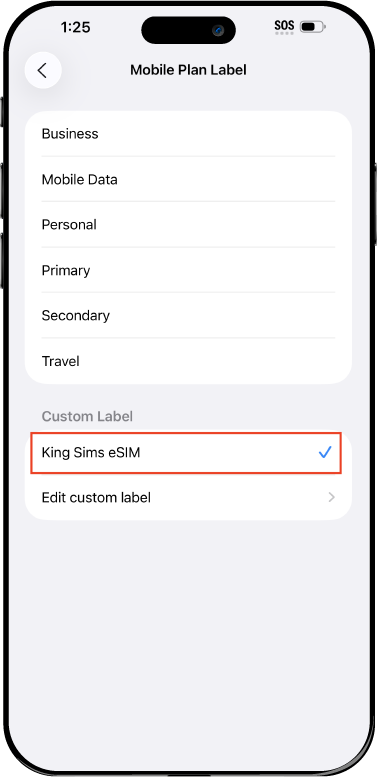
Name Your eSIM ✍️
Once you pass the last step, look for your newly activated eSIM and tap its "Name".

Mobile Plan Label:
Select "Custom Label"
Name it: "King Sims eSIM"

QR Code
Activation Guide

Step-8-iPhone-QR-Code-Activation-Guide

Final Step 👑
Turn on your line ✅

Turn Data Roaming to 'ON'
look for the option titled "Data Roaming"
then Tap 👆the option to turn it 'ON'

For Local eSIM plans with a mobile number, this step is not necessary.

You're Ready To Go 🎉

Step-9-iPhone-QR-Code-Activation-Guide

Welcome to the Kingdom 👑
Once you see the 4G or 5G symbol, test your mobile data.

Once your mobile data starts working without Wi-Fi it means your eSIM has successfully activated

Now you can start travelling with freedom
like a King 🤴 or 👸Queen.

✅ Step 1: Activate Your SIM Card

king-sims-experience.
📅 Add Your Arrival Date:
At checkout, let us know when you're landing in your destination — whether it's 🇺🇸 USA, 🇨🇦 Canada, or 🇲🇽 Mexico. We’ll schedule your SIM for seamless activation.
👑 Have King Sims Ready:
Make sure you have your King Sims packaging ready. It has all you need to get set up.
📲 Swap Your SIM cards:
Once you land, just pop the King Sims card into your phone. Use the "King Pin" in your packaging to swap your SIMs.
🔁 Restart Your Phone:
Give your device a quick restart to kickstart the activation magic.
📩 Get the Welcome Message: Depending on our partnered mobile network and which SIM card you ordered. You’ll get a welcome SMS from the Network with your brand new mobile number — you're officially connected! 🎉
💬 Need Help?
If you see SOS only or no signal, reach out via Live Chat — our support team can sort it in under 5 minutes. 👑
💡 King Tip:
If your King SIM works across multiple countries, don’t forget to turn Data Roaming ON to stay connected in every destination it covers. 🌍📶

Does My Device Have eSIM?

👑 King Tip: If your device isn't listed here simply search google with your phone model to find out if it is 💡

  • iPhone XS
  • iPhone XS Max
  • iPhone 11
  • iPhone 11 Pro
  • iPhone 11 Pro Max
  • iPhone SE (2020)
  • iPhone 12 Mini
  • iPhone 12
  • iPhone 12 Pro
  • iPhone 12 Pro Max
  • iPhone 13 mini
  • iPhone 13
  • iPhone 13 Pro
  • iPhone 13 Pro Max
  • iPhone SE (2022)
  • iPhone 14
  • iPhone 14 Plus
  • iPhone 14 Pro
  • iPhone 14 Pro Max
  • iPhone 15
  • iPhone 15 Plus
  • iPhone 15 Pro
  • iPhone 15 Pro Max
  • iPhone 16 (All Models)
  • iPad Pro (2018 and onwards)
  • iPad Air
  • iPad
  • Watch series 3
  • Watch series 4
  • Watch series 5
  • Watch series 6
  • Watch SE
  • Galaxy Z Flip
  • Galaxy Z Flip 5G
  • Galaxy Z Flip3 5G
  • Galaxy Z Flip4
  • Galaxy Z Flip5
  • Galaxy Fold
  • Galaxy Z Fold2 5G
  • Galaxy Z Fold3 5G
  • Galaxy Z Fold4
  • Galaxy Z Fold5 5G
  • Galaxy S20
  • Galaxy S21
  • Galaxy S21+ 5G
  • Galaxy S21 Ultra 5G
  • Galaxy S22
  • Galaxy S22+
  • Galaxy S22 Ultra
  • Galaxy Note 20 Ultra 5G
  • Galaxy Note 20
  • Galaxy S23
  • Galaxy S23+
  • Galaxy S23 Ultra
  • Galaxy S24
  • Galaxy S24+
  • Galaxy S24 Ultra
  • Galaxy S20 Ultra 5G
  • Gemini PDA
  • Pixel 3
  • Pixel 3a
  • Pixel 4
  • Pixel 4a
  • Pixel 5
  • Pixel 6
  • Pixel 6a
  • Pixel 6 Pro
  • Pixel 7
  • Pixel 7 Pro
  • Pixel 8
  • Pixel 8 Pro
  • P40
  • P40 Pro (not including the P40 Pro +)
  • Mate 40 Pro
  • Razr 2019
  • Razr 5G
  • Motorola Razr 40
  • Motorola Razr 40 Ultra
  • Razr+
  • Edge+
  • Edge 40
  • Edge 40 Pro
  • Edge 40 Neo
  • G52J 5G
  • G52J 5G Ⅱ
  • G53J 5G
  • Find X3 Pro
  • Reno 5 A
  • Find X5
  • Find X5 Pro
  • Reno6 Pro 5G
  • A55s 5G
  • Rakuten Mini
  • Big-S
  • Big
  • Hand
  • Hand 5G
  • Xperia 10 III Lite
  • Xperia 10 IV
  • Xperia 10V
  • Xperia Xperia 1 IV
  • Xperia 5 IV
  • Xperia 1 V
  • Xperia Ace III
  • Xperia 5 V
  • Honor
  • Magic 4 Pro
  • AQUOS Sense6s
  • AQUOS wish
  • AQUOS sense4 lite
  • AQUOS sense 7
  • AQUOS sense 7plus
  • AQUOS wish 2 SHG08
  • AQUOS wish3
  • AQUOS zero 6
  • Simple Sumaho6
  • AQUOS R7
  • AQUOS R8
  • AQUOS R8 Pro
  • V30
  • 12T Pro
  • 13
  • 13 Lite
  • 13 Pro
  • 13T Pro 
  • Honor Magic 4 Pro
  • Honor Magic 5 Pro
  • Honor 90
  • Honor X8
  • Oneplus Open
  • Oneplus 11
  • Oneplus 12 
  • Nokia XR21
  • Nokia X30
  • Nokia G60 5G
  • HAMMER Blade 3
  • HAMMER Explorer PRO
  • HAMMER Blade 5G
  • Vivo X90 Pro
  • Vivo V29 Lite 5G (Europe Only)

6 Iconic Activities To Do In New Zealand

6 Iconic Activities To Do In New Zealand

Yes, Tourists… Our next destination is New Zealand ?? !

The Land of Mystery ?!

One of the most breathtaking? countries to visit.

It’s a destination unlike any other, with its snow-capped mountains ?, old glaciers ?, mountain ranges, and plenty of adventure ?.
With only two islands, 14 state parks, and numerous cities ?, New Zealand never disappoints!

A country that inspires imagination ? with its abundance of enjoyment ?.
Can you imagine skiing ⛷ and surfing ?‍♀️ on the same day?

If New Zealand isn’t on your bucket list, you’re skipping a lot!
You’re missing out on some of the most breathtaking views ?.

You are missing out on the 6 iconic activities to do in New Zealand.

King ?? Sims is always accessible to guarantee the most relaxing trip possible, with planned visits, no headaches and the most enjoyable activities.

Let’s get started…

Icon #1- Swim with Dolphins ?

What’s even better than swimming ?‍♀️ ?
Swimming ?‍♂️ with a dolphin ? !
Have you ever imagined, or simply envisioned, this sensation?
Speechless ? ! There are no words to describe how this feels.

And not any dolphin ? .
You will be swimming with the Dusky Dolphin, a little dolphin up to 2 meters long and very lively. He lives just off the coast of Kaikoura, a small South Island ? settlement.

So, instead of picturing it right now, make it a reality by booking a trip to New Zealand ?? .
For one of the most memorable adventures! ?

Another Best Sites in New Zealand to Swim with Dolphins are
The Bay of Islands, Akaroa, and Marlborough Sounds…

Icon #2- Go Mountain Biking ?‍♀️

The Otago Central Rail Trail is the region’s crowning ?? achievement.

This trail takes you through herds of sheep ? , blue lakes?, glacier mountains ? , roads, valleys, and deep tunnels.
The best thing about this, is riding your mountain bike ? and exploring everything there.
The journey is actually very simple and enjoyable ?.

The main challenge you may face is the long distance.
But with so much to see along the way, you can’t get bored ?.
And, will always be fascinated by something new ?!

Icon #3- Do a Bungy Jump

Bungy? Scary ? ?
Do what scares you! ?

No, really! It’s literally worth the fear ?.

In the world ? , New Zealand ?? features the most huge bungy jumps.
The Nevis Bungy, for example, is the largest in New Zealand and the third highest bungy jump in the world ?.
This is the spot to get some wild adrenaline. But, it is also extremely safe.
The bungy jump operators in New Zealand are of the utmost quality. They constantly check! All day, every day.

Icon #4- Go Canyon Swinging

I mean, if there’s no adventure, why should I bother travelling ? ?
Scary ? in some ways, but an entirely other sensation!

King ? Sims is a big fan of adventures! He will always show you the finest options to take. Particularly in New Zealand, the place of adventure and amazing memories ?.

So, Canyon Swinging.
Consider jumping from 109 meters into a canyon near Queenstown.
Your heart ❤️ is jumping up ? and down ??. Your heart is sliding between your legs ?? as you scream ?.
Admitted, but the most thrilling highlight!
Tell your buddies that you really jumped off a cliff. No, off the highest cliff in the world ?!

Icon #5- Hike the Old New Zealand

Let us not forget HIKING ? .

Tongariro Alpine Crossing is New Zealand’s oldest.
Tongariro National Park is rich in both cultural identity and magnificent, awe-inspiring natural splendor.
Distinctive volcanic peaks of Ngauruhoe, Tongariro, and Ruapehu…
Imagine the feeling of hiking there…?
Yes, it’s thrilling! But it’s tough.
It is 20 kilometers long.
Are you really up for the challenge of this park? ?‍?

Icon #6- Stewart Island, Southland

Stewart Island is the southernmost and smallest of New Zealand’s three major islands.
This island has its own mystery.
It gives you a look into a simpler, slower lifestyle, in synch with the ocean ? and the waves ? , connected to the natural environment of bush ? and beach ?.

It is also famous for its beautiful night ? skies ? , which are often missed by visitors.

Despite being subantarctic, its bright turquoise water ? and white sand beaches make it a tropical ? paradise ?.

Quick Tip- Never Travel Without A King Sim

king-sims-packaging-travel-sim-aus-passport-best-facebook-review

Step into a world ? where staying connected is an absolute breeze ?!

☝ The last thing you want to worry about when you arrive at the airport ? is connecting to Wifi or finding the cheapest travel sim.

? King Sims got you covered…

No more struggling with sophisticated settings ?.
Get our New Zealand Travel SIM cards before you go ?! 
Choose from our data-packed choices, which include 3GB, 10GB, and unlimited data varieties, to stay connected across the Land of Mystery ?. They active immediately after you replace your own SIM card with our King Sim ?.

It’s time to experience connectivity like never before effortlessly and joyfully! ✅


New Zealand KingSims

0