



Shipping & Handling

How To Activate Your eSIM

Countries Covered

What countries your SIM works in

About Your SIM

SIM Features

YOUR SECRET 🤫
KING SIMS APP CODE 🎁

king-sims-experience

Copy your secret 20% off King Sims app code down below. Apply it in your cart or checkout

QR Code
Activation Guide

Step-1-iPhone-QR-code-2x

Open your 'Cellular' or 'Mobile Data' settings.

Tap 👆 "Add eSIM"

QR Code
Activation Guide

Step-2-iPhone-QR-Code-Activation-Guide

You'll be directed to a screen with multiple activation options.
For QR code activation, select the option: "Use QR code"

QR Code
Activation Guide

Step-3-iPhone-QR-Code-Activation-Guide

Position your phone's camera on the QR code we emailed you and found in the King Sims App.

💡King Tip: Travelling with a friend? Simply send your QR code to a friend and scan it off their phone!

QR Code
Activation Guide

Step-4-iPhone-QR-Code-Activation-Guide

Wait a moment for the eSIM to detect the local network.

Once successful, you'll get a message saying:
"Your new eSIM is ready to activate"

👆Tap Continue

QR Code
Activation Guide

Step-5-iPhone-QR-Code-Activation-Guide

Data Only eSIMs:
If your eSIM comes only with data
👆Tap "Data Only"

eSIMs with Calls & Texts:
If your eSIM comes with calls & texts like our other eSIM ranges
👆Tap "Voice and Data"

QR Code
Activation Guide

Step-6-iPhone-QR-Code-Activation-Guide

Wait a moment ⏳
Once you see this notice pop-up, it means your activation has successfully completed.

Last Step:
Once you see this notification, we need to name and finalise your eSIM setup.
👆Tap "Done" When your ready.

QR Code
Activation Guide

Step-7-iPhone-QR-Code-Activation-Guide

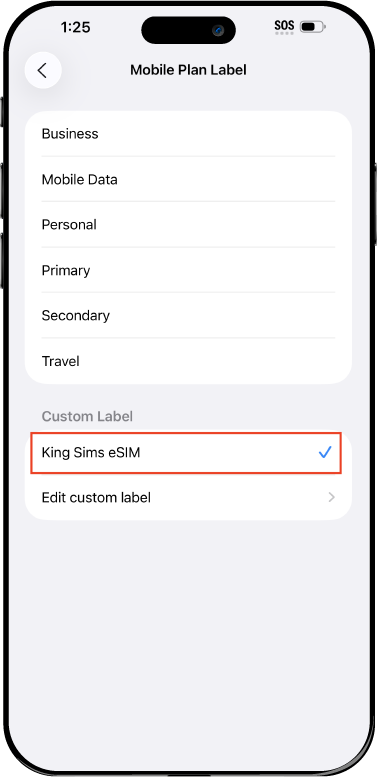
Name Your eSIM ✍️
Once you pass the last step, look for your newly activated eSIM and tap its "Name".

Mobile Plan Label:
Select "Custom Label"
Name it: "King Sims eSIM"

QR Code
Activation Guide

Step-8-iPhone-QR-Code-Activation-Guide

Final Step 👑
Turn on your line ✅

Turn Data Roaming to 'ON'
look for the option titled "Data Roaming"
then Tap 👆the option to turn it 'ON'

For Local eSIM plans with a mobile number, this step is not necessary.

You're Ready To Go 🎉

Step-9-iPhone-QR-Code-Activation-Guide

Welcome to the Kingdom 👑
Once you see the 4G or 5G symbol, test your mobile data.

Once your mobile data starts working without Wi-Fi it means your eSIM has successfully activated

Now you can start travelling with freedom
like a King 🤴 or 👸Queen.

✅ Step 1: Activate Your SIM Card

king-sims-experience.
📅 Add Your Arrival Date:
At checkout, let us know when you're landing in your destination — whether it's 🇺🇸 USA, 🇨🇦 Canada, or 🇲🇽 Mexico. We’ll schedule your SIM for seamless activation.
👑 Have King Sims Ready:
Make sure you have your King Sims packaging ready. It has all you need to get set up.
📲 Swap Your SIM cards:
Once you land, just pop the King Sims card into your phone. Use the "King Pin" in your packaging to swap your SIMs.
🔁 Restart Your Phone:
Give your device a quick restart to kickstart the activation magic.
📩 Get the Welcome Message: Depending on our partnered mobile network and which SIM card you ordered. You’ll get a welcome SMS from the Network with your brand new mobile number — you're officially connected! 🎉
💬 Need Help?
If you see SOS only or no signal, reach out via Live Chat — our support team can sort it in under 5 minutes. 👑
💡 King Tip:
If your King SIM works across multiple countries, don’t forget to turn Data Roaming ON to stay connected in every destination it covers. 🌍📶

Does My Device Have eSIM?

👑 King Tip: If your device isn't listed here simply search google with your phone model to find out if it is 💡

  • iPhone XS
  • iPhone XS Max
  • iPhone 11
  • iPhone 11 Pro
  • iPhone 11 Pro Max
  • iPhone SE (2020)
  • iPhone 12 Mini
  • iPhone 12
  • iPhone 12 Pro
  • iPhone 12 Pro Max
  • iPhone 13 mini
  • iPhone 13
  • iPhone 13 Pro
  • iPhone 13 Pro Max
  • iPhone SE (2022)
  • iPhone 14
  • iPhone 14 Plus
  • iPhone 14 Pro
  • iPhone 14 Pro Max
  • iPhone 15
  • iPhone 15 Plus
  • iPhone 15 Pro
  • iPhone 15 Pro Max
  • iPhone 16 (All Models)
  • iPad Pro (2018 and onwards)
  • iPad Air
  • iPad
  • Watch series 3
  • Watch series 4
  • Watch series 5
  • Watch series 6
  • Watch SE
  • Galaxy Z Flip
  • Galaxy Z Flip 5G
  • Galaxy Z Flip3 5G
  • Galaxy Z Flip4
  • Galaxy Z Flip5
  • Galaxy Fold
  • Galaxy Z Fold2 5G
  • Galaxy Z Fold3 5G
  • Galaxy Z Fold4
  • Galaxy Z Fold5 5G
  • Galaxy S20
  • Galaxy S21
  • Galaxy S21+ 5G
  • Galaxy S21 Ultra 5G
  • Galaxy S22
  • Galaxy S22+
  • Galaxy S22 Ultra
  • Galaxy Note 20 Ultra 5G
  • Galaxy Note 20
  • Galaxy S23
  • Galaxy S23+
  • Galaxy S23 Ultra
  • Galaxy S24
  • Galaxy S24+
  • Galaxy S24 Ultra
  • Galaxy S20 Ultra 5G
  • Gemini PDA
  • Pixel 3
  • Pixel 3a
  • Pixel 4
  • Pixel 4a
  • Pixel 5
  • Pixel 6
  • Pixel 6a
  • Pixel 6 Pro
  • Pixel 7
  • Pixel 7 Pro
  • Pixel 8
  • Pixel 8 Pro
  • P40
  • P40 Pro (not including the P40 Pro +)
  • Mate 40 Pro
  • Razr 2019
  • Razr 5G
  • Motorola Razr 40
  • Motorola Razr 40 Ultra
  • Razr+
  • Edge+
  • Edge 40
  • Edge 40 Pro
  • Edge 40 Neo
  • G52J 5G
  • G52J 5G Ⅱ
  • G53J 5G
  • Find X3 Pro
  • Reno 5 A
  • Find X5
  • Find X5 Pro
  • Reno6 Pro 5G
  • A55s 5G
  • Rakuten Mini
  • Big-S
  • Big
  • Hand
  • Hand 5G
  • Xperia 10 III Lite
  • Xperia 10 IV
  • Xperia 10V
  • Xperia Xperia 1 IV
  • Xperia 5 IV
  • Xperia 1 V
  • Xperia Ace III
  • Xperia 5 V
  • Honor
  • Magic 4 Pro
  • AQUOS Sense6s
  • AQUOS wish
  • AQUOS sense4 lite
  • AQUOS sense 7
  • AQUOS sense 7plus
  • AQUOS wish 2 SHG08
  • AQUOS wish3
  • AQUOS zero 6
  • Simple Sumaho6
  • AQUOS R7
  • AQUOS R8
  • AQUOS R8 Pro
  • V30
  • 12T Pro
  • 13
  • 13 Lite
  • 13 Pro
  • 13T Pro 
  • Honor Magic 4 Pro
  • Honor Magic 5 Pro
  • Honor 90
  • Honor X8
  • Oneplus Open
  • Oneplus 11
  • Oneplus 12 
  • Nokia XR21
  • Nokia X30
  • Nokia G60 5G
  • HAMMER Blade 3
  • HAMMER Explorer PRO
  • HAMMER Blade 5G
  • Vivo X90 Pro
  • Vivo V29 Lite 5G (Europe Only)

The Asia Hopper: How to Cross Borders Without Losing Your Signal

Traveler planning Southeast Asia route using Travel SIM for Asia

The Asia Hopper 🌏🔥

How to Cross Borders Without Losing Your Signal (or Your Mind) 👑📶

There’s nothing more humbling than this moment:

You land in a new Asian country…
You pull out your phone…
And your SIM card dies faster than your motivation at 6AM airport security. 😭📵

Meanwhile Maps won’t load, Grab won’t open, and your hostel is texting “Where are you??” while you stand outside the airport pretending you “totally know where you’re going.” 😂🧭

This is the curse of traveling Asia the wrong way.

But the King has entered the chat. 👑
And the royal decree is simple:

Stop buying a new SIM every border.

Use ONE Travel SIM for Asia.** 🌏📲

Your sanity will thank you.

The Banana Pancake Trail 🍌🥞 (And The SIM Card Chaos Nobody Warns You About)
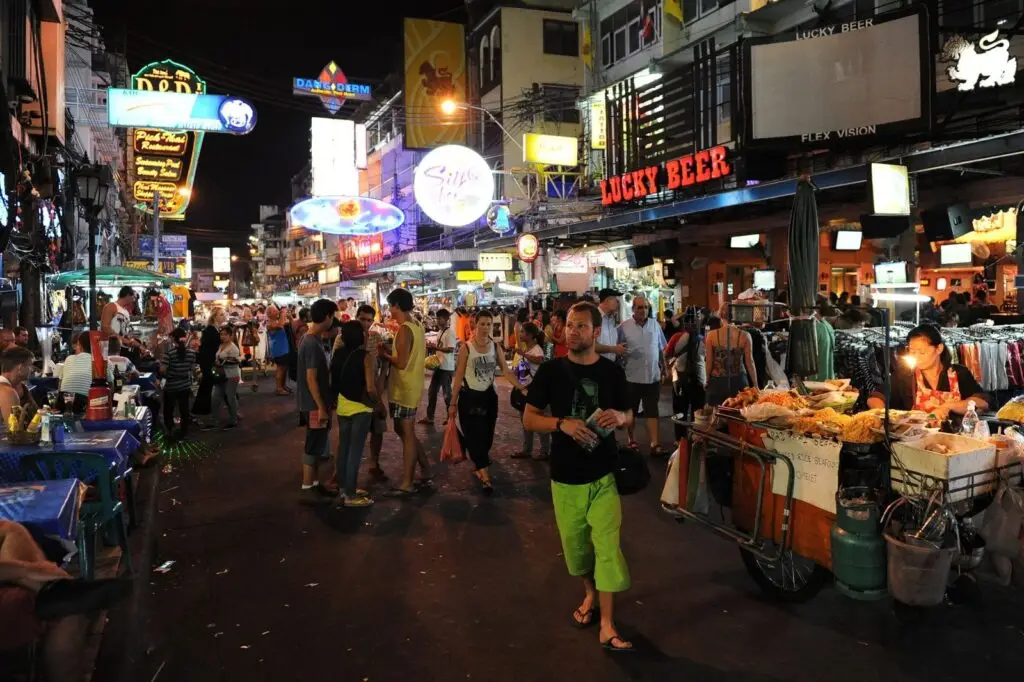
Khao San Road backpackers traveling through Southeast Asia using travel SIM.

If you’re exploring Southeast Asia, chances are you’re hitting the legendary Banana Pancake Trail:

🇹🇭 Thailand
🇻🇳 Vietnam
🇰🇭 Cambodia
🇱🇦 Laos
🇲🇲 Myanmar
🇲🇾 Malaysia
🇮🇩 Indonesia
🇵🇭 Philippines
🇸🇬 Singapore
🇭🇰 Hong Kong
🇯🇵 Japan (sometimes a bonus stop)
🇰🇷 South Korea (another bonus)

It’s the backpacker path of dreams.

But behind the coconut shakes and night markets lies one universal truth:

Every border DESTROYS your SIM.

Thailand SIM? Dead in Vietnam.
Vietnam SIM? Useless in Cambodia.
Cambodia SIM? RIP in Laos.

It’s nonstop SIM swapping.
Nonstop kiosk hunting.
Nonstop pain.

👑 King Tip:
If you’ve ever swapped a SIM during a bumpy tuk-tuk ride… you deserve a medal.

The King’s Decree: One SIM for ALL of Asia 👑🌏

Traveling Asia shouldn’t feel like tech support.

That’s why King Sims created:

👉 The Asia Travel SIMs + eSIMs

Ha Long Bay Vietnam, symbolizing multi-country travel across Asia using one SIM.

🔗 https://kingsims.com/product-category/asia/

These give you:

One SIM for the whole region
Instant activation via app
Real call minutes (rare for travel SIMs!)
Top-tier networks like SoftBank & AIS
Money-Back Guarantee
Zero roaming fees
Zero border chaos

Your phone stays connected across borders like it’s teleporting with you. 🚀

Why Travelers Lose Signal in Asia — And How to Fix It 🌏🤯

Southeast Asia travel scenery representing regional Travel SIM for Asia coverage.

1. Every Border Breaks Your SIM 🚫

Asia uses different carriers, towers, and rules.

A local SIM only works in its home country.
The moment you pass immigration?

Signal: ❌
Maps: ❌
Ride apps: ❌
Sanity: ❌

A King Sims Travel SIM for Asia works across multiple Asian countries without interruption.

Cross a border → Still connected.
Fly to a new country → Still connected.
Take a night bus → Still connected.

That’s REAL power.

2. Airport SIM Kiosks Are an Extreme Sport ⚠️

Land at BKK (Thailand), SGN (Vietnam), or REP (Cambodia) and brace yourself:

  • “Best price! Special today only!”
  • “Passport please! No, the real one!”
  • “Cash only!”
  • “Oh sorry, that plan is finished… but we have MORE EXPENSIVE ONE.”

It’s pure chaos. 🤡

Meanwhile you’re tired, hungry, and carrying 16kg of laundry in a backpack with only one working zipper.

👑 King Tip:
If an airport kiosk yells “SPECIAL PRICE!”, that’s your cue to disappear.

3. Hostel / Café Wi-Fi Will Betray You ☠️📡

Never trust Wi-Fi with passwords like:

  • “coffee123”
  • “guestwifi420”
  • “wifi_please_no_netflix”
  • Handwritten on a napkin

You will:

❌ Lag on calls
❌ Lose connection mid-Grab booking
❌ Miss hotel messages
❌ Break Google Maps
❌ Question your life choices

Don’t do this to yourself.

4. The Roaming Racket Is Alive and Stealing 💸🔥

Your home carrier LOVES that you travel Asia.

Because they get to hit you with:

$10/day roaming for Thailand
$10/day roaming for Vietnam
$10/day roaming for Cambodia

A 3-week Asia trip = $210+
That’s basically a month of accommodation in Vietnam. 😩

In the Kingdom of King Sims…
we do NOT support this villainy.

We fight it.
We roast it.
We banish it. ⚔️👑

Meet the Royal Asia Travel SIM 👑🌏 (Your New Best Travel Buddy)

Angkor Wat sunrise representing cross-border Southeast Asia travel.

Here’s what makes King Sims the undisputed ruler of Asia travel connectivity:

✔ One SIM for the Entire Region 🌏

Works across:

🇹🇭 Thailand
🇻🇳 Vietnam
🇰🇭 Cambodia
🇱🇦 Laos
🇲🇾 Malaysia
🇮🇩 Indonesia
🇵🇭 Philippines
🇸🇬 Singapore
🇭🇰 Hong Kong
🇯🇵 Japan
🇰🇷 South Korea
🇹🇼 Taiwan

No SIM swapping.
No border drama.
No tech tantrums.

✔ Instant Activation via App 📲⚡

Download the King Sims App:

📱 iOS
📱 Android

Scan → Activate → Done.
Your eSIM activates the moment you land.

✔ Money-Back Guarantee 💰🛡️

If your SIM doesn’t perform like royalty,
the King refunds you.
No questions.
No excuses.

✔ Real What?! REAL CALL MINUTES 📞🔥

Hotels in Asia call you.
Tour guides call you.
Drivers call you.
Airlines call you.

Most travel SIMs are data only.
King Sims = real phone number + real call minutes.

This is a game-changer.

✔ Top-Tier Networks Only 📡💎

We only partner with the BEST:

  • SoftBank 🇯🇵
  • AIS 🇹🇭
  • Viettel 🇻🇳
  • Smart 🇰🇭
  • Singtel 🇸🇬
  • SK Telecom 🇰🇷

No cheap networks.
No “sorry, the signal is weak.”
Only top-shelf coverage.

Asia Local SIM vs. King Sims Asia SIM ⚔️👑

Laos night market representing Banana Pancake Trail stops.

❌ Local SIM Cards

  • One per country
  • Airport chaos
  • Cash-only traps
  • No call minutes
  • Sketchy quality
  • No refunds
  • No cross-border coverage
  • APN setup nightmares

👑 King Sims Asia Travel SIM

  • One SIM for all of Asia
  • Instant activation via app
  • Works across borders
  • Real call minutes
  • Money-Back Guarantee
  • Top-tier networks
  • Stress-free travel
  • No Roaming Racket

Royal victory. Every time. 🏆

The King Sims App = Your Travel Superpower 📱✨

Inside the app you can:

  • Activate instantly
  • Track data
  • Top up anytime
  • Manage multiple trips
  • Access royal support
  • Store QR codes securely

It’s the digital travel buddy you never knew you needed.

The Royal Asia Landing Experience (Your Upgrade) 🛬✨

Traveler moving across multiple Southeast Asia countries using Asia Travel SIM.

Let’s compare realities:

❌ Old Backpacker Way:

SIM dies at the border.
Maps break.
Grab won’t load.
Wi-Fi lies to you.
Drivers can’t reach you.
Airport kiosk scams you.
Pure stress.

👑 The King Sims Way:

Plane lands → Signal ON
Driver calls you immediately
Maps load instantly
Grab works
Hotel confirms your arrival
Smooth. Simple. Royal.

Asia becomes EASY.
Asia becomes FUN.
Asia becomes YOUR KINGDOM. 🌏👑

You deserve better than SIM chaos.
Better than airport kiosks.
Better than roaming traps.
Better than random Wi-Fi networks named after someone’s cat.

Choose the Travel SIM for Asia that actually works.

Buy before you fly.
Activate instantly.
Cross borders confidently.
Travel like a King — pay like a pauper. 🌏💸

And when you join the Royal Kingdom?

🎉 Enjoy 15% off your first order when you sign up.

Your Asia adventure starts NOW — and this time, your signal isn’t going anywhere. 📶👑✨

0