



Shipping & Handling

How To Activate Your eSIM

Countries Covered

What countries your SIM works in

About Your SIM

SIM Features

YOUR SECRET 🤫
KING SIMS APP CODE 🎁

king-sims-experience

Copy your secret 20% off King Sims app code down below. Apply it in your cart or checkout

QR Code
Activation Guide

Step-1-iPhone-QR-code-2x

Open your 'Cellular' or 'Mobile Data' settings.

Tap 👆 "Add eSIM"

QR Code
Activation Guide

Step-2-iPhone-QR-Code-Activation-Guide

You'll be directed to a screen with multiple activation options.
For QR code activation, select the option: "Use QR code"

QR Code
Activation Guide

Step-3-iPhone-QR-Code-Activation-Guide

Position your phone's camera on the QR code we emailed you and found in the King Sims App.

💡King Tip: Travelling with a friend? Simply send your QR code to a friend and scan it off their phone!

QR Code
Activation Guide

Step-4-iPhone-QR-Code-Activation-Guide

Wait a moment for the eSIM to detect the local network.

Once successful, you'll get a message saying:
"Your new eSIM is ready to activate"

👆Tap Continue

QR Code
Activation Guide

Step-5-iPhone-QR-Code-Activation-Guide

Data Only eSIMs:
If your eSIM comes only with data
👆Tap "Data Only"

eSIMs with Calls & Texts:
If your eSIM comes with calls & texts like our other eSIM ranges
👆Tap "Voice and Data"

QR Code
Activation Guide

Step-6-iPhone-QR-Code-Activation-Guide

Wait a moment ⏳
Once you see this notice pop-up, it means your activation has successfully completed.

Last Step:
Once you see this notification, we need to name and finalise your eSIM setup.
👆Tap "Done" When your ready.

QR Code
Activation Guide

Step-7-iPhone-QR-Code-Activation-Guide

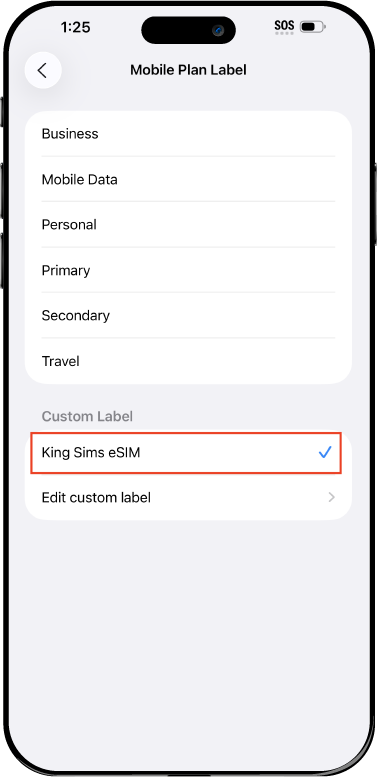
Name Your eSIM ✍️
Once you pass the last step, look for your newly activated eSIM and tap its "Name".

Mobile Plan Label:
Select "Custom Label"
Name it: "King Sims eSIM"

QR Code
Activation Guide

Step-8-iPhone-QR-Code-Activation-Guide

Final Step 👑
Turn on your line ✅

Turn Data Roaming to 'ON'
look for the option titled "Data Roaming"
then Tap 👆the option to turn it 'ON'

For Local eSIM plans with a mobile number, this step is not necessary.

You're Ready To Go 🎉

Step-9-iPhone-QR-Code-Activation-Guide

Welcome to the Kingdom 👑
Once you see the 4G or 5G symbol, test your mobile data.

Once your mobile data starts working without Wi-Fi it means your eSIM has successfully activated

Now you can start travelling with freedom
like a King 🤴 or 👸Queen.

✅ Step 1: Activate Your SIM Card

king-sims-experience.
📅 Add Your Arrival Date:
At checkout, let us know when you're landing in your destination — whether it's 🇺🇸 USA, 🇨🇦 Canada, or 🇲🇽 Mexico. We’ll schedule your SIM for seamless activation.
👑 Have King Sims Ready:
Make sure you have your King Sims packaging ready. It has all you need to get set up.
📲 Swap Your SIM cards:
Once you land, just pop the King Sims card into your phone. Use the "King Pin" in your packaging to swap your SIMs.
🔁 Restart Your Phone:
Give your device a quick restart to kickstart the activation magic.
📩 Get the Welcome Message: Depending on our partnered mobile network and which SIM card you ordered. You’ll get a welcome SMS from the Network with your brand new mobile number — you're officially connected! 🎉
💬 Need Help?
If you see SOS only or no signal, reach out via Live Chat — our support team can sort it in under 5 minutes. 👑
💡 King Tip:
If your King SIM works across multiple countries, don’t forget to turn Data Roaming ON to stay connected in every destination it covers. 🌍📶

Does My Device Have eSIM?

👑 King Tip: If your device isn't listed here simply search google with your phone model to find out if it is 💡

  • iPhone XS
  • iPhone XS Max
  • iPhone 11
  • iPhone 11 Pro
  • iPhone 11 Pro Max
  • iPhone SE (2020)
  • iPhone 12 Mini
  • iPhone 12
  • iPhone 12 Pro
  • iPhone 12 Pro Max
  • iPhone 13 mini
  • iPhone 13
  • iPhone 13 Pro
  • iPhone 13 Pro Max
  • iPhone SE (2022)
  • iPhone 14
  • iPhone 14 Plus
  • iPhone 14 Pro
  • iPhone 14 Pro Max
  • iPhone 15
  • iPhone 15 Plus
  • iPhone 15 Pro
  • iPhone 15 Pro Max
  • iPhone 16 (All Models)
  • iPad Pro (2018 and onwards)
  • iPad Air
  • iPad
  • Watch series 3
  • Watch series 4
  • Watch series 5
  • Watch series 6
  • Watch SE
  • Galaxy Z Flip
  • Galaxy Z Flip 5G
  • Galaxy Z Flip3 5G
  • Galaxy Z Flip4
  • Galaxy Z Flip5
  • Galaxy Fold
  • Galaxy Z Fold2 5G
  • Galaxy Z Fold3 5G
  • Galaxy Z Fold4
  • Galaxy Z Fold5 5G
  • Galaxy S20
  • Galaxy S21
  • Galaxy S21+ 5G
  • Galaxy S21 Ultra 5G
  • Galaxy S22
  • Galaxy S22+
  • Galaxy S22 Ultra
  • Galaxy Note 20 Ultra 5G
  • Galaxy Note 20
  • Galaxy S23
  • Galaxy S23+
  • Galaxy S23 Ultra
  • Galaxy S24
  • Galaxy S24+
  • Galaxy S24 Ultra
  • Galaxy S20 Ultra 5G
  • Gemini PDA
  • Pixel 3
  • Pixel 3a
  • Pixel 4
  • Pixel 4a
  • Pixel 5
  • Pixel 6
  • Pixel 6a
  • Pixel 6 Pro
  • Pixel 7
  • Pixel 7 Pro
  • Pixel 8
  • Pixel 8 Pro
  • P40
  • P40 Pro (not including the P40 Pro +)
  • Mate 40 Pro
  • Razr 2019
  • Razr 5G
  • Motorola Razr 40
  • Motorola Razr 40 Ultra
  • Razr+
  • Edge+
  • Edge 40
  • Edge 40 Pro
  • Edge 40 Neo
  • G52J 5G
  • G52J 5G Ⅱ
  • G53J 5G
  • Find X3 Pro
  • Reno 5 A
  • Find X5
  • Find X5 Pro
  • Reno6 Pro 5G
  • A55s 5G
  • Rakuten Mini
  • Big-S
  • Big
  • Hand
  • Hand 5G
  • Xperia 10 III Lite
  • Xperia 10 IV
  • Xperia 10V
  • Xperia Xperia 1 IV
  • Xperia 5 IV
  • Xperia 1 V
  • Xperia Ace III
  • Xperia 5 V
  • Honor
  • Magic 4 Pro
  • AQUOS Sense6s
  • AQUOS wish
  • AQUOS sense4 lite
  • AQUOS sense 7
  • AQUOS sense 7plus
  • AQUOS wish 2 SHG08
  • AQUOS wish3
  • AQUOS zero 6
  • Simple Sumaho6
  • AQUOS R7
  • AQUOS R8
  • AQUOS R8 Pro
  • V30
  • 12T Pro
  • 13
  • 13 Lite
  • 13 Pro
  • 13T Pro 
  • Honor Magic 4 Pro
  • Honor Magic 5 Pro
  • Honor 90
  • Honor X8
  • Oneplus Open
  • Oneplus 11
  • Oneplus 12 
  • Nokia XR21
  • Nokia X30
  • Nokia G60 5G
  • HAMMER Blade 3
  • HAMMER Explorer PRO
  • HAMMER Blade 5G
  • Vivo X90 Pro
  • Vivo V29 Lite 5G (Europe Only)

What’s the Best SIM for Frequent Flyers?

Let me guess.

You landed in London last week. Berlin yesterday. Dubai tomorrow. Your phone bill? Already plotting revenge.

You’re juggling SIM cards like airport souvenirs. Your WhatsApp number changes every week. And your home carrier just sent that sweet little message:

“International roaming is $10 per day.”

Ah yes. The Roaming Racket strikes again. ⚔️📵

By Royal Decree, it’s time to upgrade your travel game. If you’re a remote worker, digital nomad, consultant, entrepreneur, or full-time frequent flyer — you need the best travel SIM for multiple countries, not a suitcase full of plastic cards.

Allow the King to explain. 👑

The Problem with Traditional SIM Hopping

Frequent flyers face three common disasters:

  • ❌ Buying a new SIM in every country
  • ❌ Airport kiosks charging “convenience” taxes
  • ❌ Switching numbers constantly

For remote workers and long-term travelers, this isn’t just annoying — it’s disruptive.

You miss calls.
You lose 2FA access.
You can’t tether your laptop.
You waste precious airport time.

Public Wi-Fi? Brave… but foolish.

The Kingdom demands stability.

What Makes the Best Travel SIM for Multiple Countries?

If you cross borders regularly, your SIM must:

  • 🌍 Work in multiple countries without swapping
  • ⚡ Activate instantly
  • 📶 Connect to top-tier networks
  • 📞 Offer real number options (not just data)
  • 🔥 Allow hotspot/tethering
  • 💰 Protect you from roaming fees

Anything less is peasant-tier connectivity.

The Royal Solution: King Sims Worldwide eSIM 👑🌎

Let’s introduce the crown jewel:

👉 https://kingsims.com/product/worldwide-esim/

One QR code.
100+ countries.
Zero airport chaos.

This isn’t just an eSIM. It’s travel freedom.

Why It’s the Best Travel SIM for Multiple Countries

👑 One eSIM. 100+ Countries.

You install once.

Then move freely across:

  • Europe
  • North America
  • Asia
  • Middle East
  • Australia
  • And beyond

No reinstalling.
No country switching.
No airport kiosk drama.

You land. You’re connected. That’s it.

📲 Instant Delivery & Activation

Remote workers don’t have time for shipping delays.

With King Sims:

  • Purchase online
  • Download the King Sims App (iOS & Android)
  • Scan your QR code
  • Activate instantly

You can even install before departure and switch it on when you land.

This is what “Buy Before You Fly” looks like in action.

📡 Top-Tier Networks Only

We don’t connect you to discount mystery carriers.

King Sims partners with premium networks like:

  • Orange
  • SoftBank
  • T-Mobile

Meaning:

  • Strong signal
  • Reliable speeds
  • Priority access in major cities

From New York to Paris to Tokyo — your connection stays royal.

Data-Only vs Full SIM Plans: What’s Better? 🤔

Here’s where many travelers get confused.

Let’s break it down.

🟢 Data-Only eSIM (Good for Some)

Perfect if:

  • You only use WhatsApp, Zoom, Slack
  • You don’t need a local phone number
  • You rely on internet-based calls

Pros:

  • Usually cheaper
  • Simple setup
  • Great for short stays

Cons:

  • No real phone number
  • No traditional calls or SMS

👑 Full SIM with Calls & Text (The Royal Upgrade)

Here’s where King Sims stands out.

Unlike many competitors, many of our SIM plans include real phone numbers with calls & texts — not just data.

Why that matters for frequent flyers:

  • Client calls without app dependency
  • Bank verifications
  • Restaurant reservations
  • Ride-share confirmations
  • Local contacts

For remote professionals and business travelers?
This is power.

Built for Remote Workers & Long-Term Travelers 💻🌍

If you’re working from cafés in Lisbon one month and co-working spaces in Bangkok the next, your SIM must:

  • Support hotspot for laptop tethering
  • Handle video calls smoothly
  • Stay active across borders
  • Avoid SIM reinstallation every week

The King Sims Worldwide eSIM delivers.

Hotspot? Yes.
Multi-country coverage? Yes.
Stress-free switching? Absolutely.

The Cost of Doing Nothing 💸

Let’s do quick math.

$10/day roaming × 30 days = $300.

Multiply that across multiple trips per year?
You’re funding your carrier’s vacation home.

Meanwhile, juggling local SIMs costs:

  • Time
  • Energy
  • Lost productivity

Frequent flyers don’t need extra friction.
They need consistency.

Airport SIM Kiosks: A Frequent Flyer’s Trap 🎭

You know the scene.

You land exhausted. The SIM booth glows like salvation. The price? Inflated.

Airport sellers rely on:

  • Urgency
  • Confusion
  • Limited competition

The King’s Decree is simple:

Buy before you fly.

Install your worldwide eSIM before departure. Walk past kiosks like royalty ignoring peasants.

Prepared travelers don’t get hustled.

Money-Back Guarantee = Zero Royal Risk 👑

What if something goes wrong?

You’re protected by King Sims’ Money-Back Guarantee.

We’re verified by IB Times for a reason.
This Kingdom doesn’t vanish when you need support.

So… What’s the Best Travel SIM for Multiple Countries?

If you’re a frequent flyer, remote worker, or long-term explorer, the answer is clear:

  • One eSIM
  • 100+ countries
  • Instant activation
  • Real number options
  • Top-tier networks
  • Hotspot capability
  • No roaming fees

That’s not convenience.
That’s freedom.

The King’s Final Verdict 👑⚖️

The best travel SIM for multiple countries isn’t the cheapest random plan at an airport counter.

It’s the one that:

  • Works everywhere
  • Activates instantly
  • Protects your wallet
  • Supports your business
  • Keeps your number stable

The King Sims Worldwide eSIM checks every box.

Join the Royal Class 👑✨

Ready to travel smarter?

👉 Secure your worldwide eSIM now:
https://kingsims.com/product/worldwide-esim/

Sign up today and enjoy 15% off your first order — because loyalty deserves rewards.

Travel like a King.
Pay like a pauper.
And let roaming fees remain exiled from the Kingdom. ⚔️📵✈️

0