



Shipping & Handling

How To Activate Your eSIM

Countries Covered

What countries your SIM works in

About Your SIM

SIM Features

YOUR SECRET 🤫
KING SIMS APP CODE 🎁

king-sims-experience

Copy your secret 20% off King Sims app code down below. Apply it in your cart or checkout

QR Code
Activation Guide

Step-1-iPhone-QR-code-2x

Open your 'Cellular' or 'Mobile Data' settings.

Tap 👆 "Add eSIM"

QR Code
Activation Guide

Step-2-iPhone-QR-Code-Activation-Guide

You'll be directed to a screen with multiple activation options.
For QR code activation, select the option: "Use QR code"

QR Code
Activation Guide

Step-3-iPhone-QR-Code-Activation-Guide

Position your phone's camera on the QR code we emailed you and found in the King Sims App.

💡King Tip: Travelling with a friend? Simply send your QR code to a friend and scan it off their phone!

QR Code
Activation Guide

Step-4-iPhone-QR-Code-Activation-Guide

Wait a moment for the eSIM to detect the local network.

Once successful, you'll get a message saying:
"Your new eSIM is ready to activate"

👆Tap Continue

QR Code
Activation Guide

Step-5-iPhone-QR-Code-Activation-Guide

Data Only eSIMs:
If your eSIM comes only with data
👆Tap "Data Only"

eSIMs with Calls & Texts:
If your eSIM comes with calls & texts like our other eSIM ranges
👆Tap "Voice and Data"

QR Code
Activation Guide

Step-6-iPhone-QR-Code-Activation-Guide

Wait a moment ⏳
Once you see this notice pop-up, it means your activation has successfully completed.

Last Step:
Once you see this notification, we need to name and finalise your eSIM setup.
👆Tap "Done" When your ready.

QR Code
Activation Guide

Step-7-iPhone-QR-Code-Activation-Guide

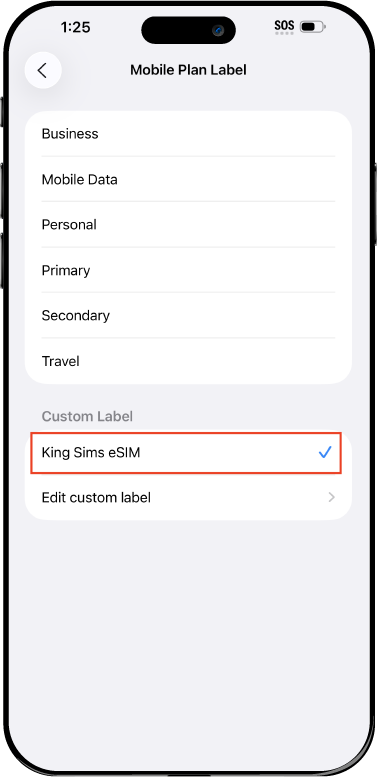
Name Your eSIM ✍️
Once you pass the last step, look for your newly activated eSIM and tap its "Name".

Mobile Plan Label:
Select "Custom Label"
Name it: "King Sims eSIM"

QR Code
Activation Guide

Step-8-iPhone-QR-Code-Activation-Guide

Final Step 👑
Turn on your line ✅

Turn Data Roaming to 'ON'
look for the option titled "Data Roaming"
then Tap 👆the option to turn it 'ON'

For Local eSIM plans with a mobile number, this step is not necessary.

You're Ready To Go 🎉

Step-9-iPhone-QR-Code-Activation-Guide

Welcome to the Kingdom 👑
Once you see the 4G or 5G symbol, test your mobile data.

Once your mobile data starts working without Wi-Fi it means your eSIM has successfully activated

Now you can start travelling with freedom
like a King 🤴 or 👸Queen.

✅ Step 1: Activate Your SIM Card

king-sims-experience.
📅 Add Your Arrival Date:
At checkout, let us know when you're landing in your destination — whether it's 🇺🇸 USA, 🇨🇦 Canada, or 🇲🇽 Mexico. We’ll schedule your SIM for seamless activation.
👑 Have King Sims Ready:
Make sure you have your King Sims packaging ready. It has all you need to get set up.
📲 Swap Your SIM cards:
Once you land, just pop the King Sims card into your phone. Use the "King Pin" in your packaging to swap your SIMs.
🔁 Restart Your Phone:
Give your device a quick restart to kickstart the activation magic.
📩 Get the Welcome Message: Depending on our partnered mobile network and which SIM card you ordered. You’ll get a welcome SMS from the Network with your brand new mobile number — you're officially connected! 🎉
💬 Need Help?
If you see SOS only or no signal, reach out via Live Chat — our support team can sort it in under 5 minutes. 👑
💡 King Tip:
If your King SIM works across multiple countries, don’t forget to turn Data Roaming ON to stay connected in every destination it covers. 🌍📶

Does My Device Have eSIM?

👑 King Tip: If your device isn't listed here simply search google with your phone model to find out if it is 💡

  • iPhone XS
  • iPhone XS Max
  • iPhone 11
  • iPhone 11 Pro
  • iPhone 11 Pro Max
  • iPhone SE (2020)
  • iPhone 12 Mini
  • iPhone 12
  • iPhone 12 Pro
  • iPhone 12 Pro Max
  • iPhone 13 mini
  • iPhone 13
  • iPhone 13 Pro
  • iPhone 13 Pro Max
  • iPhone SE (2022)
  • iPhone 14
  • iPhone 14 Plus
  • iPhone 14 Pro
  • iPhone 14 Pro Max
  • iPhone 15
  • iPhone 15 Plus
  • iPhone 15 Pro
  • iPhone 15 Pro Max
  • iPhone 16 (All Models)
  • iPad Pro (2018 and onwards)
  • iPad Air
  • iPad
  • Watch series 3
  • Watch series 4
  • Watch series 5
  • Watch series 6
  • Watch SE
  • Galaxy Z Flip
  • Galaxy Z Flip 5G
  • Galaxy Z Flip3 5G
  • Galaxy Z Flip4
  • Galaxy Z Flip5
  • Galaxy Fold
  • Galaxy Z Fold2 5G
  • Galaxy Z Fold3 5G
  • Galaxy Z Fold4
  • Galaxy Z Fold5 5G
  • Galaxy S20
  • Galaxy S21
  • Galaxy S21+ 5G
  • Galaxy S21 Ultra 5G
  • Galaxy S22
  • Galaxy S22+
  • Galaxy S22 Ultra
  • Galaxy Note 20 Ultra 5G
  • Galaxy Note 20
  • Galaxy S23
  • Galaxy S23+
  • Galaxy S23 Ultra
  • Galaxy S24
  • Galaxy S24+
  • Galaxy S24 Ultra
  • Galaxy S20 Ultra 5G
  • Gemini PDA
  • Pixel 3
  • Pixel 3a
  • Pixel 4
  • Pixel 4a
  • Pixel 5
  • Pixel 6
  • Pixel 6a
  • Pixel 6 Pro
  • Pixel 7
  • Pixel 7 Pro
  • Pixel 8
  • Pixel 8 Pro
  • P40
  • P40 Pro (not including the P40 Pro +)
  • Mate 40 Pro
  • Razr 2019
  • Razr 5G
  • Motorola Razr 40
  • Motorola Razr 40 Ultra
  • Razr+
  • Edge+
  • Edge 40
  • Edge 40 Pro
  • Edge 40 Neo
  • G52J 5G
  • G52J 5G Ⅱ
  • G53J 5G
  • Find X3 Pro
  • Reno 5 A
  • Find X5
  • Find X5 Pro
  • Reno6 Pro 5G
  • A55s 5G
  • Rakuten Mini
  • Big-S
  • Big
  • Hand
  • Hand 5G
  • Xperia 10 III Lite
  • Xperia 10 IV
  • Xperia 10V
  • Xperia Xperia 1 IV
  • Xperia 5 IV
  • Xperia 1 V
  • Xperia Ace III
  • Xperia 5 V
  • Honor
  • Magic 4 Pro
  • AQUOS Sense6s
  • AQUOS wish
  • AQUOS sense4 lite
  • AQUOS sense 7
  • AQUOS sense 7plus
  • AQUOS wish 2 SHG08
  • AQUOS wish3
  • AQUOS zero 6
  • Simple Sumaho6
  • AQUOS R7
  • AQUOS R8
  • AQUOS R8 Pro
  • V30
  • 12T Pro
  • 13
  • 13 Lite
  • 13 Pro
  • 13T Pro 
  • Honor Magic 4 Pro
  • Honor Magic 5 Pro
  • Honor 90
  • Honor X8
  • Oneplus Open
  • Oneplus 11
  • Oneplus 12 
  • Nokia XR21
  • Nokia X30
  • Nokia G60 5G
  • HAMMER Blade 3
  • HAMMER Explorer PRO
  • HAMMER Blade 5G
  • Vivo X90 Pro
  • Vivo V29 Lite 5G (Europe Only)

Best USA eSIM Plans for Last-Minute Trips From Australia & NZ

best usa esim plans for last minute travel helping tourists stay connected immediately after landing

You just booked a flight.

Sydney → Los Angeles.
Auckland → New York.

Departure? In 5 days. Maybe 3. Maybe tomorrow.

You’re packing fast, planning faster… and completely forgot one thing:

How are you going to stay connected?

Your options?

  • Wait for a physical SIM to arrive (good luck)
  • Buy one at the airport (overpriced chaos)
  • Use roaming (hello, $10/day bill shock)

Ah yes… the Roaming Racket is waiting.

But not in this Kingdom.

By Royal Decree, the smart move for spontaneous travelers is simple:

👉 Get one of the best USA eSIM plans — instantly.

Let’s break it down.

👑 Why Last-Minute Travelers Need an eSIM

If your trip is coming up fast, time is not your friend.

Physical SIM Problem:

  • Shipping delays
  • Risk of not arriving in time
  • Activation hassle

Airport SIM Problem:

  • Long queues
  • Higher prices
  • Limited choices

Roaming Problem:

  • Expensive
  • Limited data
  • Unpredictable charges

Now compare that to eSIM:

  • Instant delivery
  • No shipping
  • Activated before you fly
  • Works the moment you land

For last-minute trips?

eSIM isn’t optional. It’s essential.

⚡ The Royal Solution: King Sims USA Unlimited eSIM

Traveler booking a last minute international flight online using smartphone and laptop

👉 https://kingsims.com/product/usa-unlimited-data-esim/

This is where the Kingdom flexes.

The best USA eSIM plans are built for speed, flexibility, and zero stress.

📲 Instant QR Delivery (No Waiting)

You buy it.

You get it.

Immediately.

  • No shipping
  • No delays
  • No excuses

Scan the QR code or install via the King Sims App (iOS & Android).

Boom. Installed.

👑 Instant Activation via the App

Before you even leave Australia or NZ:

  • Open the app
  • Activate your plan
  • Set it ready

When your plane lands in the US?

You’re already connected.

No airport SIM drama. No hunting for signal.

📊 Best USA eSIM Plans (What You Actually Get)

Let’s talk options.

📅 Flexible Trip Durations

King Sims plans are built for real travel timelines:

  • 7 days → Quick city trips
  • 10–15 days → Standard holidays
  • 30 days → Long stays / work trips

Pick what matches your trip. No overpaying.

🔥 Unlimited Data (Use It Like Home)

No counting megabytes.

No stress.

Use your phone like you normally would:

  • Google Maps
  • Uber / Lyft
  • Streaming
  • Social media
  • Work calls

Unlimited means freedom.

📡 T-Mobile Network Power

We connect you to T-Mobile, one of the strongest US networks.

You get:

  • 4G/5G coverage
  • Strong signal in major cities
  • Reliable speeds

From:

  • Los Angeles 🌴
  • New York 🗽
  • Miami 🌊
  • Las Vegas 🎰

You’re covered.

🔥 Hotspot Capability (Big Win)

Traveling with friends?

Working remotely?

You can:

  • Share your data
  • Connect your laptop
  • Keep multiple devices online

One eSIM. Multiple connections.

You become the group’s Wi-Fi hero 👑

🌎 Bonus: Canada & Mexico Coverage (On Select Plans)

Traveler arriving in the USA with no mobile signal and searching for internet connection

Planning to cross borders?

Some plans include:

  • Canada 🇨🇦
  • Mexico 🇲🇽

No extra SIM. No extra setup.

One plan. Multiple countries.

📞 Real Phone Numbers = Real Advantage

Most eSIM providers?

Data only.

King Sims?

Built different.

Many plans include:

  • Real phone numbers
  • Calls
  • SMS

Why that matters:

  • Booking restaurants
  • Ride-share verification
  • Receiving security codes
  • Staying reachable

You’re not just online.

You’re functional.

💸 The Cost of Doing It Wrong

Let’s talk numbers.

Roaming Fees

$10/day × 14 days = $140
For limited, slower data.

Airport SIM

  • Overpriced
  • Time wasted
  • Limited support

King Sims eSIM

  • Unlimited data
  • Instant activation
  • Transparent pricing

Travel like a King.
Pay like a pauper.

✈️ The King’s Decree: Buy Before You Fly
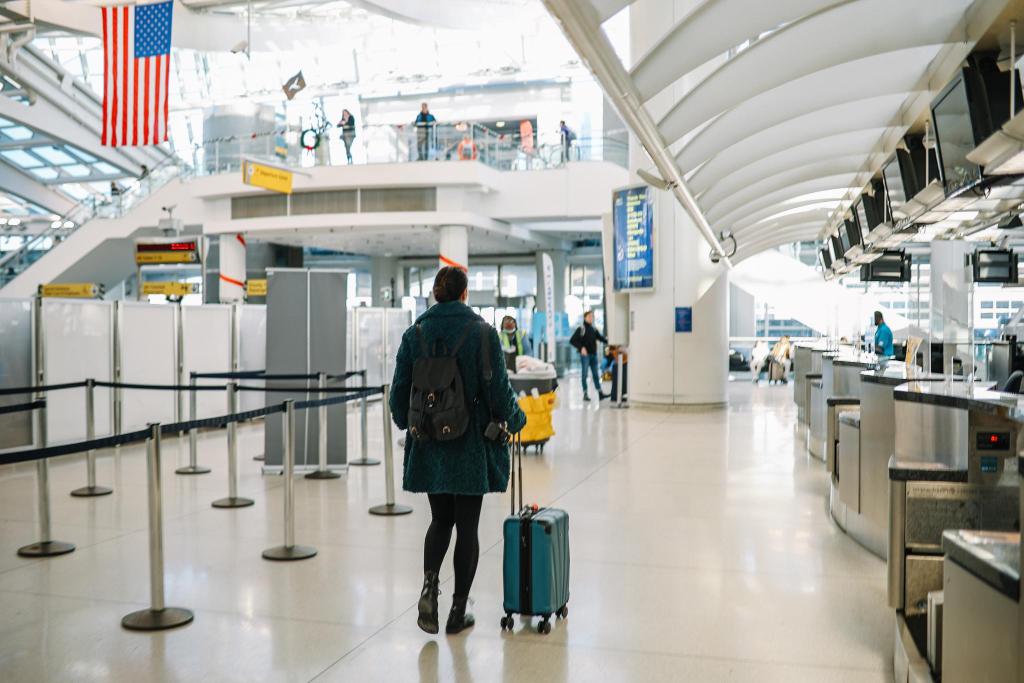
Traveler booking a ride using mobile app in the USA with fast internet connection

Especially for last-minute trips.

This is not optional.

This is law.

Why?

Because when you land in the US:

  • You need maps immediately
  • You need ride apps
  • You need communication

The last thing you want?

Wandering an airport looking for a SIM kiosk after a 14-hour flight.

🧠 Who These Plans Are Perfect For

If this sounds like you… welcome to the Kingdom.

  • ✈️ Last-minute travelers
  • 💼 Business trips booked on short notice
  • 🎒 Backpackers moving fast
  • 💻 Remote workers
  • 👫 Couples and group travelers

If your trip is spontaneous… your connectivity should be instant.

⚔️ Common Last-Minute Mistakes

(Avoid These)

❌ Waiting for a Physical SIM

It may not arrive in time.

❌ Assuming Airport Wi-Fi Will Save You

It won’t.

❌ Turning on Roaming “Just for a Day”

That’s how $100 bills happen.

❌ Not Activating Before Departure

Set it up early.

Land ready.

👑 The Royal Verdict

If you’re traveling to the US last minute, the answer is simple:

The best USA eSIM plans are the ones that:

  • Activate instantly
  • Offer unlimited data
  • Support hotspot
  • Work across borders
  • Keep you reachable

King Sims delivers all of it.

No waiting. No stress. No roaming traps.

🏰 Join the Royal Class

Business traveler using laptop connected to USA eSIM hotspot while traveling

Ready to lock in your connection before takeoff?

👉 https://kingsims.com/product/usa-unlimited-data-esim/

Here’s your move:

1️⃣ Choose your plan
2️⃣ Install via the app
3️⃣ Activate before flying
4️⃣ Land connected

And when you sign up?

Enjoy 15% off your first order 👑

No roaming racket.
No airport chaos.
No last-minute panic.

Just smooth, instant connectivity across the USA.

Travel like a King.
Even when you booked it yesterday ✈️👑📶

0