


Shipping & Handling

How To Activate Your eSIM

Countries Covered

What countries your SIM works in

About Your SIM

SIM Features

YOUR SECRET 🤫
KING SIMS APP CODE 🎁

king-sims-experience

Copy your secret 20% off King Sims app code down below. Apply it in your cart or checkout

QR Code
Activation Guide

Step-1-iPhone-QR-code-2x

Open your 'Cellular' or 'Mobile Data' settings.

Tap 👆 "Add eSIM"

QR Code
Activation Guide

Step-2-iPhone-QR-Code-Activation-Guide

You'll be directed to a screen with multiple activation options.
For QR code activation, select the option: "Use QR code"

QR Code
Activation Guide

Step-3-iPhone-QR-Code-Activation-Guide

Position your phone's camera on the QR code we emailed you and found in the King Sims App.

💡King Tip: Travelling with a friend? Simply send your QR code to a friend and scan it off their phone!

QR Code
Activation Guide

Step-4-iPhone-QR-Code-Activation-Guide

Wait a moment for the eSIM to detect the local network.

Once successful, you'll get a message saying:
"Your new eSIM is ready to activate"

👆Tap Continue

QR Code
Activation Guide

Step-5-iPhone-QR-Code-Activation-Guide

Data Only eSIMs:
If your eSIM comes only with data
👆Tap "Data Only"

eSIMs with Calls & Texts:
If your eSIM comes with calls & texts like our other eSIM ranges
👆Tap "Voice and Data"

QR Code
Activation Guide

Step-6-iPhone-QR-Code-Activation-Guide

Wait a moment ⏳
Once you see this notice pop-up, it means your activation has successfully completed.

Last Step:
Once you see this notification, we need to name and finalise your eSIM setup.
👆Tap "Done" When your ready.

QR Code
Activation Guide

Step-7-iPhone-QR-Code-Activation-Guide

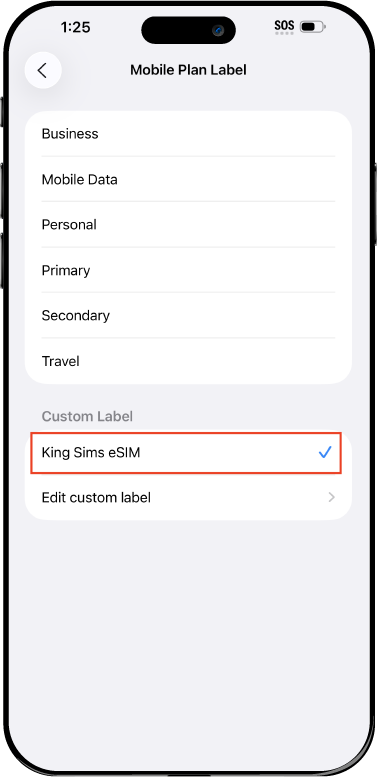
Name Your eSIM ✍️
Once you pass the last step, look for your newly activated eSIM and tap its "Name".

Mobile Plan Label:
Select "Custom Label"
Name it: "King Sims eSIM"

QR Code
Activation Guide

Step-8-iPhone-QR-Code-Activation-Guide

Final Step 👑
Turn on your line ✅

Turn Data Roaming to 'ON'
look for the option titled "Data Roaming"
then Tap 👆the option to turn it 'ON'

For Local eSIM plans with a mobile number, this step is not necessary.

You're Ready To Go 🎉

Step-9-iPhone-QR-Code-Activation-Guide

Welcome to the Kingdom 👑
Once you see the 4G or 5G symbol, test your mobile data.

Once your mobile data starts working without Wi-Fi it means your eSIM has successfully activated

Now you can start travelling with freedom
like a King 🤴 or 👸Queen.

✅ Step 1: Activate Your SIM Card

king-sims-experience.
📅 Add Your Arrival Date:
At checkout, let us know when you're landing in your destination — whether it's 🇺🇸 USA, 🇨🇦 Canada, or 🇲🇽 Mexico. We’ll schedule your SIM for seamless activation.
👑 Have King Sims Ready:
Make sure you have your King Sims packaging ready. It has all you need to get set up.
📲 Swap Your SIM cards:
Once you land, just pop the King Sims card into your phone. Use the "King Pin" in your packaging to swap your SIMs.
🔁 Restart Your Phone:
Give your device a quick restart to kickstart the activation magic.
📩 Get the Welcome Message: Depending on our partnered mobile network and which SIM card you ordered. You’ll get a welcome SMS from the Network with your brand new mobile number — you're officially connected! 🎉
💬 Need Help?
If you see SOS only or no signal, reach out via Live Chat — our support team can sort it in under 5 minutes. 👑
💡 King Tip:
If your King SIM works across multiple countries, don’t forget to turn Data Roaming ON to stay connected in every destination it covers. 🌍📶

Does My Device Have eSIM?

👑 King Tip: If your device isn't listed here simply search google with your phone model to find out if it is 💡

  • iPhone XS
  • iPhone XS Max
  • iPhone 11
  • iPhone 11 Pro
  • iPhone 11 Pro Max
  • iPhone SE (2020)
  • iPhone 12 Mini
  • iPhone 12
  • iPhone 12 Pro
  • iPhone 12 Pro Max
  • iPhone 13 mini
  • iPhone 13
  • iPhone 13 Pro
  • iPhone 13 Pro Max
  • iPhone SE (2022)
  • iPhone 14
  • iPhone 14 Plus
  • iPhone 14 Pro
  • iPhone 14 Pro Max
  • iPhone 15
  • iPhone 15 Plus
  • iPhone 15 Pro
  • iPhone 15 Pro Max
  • iPhone 16 (All Models)
  • iPad Pro (2018 and onwards)
  • iPad Air
  • iPad
  • Watch series 3
  • Watch series 4
  • Watch series 5
  • Watch series 6
  • Watch SE
  • Galaxy Z Flip
  • Galaxy Z Flip 5G
  • Galaxy Z Flip3 5G
  • Galaxy Z Flip4
  • Galaxy Z Flip5
  • Galaxy Fold
  • Galaxy Z Fold2 5G
  • Galaxy Z Fold3 5G
  • Galaxy Z Fold4
  • Galaxy Z Fold5 5G
  • Galaxy S20
  • Galaxy S21
  • Galaxy S21+ 5G
  • Galaxy S21 Ultra 5G
  • Galaxy S22
  • Galaxy S22+
  • Galaxy S22 Ultra
  • Galaxy Note 20 Ultra 5G
  • Galaxy Note 20
  • Galaxy S23
  • Galaxy S23+
  • Galaxy S23 Ultra
  • Galaxy S24
  • Galaxy S24+
  • Galaxy S24 Ultra
  • Galaxy S20 Ultra 5G
  • Gemini PDA
  • Pixel 3
  • Pixel 3a
  • Pixel 4
  • Pixel 4a
  • Pixel 5
  • Pixel 6
  • Pixel 6a
  • Pixel 6 Pro
  • Pixel 7
  • Pixel 7 Pro
  • Pixel 8
  • Pixel 8 Pro
  • P40
  • P40 Pro (not including the P40 Pro +)
  • Mate 40 Pro
  • Razr 2019
  • Razr 5G
  • Motorola Razr 40
  • Motorola Razr 40 Ultra
  • Razr+
  • Edge+
  • Edge 40
  • Edge 40 Pro
  • Edge 40 Neo
  • G52J 5G
  • G52J 5G Ⅱ
  • G53J 5G
  • Find X3 Pro
  • Reno 5 A
  • Find X5
  • Find X5 Pro
  • Reno6 Pro 5G
  • A55s 5G
  • Rakuten Mini
  • Big-S
  • Big
  • Hand
  • Hand 5G
  • Xperia 10 III Lite
  • Xperia 10 IV
  • Xperia 10V
  • Xperia Xperia 1 IV
  • Xperia 5 IV
  • Xperia 1 V
  • Xperia Ace III
  • Xperia 5 V
  • Honor
  • Magic 4 Pro
  • AQUOS Sense6s
  • AQUOS wish
  • AQUOS sense4 lite
  • AQUOS sense 7
  • AQUOS sense 7plus
  • AQUOS wish 2 SHG08
  • AQUOS wish3
  • AQUOS zero 6
  • Simple Sumaho6
  • AQUOS R7
  • AQUOS R8
  • AQUOS R8 Pro
  • V30
  • 12T Pro
  • 13
  • 13 Lite
  • 13 Pro
  • 13T Pro 
  • Honor Magic 4 Pro
  • Honor Magic 5 Pro
  • Honor 90
  • Honor X8
  • Oneplus Open
  • Oneplus 11
  • Oneplus 12 
  • Nokia XR21
  • Nokia X30
  • Nokia G60 5G
  • HAMMER Blade 3
  • HAMMER Explorer PRO
  • HAMMER Blade 5G
  • Vivo X90 Pro
  • Vivo V29 Lite 5G (Europe Only)

Japan by Rail: Build a Flexible Itinerary With One Unlimited eSIM

japan rail travel esim helping travelers stay connected while using high speed trains across Japan

Japan’s train system is legendary.

Fast. Clean. Precise.

With a JR-style itinerary, you can travel:

  • Tokyo → Kyoto
  • Kyoto → Osaka
  • Osaka → Hiroshima

All with minimal effort.

But here’s the catch…

Japan rail travel runs on real-time decisions.

You’ll constantly:

  • Check train times
  • Switch platforms
  • Adjust routes
  • Book last-minute stays

Without data?

You’re stuck.

🚄 Your Route: Tokyo → Kyoto → Osaka → Hiroshima

Shinkansen bullet train used for fast rail travel between Japanese cities

Let’s break down the classic route.

🗼 Tokyo – The Launch Point

Your journey begins in Tokyo.

You’ll use your phone for:

  • Navigating giant stations (Shinjuku says hello 👀)
  • Checking train platforms
  • Booking Shinkansen tickets
  • Finding hidden food spots

Tokyo moves fast.

Your connection needs to match.

🏯 Kyoto – Culture & Calm

Next stop: Kyoto.

Here, things slow down — but navigation doesn’t get easier.

You’ll rely on:

  • Maps for temples and shrines
  • Translation apps for menus
  • Bus/train combos for transport

Without data?

You’ll spend more time lost than exploring.

🍜 Osaka – Energy & Food

Welcome to Osaka.

This city is all about:

  • Street food
  • Nightlife
  • Exploring districts like Dotonbori

Your phone becomes your guide:

  • Finding food
  • Navigating nightlife
  • Booking experiences

Unlimited data = unlimited fun.

🌊 Hiroshima – The Final Stretch

End your journey in Hiroshima.

More relaxed. Still connected.

You’ll need:

  • Ferry schedules
  • Local transport routes
  • Booking tools

Even here, data keeps your trip smooth.

📱 Why You Need Constant Data on a Rail Trip

hiroshima-travel-city-japan.jpg

Let’s be honest.

This isn’t a “check once and go” type of trip.

You’ll constantly use:

🗺️ Google Maps (Your Lifeline)

  • Platform numbers
  • Train changes
  • Walking routes

Without it? Chaos.

🚆 Train Apps & Timetables

Japan trains are precise — but complex.

You’ll check:

  • Departure times
  • Platform updates
  • Route changes

Real-time data is everything.

🌐 Translation Apps

Menus. Signs. Directions.

Instant translation saves time and awkward guessing.

🏨 Last-Minute Bookings

Flexibility is the goal.

You might:

  • Stay longer in Kyoto
  • Leave Osaka early
  • Book hotels on the go

No data = no flexibility.

⚔️ The Problem: Wi-Fi & SIM Chaos

kingsims-japan-esim-app-setup.jpg

Let’s expose the traps.

❌ Public Wi-Fi

  • Not always available
  • Slow in stations
  • Unreliable

❌ Airport SIM Kiosks

  • Long lines
  • Confusing plans
  • Overpriced

❌ Pocket WiFi

  • Extra device
  • Needs charging
  • Easy to lose
  • Must return

This is not the way of the Kingdom.

👑 The King’s Decree: Buy Before You Fly

Say it with me:

Buy. Before. You. Fly.

Set up your connection before you even step on the plane.

That’s how you win.

📲 The Royal Backbone: King Sims Japan Unlimited eSIM

👉 https://kingsims.com/product/japan-esim/

This is the engine behind your smooth rail journey.

⚡ Instant Activation via the App

  • Buy online
  • Install via King Sims App (iOS & Android)
  • Activate instantly

Land in Japan → already connected.

No station confusion. No setup stress.

📡 Unlimited Data on SoftBank Network

We connect you to SoftBank, one of Japan’s top networks.

You get:

  • Fast speeds across cities
  • Reliable coverage on trains
  • Smooth navigation everywhere

No throttling stress.

📞 More Than Just Data

Here’s where we flex.

Many eSIM providers = data only.

King Sims?

  • Real phone numbers (on many plans)
  • Calls
  • SMS

Useful for:

  • Hotel confirmations
  • Reservations
  • Emergency contact

💰 Money-Back Guarantee

First time using eSIM?

No worries.

If something goes wrong, you’re covered.

Royal confidence 👑

💸 Roaming vs eSIM (Quick Reality Check)

japan rail travel esim helping travelers stay connected while using high speed trains across Japan

Roaming

$10/day × 14 days = $140
Limited data. Slower speeds.

Airport SIM

  • Higher cost
  • Time wasted
  • Limited support

King Sims eSIM

  • Unlimited data
  • Instant activation
  • Reliable network

Travel like a King.
Pay like a pauper.

🧠 Pro Tips for a Smooth Rail Trip

✔️ Download Apps Before Arrival

Set up Maps + translation apps early.

✔️ Keep Your eSIM Active All Day

Don’t rely on Wi-Fi.

✔️ Stay Flexible

Change plans freely — that’s the beauty of rail travel.

✔️ Use Your Phone as Your Command Center

Everything runs through it.

👑 The Royal Verdict

Japan rail travel is one of the best travel experiences on Earth.

But it only feels effortless when:

  • You have real-time data
  • You can adapt instantly
  • You stay connected at every stop

A japan rail travel esim isn’t just helpful.

It’s essential.

🏰 Join the Royal Class

Kyoto temple visited during Japan rail travel itinerary

Before your trip:

👉 https://kingsims.com/product/japan-esim/

1️⃣ Choose your plan
2️⃣ Install via the app
3️⃣ Activate before flying
4️⃣ Land connected

And when you sign up?

Enjoy 15% off your first order 👑

No roaming racket.
No getting lost in stations.
No travel stress.

Just smooth, flexible rail travel — the Royal way 🚄👑📶

0