



Shipping & Handling

How To Activate Your eSIM

Countries Covered

What countries your SIM works in

About Your SIM

SIM Features

YOUR SECRET 🤫
KING SIMS APP CODE 🎁

king-sims-experience

Copy your secret 20% off King Sims app code down below. Apply it in your cart or checkout

QR Code
Activation Guide

Step-1-iPhone-QR-code-2x

Open your 'Cellular' or 'Mobile Data' settings.

Tap 👆 "Add eSIM"

QR Code
Activation Guide

Step-2-iPhone-QR-Code-Activation-Guide

You'll be directed to a screen with multiple activation options.
For QR code activation, select the option: "Use QR code"

QR Code
Activation Guide

Step-3-iPhone-QR-Code-Activation-Guide

Position your phone's camera on the QR code we emailed you and found in the King Sims App.

💡King Tip: Travelling with a friend? Simply send your QR code to a friend and scan it off their phone!

QR Code
Activation Guide

Step-4-iPhone-QR-Code-Activation-Guide

Wait a moment for the eSIM to detect the local network.

Once successful, you'll get a message saying:
"Your new eSIM is ready to activate"

👆Tap Continue

QR Code
Activation Guide

Step-5-iPhone-QR-Code-Activation-Guide

Data Only eSIMs:
If your eSIM comes only with data
👆Tap "Data Only"

eSIMs with Calls & Texts:
If your eSIM comes with calls & texts like our other eSIM ranges
👆Tap "Voice and Data"

QR Code
Activation Guide

Step-6-iPhone-QR-Code-Activation-Guide

Wait a moment ⏳
Once you see this notice pop-up, it means your activation has successfully completed.

Last Step:
Once you see this notification, we need to name and finalise your eSIM setup.
👆Tap "Done" When your ready.

QR Code
Activation Guide

Step-7-iPhone-QR-Code-Activation-Guide

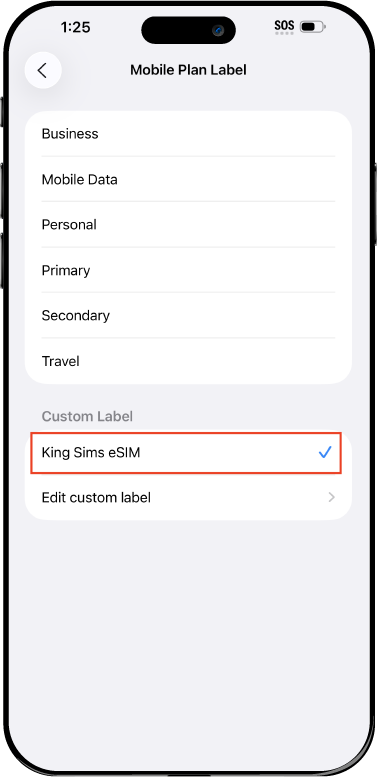
Name Your eSIM ✍️
Once you pass the last step, look for your newly activated eSIM and tap its "Name".

Mobile Plan Label:
Select "Custom Label"
Name it: "King Sims eSIM"

QR Code
Activation Guide

Step-8-iPhone-QR-Code-Activation-Guide

Final Step 👑
Turn on your line ✅

Turn Data Roaming to 'ON'
look for the option titled "Data Roaming"
then Tap 👆the option to turn it 'ON'

For Local eSIM plans with a mobile number, this step is not necessary.

You're Ready To Go 🎉

Step-9-iPhone-QR-Code-Activation-Guide

Welcome to the Kingdom 👑
Once you see the 4G or 5G symbol, test your mobile data.

Once your mobile data starts working without Wi-Fi it means your eSIM has successfully activated

Now you can start travelling with freedom
like a King 🤴 or 👸Queen.

✅ Step 1: Activate Your SIM Card

king-sims-experience.
📅 Add Your Arrival Date:
At checkout, let us know when you're landing in your destination — whether it's 🇺🇸 USA, 🇨🇦 Canada, or 🇲🇽 Mexico. We’ll schedule your SIM for seamless activation.
👑 Have King Sims Ready:
Make sure you have your King Sims packaging ready. It has all you need to get set up.
📲 Swap Your SIM cards:
Once you land, just pop the King Sims card into your phone. Use the "King Pin" in your packaging to swap your SIMs.
🔁 Restart Your Phone:
Give your device a quick restart to kickstart the activation magic.
📩 Get the Welcome Message: Depending on our partnered mobile network and which SIM card you ordered. You’ll get a welcome SMS from the Network with your brand new mobile number — you're officially connected! 🎉
💬 Need Help?
If you see SOS only or no signal, reach out via Live Chat — our support team can sort it in under 5 minutes. 👑
💡 King Tip:
If your King SIM works across multiple countries, don’t forget to turn Data Roaming ON to stay connected in every destination it covers. 🌍📶

Does My Device Have eSIM?

👑 King Tip: If your device isn't listed here simply search google with your phone model to find out if it is 💡

  • iPhone XS
  • iPhone XS Max
  • iPhone 11
  • iPhone 11 Pro
  • iPhone 11 Pro Max
  • iPhone SE (2020)
  • iPhone 12 Mini
  • iPhone 12
  • iPhone 12 Pro
  • iPhone 12 Pro Max
  • iPhone 13 mini
  • iPhone 13
  • iPhone 13 Pro
  • iPhone 13 Pro Max
  • iPhone SE (2022)
  • iPhone 14
  • iPhone 14 Plus
  • iPhone 14 Pro
  • iPhone 14 Pro Max
  • iPhone 15
  • iPhone 15 Plus
  • iPhone 15 Pro
  • iPhone 15 Pro Max
  • iPhone 16 (All Models)
  • iPad Pro (2018 and onwards)
  • iPad Air
  • iPad
  • Watch series 3
  • Watch series 4
  • Watch series 5
  • Watch series 6
  • Watch SE
  • Galaxy Z Flip
  • Galaxy Z Flip 5G
  • Galaxy Z Flip3 5G
  • Galaxy Z Flip4
  • Galaxy Z Flip5
  • Galaxy Fold
  • Galaxy Z Fold2 5G
  • Galaxy Z Fold3 5G
  • Galaxy Z Fold4
  • Galaxy Z Fold5 5G
  • Galaxy S20
  • Galaxy S21
  • Galaxy S21+ 5G
  • Galaxy S21 Ultra 5G
  • Galaxy S22
  • Galaxy S22+
  • Galaxy S22 Ultra
  • Galaxy Note 20 Ultra 5G
  • Galaxy Note 20
  • Galaxy S23
  • Galaxy S23+
  • Galaxy S23 Ultra
  • Galaxy S24
  • Galaxy S24+
  • Galaxy S24 Ultra
  • Galaxy S20 Ultra 5G
  • Gemini PDA
  • Pixel 3
  • Pixel 3a
  • Pixel 4
  • Pixel 4a
  • Pixel 5
  • Pixel 6
  • Pixel 6a
  • Pixel 6 Pro
  • Pixel 7
  • Pixel 7 Pro
  • Pixel 8
  • Pixel 8 Pro
  • P40
  • P40 Pro (not including the P40 Pro +)
  • Mate 40 Pro
  • Razr 2019
  • Razr 5G
  • Motorola Razr 40
  • Motorola Razr 40 Ultra
  • Razr+
  • Edge+
  • Edge 40
  • Edge 40 Pro
  • Edge 40 Neo
  • G52J 5G
  • G52J 5G Ⅱ
  • G53J 5G
  • Find X3 Pro
  • Reno 5 A
  • Find X5
  • Find X5 Pro
  • Reno6 Pro 5G
  • A55s 5G
  • Rakuten Mini
  • Big-S
  • Big
  • Hand
  • Hand 5G
  • Xperia 10 III Lite
  • Xperia 10 IV
  • Xperia 10V
  • Xperia Xperia 1 IV
  • Xperia 5 IV
  • Xperia 1 V
  • Xperia Ace III
  • Xperia 5 V
  • Honor
  • Magic 4 Pro
  • AQUOS Sense6s
  • AQUOS wish
  • AQUOS sense4 lite
  • AQUOS sense 7
  • AQUOS sense 7plus
  • AQUOS wish 2 SHG08
  • AQUOS wish3
  • AQUOS zero 6
  • Simple Sumaho6
  • AQUOS R7
  • AQUOS R8
  • AQUOS R8 Pro
  • V30
  • 12T Pro
  • 13
  • 13 Lite
  • 13 Pro
  • 13T Pro 
  • Honor Magic 4 Pro
  • Honor Magic 5 Pro
  • Honor 90
  • Honor X8
  • Oneplus Open
  • Oneplus 11
  • Oneplus 12 
  • Nokia XR21
  • Nokia X30
  • Nokia G60 5G
  • HAMMER Blade 3
  • HAMMER Explorer PRO
  • HAMMER Blade 5G
  • Vivo X90 Pro
  • Vivo V29 Lite 5G (Europe Only)

Business Trips to China & Hong Kong: A No-Nonsense Connectivity Guide 👑💼

Modern business districts in China where business travel china hong kong esim ensures connectivity

When “No Signal” Costs You Real Money 😤📱

You’ve just landed in Shanghai for a trade show. Your inbox is stacked. Your team’s waiting on updates. Your next meeting is across the city.

You open your phone… nothing loads.

No email sync. No maps. No ride apps.

Meanwhile, your carrier back home is ready to charge you $10/day for the privilege of being barely connected. Welcome to the Roaming Racket. 💸

Here’s the truth:

On a business trip, being offline isn’t inconvenient—it’s expensive.

The Royal Solution? A business travel china hong kong esim from King Sims.

Install before you fly. Land connected. Get straight to business. 👑

The Reality of Business Travel in China & Hong Kong 🧠

If you’re flying into cities like:

  • Shanghai
  • Shenzhen
  • Guangzhou
  • Hong Kong

You already know the pace is fast—and unforgiving.

Common pain points:

  • ⏱️ Tight schedules (no time for SIM kiosks)
  • 🏨 Multiple hotel changes
  • 📶 Unreliable hotel Wi-Fi
  • 🌐 Constant need for email + messaging
  • 🚕 Navigating unfamiliar cities quickly

Translation: You need your phone working instantly, everywhere.

The King’s Decree: Buy Before You Fly ✈️

Business traveler using smartphone showing importance of business travel china hong kong esim connectivity

Let’s make this simple:

If you’re setting up connectivity after landing, you’re already behind.

Airport SIM stalls? Slow.
Pocket Wi-Fi rentals? Clunky.
Hotel Wi-Fi? Unreliable.

By Royal Decree: Set everything up before departure.

That’s where King Sims steps in.

Meet the Business Travel Power Move: King Sims eSIM 👑📶

This isn’t a tourist toy. This is a productivity weapon.

⚡ Instant Activation via the App

  • Install in minutes before departure
  • Activate as soon as you land
  • Works on iOS & Android

No queues. No confusion. No downtime.

🌏 Seamless China + Hong Kong Coverage

One plan. Multiple cities. Zero switching.

Move from Shanghai → Shenzhen → Hong Kong without missing a beat.

📞 Real Phone Numbers (Not Just Data)

Many King Sims plans include:

  • Calls
  • SMS
  • A real phone number

Because sometimes, deals don’t close over Wi-Fi.

📶 Premium Network Access

Powered by top-tier partners like Orange, SoftBank, and T-Mobile.

Translation: Reliable signal when it matters most.

💸 Money-Back Guarantee

If something doesn’t work, you’re covered.

No risk. Just results.

Real Business Scenarios (Where eSIM Wins) 💼

Executive arriving and using phone immediately with business travel china hong kong esim

Let’s get practical.

📍 Scenario 1: Airport Arrival → Meeting Across the City

You land. You’ve got 90 minutes to reach your first meeting.

With King Sims eSIM:

  • Open maps
  • Book a ride
  • Message your contact

You’re moving within minutes.

Without it?
You’re stuck hunting for Wi-Fi or SIM cards. Not a great first impression.

📧 Scenario 2: Staying on Top of Email

Deals don’t pause because you’re in transit.

With stable data:

  • Inbox syncs instantly
  • Attachments download fast
  • Replies go out in real time

No lag. No missed opportunities.

🏨 Scenario 3: Hotel Hopping

Business trips = multiple hotels.

Hotel Wi-Fi = unpredictable at best.

With your own mobile data:

  • You’re connected everywhere
  • No login portals
  • No slow speeds

Your office travels with you.

🚄 Scenario 4: Traveling Between Cities

On a train from Guangzhou to Shenzhen?

With eSIM:

  • Stay connected en route
  • Coordinate meetings
  • Update schedules

No signal drops. No dead zones.

💬 Scenario 5: Team Coordination

Your team is spread across time zones.

You need:

  • Messaging apps
  • Calls
  • Instant updates

King Sims keeps you plugged in 24/7.

Why Not Just Use Roaming or Wi-Fi? 🤨
Business traveler booking ride using business travel china hong kong esim for fast airport transfer

Let’s expose the competition.

🛑 Roaming (The Villain)

  • Expensive ($10/day+)
  • Often slower speeds
  • Surprise charges

Verdict: The Roaming Racket strikes again.

🏨 Public / Hotel Wi-Fi

  • Unreliable
  • Slow
  • Security risks

Verdict: Not business-grade.

📡 Pocket Wi-Fi

  • Extra device to carry
  • Needs charging
  • Pickup/return hassle

Verdict: Too much friction for short trips.

👑 King Sims eSIM

  • Instant setup
  • No hardware
  • No queues
  • No surprises

Verdict: Built for professionals who value time.

Why King Sims Hits Different 👑🔥

This isn’t just convenience—it’s control.

The Royal Edge:

  • 🏆 Featured by IB Times
  • 📱 Dedicated mobile app
  • 🌍 Global coverage
  • 📞 Real numbers on many plans
  • ⚡ Instant activation
  • 💸 Money-back guarantee

And most importantly:

You stay connected from touchdown to takeoff.

Pro Tips for Business Travelers 🧠

Executive managing emails on the go using business travel china hong kong esim connection
  • 📲 Install your eSIM before departure
  • 🔋 Carry a power bank (long days = heavy usage)
  • 📍 Save key meeting locations in advance
  • 📧 Enable offline email backup just in case

Preparation separates amateurs from pros.

Final Word: Stay Connected, Close Deals 👑

Travel like a king with business travel china hong kong esim premium connectivity experience

Business travel in China and Hong Kong moves fast.

You don’t have time to:

  • Queue at kiosks
  • Troubleshoot Wi-Fi
  • Worry about roaming fees

You need something that just works.

👉 A business travel china hong kong esim from King Sims.

Scan it. Land. Execute.

By Royal Decree:
Skip the Roaming Racket. Stay sharp. Stay connected.

🎁 Royal Bonus:
Sign up today and get 15% OFF your first order.

Welcome to the Kingdom—where business travelers move like Kings. 👑💼

0