



Shipping & Handling

How To Activate Your eSIM

Countries Covered

What countries your SIM works in

About Your SIM

SIM Features

YOUR SECRET 🤫
KING SIMS APP CODE 🎁

king-sims-experience

Copy your secret 20% off King Sims app code down below. Apply it in your cart or checkout

QR Code
Activation Guide

Step-1-iPhone-QR-code-2x

Open your 'Cellular' or 'Mobile Data' settings.

Tap 👆 "Add eSIM"

QR Code
Activation Guide

Step-2-iPhone-QR-Code-Activation-Guide

You'll be directed to a screen with multiple activation options.
For QR code activation, select the option: "Use QR code"

QR Code
Activation Guide

Step-3-iPhone-QR-Code-Activation-Guide

Position your phone's camera on the QR code we emailed you and found in the King Sims App.

💡King Tip: Travelling with a friend? Simply send your QR code to a friend and scan it off their phone!

QR Code
Activation Guide

Step-4-iPhone-QR-Code-Activation-Guide

Wait a moment for the eSIM to detect the local network.

Once successful, you'll get a message saying:
"Your new eSIM is ready to activate"

👆Tap Continue

QR Code
Activation Guide

Step-5-iPhone-QR-Code-Activation-Guide

Data Only eSIMs:
If your eSIM comes only with data
👆Tap "Data Only"

eSIMs with Calls & Texts:
If your eSIM comes with calls & texts like our other eSIM ranges
👆Tap "Voice and Data"

QR Code
Activation Guide

Step-6-iPhone-QR-Code-Activation-Guide

Wait a moment ⏳
Once you see this notice pop-up, it means your activation has successfully completed.

Last Step:
Once you see this notification, we need to name and finalise your eSIM setup.
👆Tap "Done" When your ready.

QR Code
Activation Guide

Step-7-iPhone-QR-Code-Activation-Guide

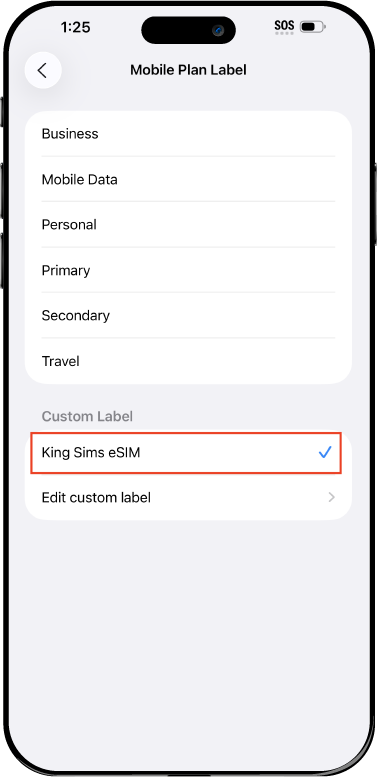
Name Your eSIM ✍️
Once you pass the last step, look for your newly activated eSIM and tap its "Name".

Mobile Plan Label:
Select "Custom Label"
Name it: "King Sims eSIM"

QR Code
Activation Guide

Step-8-iPhone-QR-Code-Activation-Guide

Final Step 👑
Turn on your line ✅

Turn Data Roaming to 'ON'
look for the option titled "Data Roaming"
then Tap 👆the option to turn it 'ON'

For Local eSIM plans with a mobile number, this step is not necessary.

You're Ready To Go 🎉

Step-9-iPhone-QR-Code-Activation-Guide

Welcome to the Kingdom 👑
Once you see the 4G or 5G symbol, test your mobile data.

Once your mobile data starts working without Wi-Fi it means your eSIM has successfully activated

Now you can start travelling with freedom
like a King 🤴 or 👸Queen.

✅ Step 1: Activate Your SIM Card

king-sims-experience.
📅 Add Your Arrival Date:
At checkout, let us know when you're landing in your destination — whether it's 🇺🇸 USA, 🇨🇦 Canada, or 🇲🇽 Mexico. We’ll schedule your SIM for seamless activation.
👑 Have King Sims Ready:
Make sure you have your King Sims packaging ready. It has all you need to get set up.
📲 Swap Your SIM cards:
Once you land, just pop the King Sims card into your phone. Use the "King Pin" in your packaging to swap your SIMs.
🔁 Restart Your Phone:
Give your device a quick restart to kickstart the activation magic.
📩 Get the Welcome Message: Depending on our partnered mobile network and which SIM card you ordered. You’ll get a welcome SMS from the Network with your brand new mobile number — you're officially connected! 🎉
💬 Need Help?
If you see SOS only or no signal, reach out via Live Chat — our support team can sort it in under 5 minutes. 👑
💡 King Tip:
If your King SIM works across multiple countries, don’t forget to turn Data Roaming ON to stay connected in every destination it covers. 🌍📶

Does My Device Have eSIM?

👑 King Tip: If your device isn't listed here simply search google with your phone model to find out if it is 💡

  • iPhone XS
  • iPhone XS Max
  • iPhone 11
  • iPhone 11 Pro
  • iPhone 11 Pro Max
  • iPhone SE (2020)
  • iPhone 12 Mini
  • iPhone 12
  • iPhone 12 Pro
  • iPhone 12 Pro Max
  • iPhone 13 mini
  • iPhone 13
  • iPhone 13 Pro
  • iPhone 13 Pro Max
  • iPhone SE (2022)
  • iPhone 14
  • iPhone 14 Plus
  • iPhone 14 Pro
  • iPhone 14 Pro Max
  • iPhone 15
  • iPhone 15 Plus
  • iPhone 15 Pro
  • iPhone 15 Pro Max
  • iPhone 16 (All Models)
  • iPad Pro (2018 and onwards)
  • iPad Air
  • iPad
  • Watch series 3
  • Watch series 4
  • Watch series 5
  • Watch series 6
  • Watch SE
  • Galaxy Z Flip
  • Galaxy Z Flip 5G
  • Galaxy Z Flip3 5G
  • Galaxy Z Flip4
  • Galaxy Z Flip5
  • Galaxy Fold
  • Galaxy Z Fold2 5G
  • Galaxy Z Fold3 5G
  • Galaxy Z Fold4
  • Galaxy Z Fold5 5G
  • Galaxy S20
  • Galaxy S21
  • Galaxy S21+ 5G
  • Galaxy S21 Ultra 5G
  • Galaxy S22
  • Galaxy S22+
  • Galaxy S22 Ultra
  • Galaxy Note 20 Ultra 5G
  • Galaxy Note 20
  • Galaxy S23
  • Galaxy S23+
  • Galaxy S23 Ultra
  • Galaxy S24
  • Galaxy S24+
  • Galaxy S24 Ultra
  • Galaxy S20 Ultra 5G
  • Gemini PDA
  • Pixel 3
  • Pixel 3a
  • Pixel 4
  • Pixel 4a
  • Pixel 5
  • Pixel 6
  • Pixel 6a
  • Pixel 6 Pro
  • Pixel 7
  • Pixel 7 Pro
  • Pixel 8
  • Pixel 8 Pro
  • P40
  • P40 Pro (not including the P40 Pro +)
  • Mate 40 Pro
  • Razr 2019
  • Razr 5G
  • Motorola Razr 40
  • Motorola Razr 40 Ultra
  • Razr+
  • Edge+
  • Edge 40
  • Edge 40 Pro
  • Edge 40 Neo
  • G52J 5G
  • G52J 5G Ⅱ
  • G53J 5G
  • Find X3 Pro
  • Reno 5 A
  • Find X5
  • Find X5 Pro
  • Reno6 Pro 5G
  • A55s 5G
  • Rakuten Mini
  • Big-S
  • Big
  • Hand
  • Hand 5G
  • Xperia 10 III Lite
  • Xperia 10 IV
  • Xperia 10V
  • Xperia Xperia 1 IV
  • Xperia 5 IV
  • Xperia 1 V
  • Xperia Ace III
  • Xperia 5 V
  • Honor
  • Magic 4 Pro
  • AQUOS Sense6s
  • AQUOS wish
  • AQUOS sense4 lite
  • AQUOS sense 7
  • AQUOS sense 7plus
  • AQUOS wish 2 SHG08
  • AQUOS wish3
  • AQUOS zero 6
  • Simple Sumaho6
  • AQUOS R7
  • AQUOS R8
  • AQUOS R8 Pro
  • V30
  • 12T Pro
  • 13
  • 13 Lite
  • 13 Pro
  • 13T Pro 
  • Honor Magic 4 Pro
  • Honor Magic 5 Pro
  • Honor 90
  • Honor X8
  • Oneplus Open
  • Oneplus 11
  • Oneplus 12 
  • Nokia XR21
  • Nokia X30
  • Nokia G60 5G
  • HAMMER Blade 3
  • HAMMER Explorer PRO
  • HAMMER Blade 5G
  • Vivo X90 Pro
  • Vivo V29 Lite 5G (Europe Only)

Essential Apps for China & Hong Kong: How One eSIM Keeps Them All Running 👑📱

Traveler using phone at Great Wall highlighting need for china hong kong esim vs pocket wifi coverage

When Your Apps Fail, Your Trip Follows 😵

You land in China or Hong Kong, open your phone to book a ride… and nothing loads.

Maps won’t refresh. Messages won’t send. Payment apps? Dead.

Welcome to the Roaming Racket, where your home carrier charges you $10/day for “maybe-working” data. 💸

But here’s the truth most travelers learn the hard way:

Your trip runs on apps—and apps run on data.

The Royal Solution? A China • Hong Kong eSIM from King Sims. Installed before takeoff, activated instantly when you land. No kiosks. No stress. Just connection. 👑

Let’s break down the must-have china hong kong travel apps—and exactly how they save your trip.

The King’s Decree: Buy Before You Fly ✈️

Traveler using smartphone apps in city showing importance of china hong kong travel apps connectivity

Before we get into apps, hear this:

If you don’t have data when you land, none of these apps will work when you need them most.

With King Sims:

  • ⚡ Instant activation via the app (iOS & Android)
  • 📶 Premium networks like Orange, SoftBank, T-Mobile
  • 📞 Real phone numbers on many plans (calls + SMS!)
  • 💸 Money-back guarantee

Translation: You land connected. Like royalty.

📲 Must-Have China Hong Kong Travel Apps

🚕 Ride-Hailing Apps (Your First Lifeline)

Apps to download:

  • DiDi
  • Uber (works better in Hong Kong)

Real-life moment:

You step out of the airport. No idea where to go. Taxis are confusing.

Open DiDi → book a ride → driver arrives. Done.

Why data matters:

  • Live GPS tracking
  • Driver communication
  • Payment processing

No data = no ride. Simple.

🗺️ Maps & Navigation (Don’t Get Lost)

Apps to download:

  • Google Maps
  • Apple Maps

Real-life moment:

You’re walking through a maze of streets in Hong Kong trying to find a café.

Maps guide you turn-by-turn → you arrive like a local. ☕

Why data matters:

  • Real-time directions
  • Traffic updates
  • Business hours & reviews

Offline maps help—but live data is king.

💬 Messaging Apps (Stay in Touch)

Apps to download:

  • WeChat
  • WhatsApp

Real-life moment:

Your hotel sends check-in instructions. Your friend shares a location pin.

Without messaging? You’re guessing.

Why data matters:

  • Instant communication
  • Sharing locations
  • Booking confirmations

🌐 Translation Apps (Break the Language Barrier)

Apps to download:

  • Google Translate

Real-life moment:

You’re at a restaurant. Menu is all in Chinese.

Open camera → scan → instant translation. 🍜

Why data matters:

  • Faster, more accurate translations
  • Voice translation features
  • Real-time conversation mode

💳 Payment Apps (Cash Is Not King Here)

Apps to download:

  • Alipay
  • WeChat Pay

Real-life moment:

You grab a drink at a convenience store. No one takes cash.

Scan → pay → done.

Why data matters:

  • QR code payments
  • Transaction verification
  • Account syncing

No connection = no payment.

🍜 Food Delivery & Restaurant Apps

Traveler booking train using china hong kong travel apps on smartphone during trip

Apps to download:

  • Meituan
  • OpenRice

Real-life moment:

Late night. Hungry. Don’t want to wander.

Order food straight to your door—or find the best local spot nearby.

Why data matters:

  • Live menus
  • Delivery tracking
  • Reviews & ratings

🚄 Transport & Train Booking Apps

Apps to download:

  • Trip.com

Real-life moment:

You decide to travel from one city to another.

Book a train in minutes → skip ticket lines entirely.

Why data matters:

  • Real-time schedules
  • Mobile tickets
  • Platform updates

☕ Bonus: Finding Cafés, Wi-Fi & Chill Spots

Apps to use:

  • Google Maps
  • OpenRice

Real-life moment:

You need a place to sit, recharge, and plan your day.

Search → filter → walk in confidently.

⚠️ What Happens Without Data? (The Ugly Truth)
Traveler navigating city using china hong kong travel apps maps in busy street

Let’s not sugarcoat it:

Without a china hong kong travel apps setup backed by real data, you get:

  • ❌ No ride from the airport
  • ❌ No way to translate menus
  • ❌ No payments in many places
  • ❌ No navigation in unfamiliar cities
  • ❌ No communication with hotels or guides

And suddenly… your trip gets complicated fast.

👑 The Power Behind It All: King Sims eSIM

All these apps? Useless without connection.

That’s where King Sims comes in.

Why It Wins:

  • ⚡ Instant activation via the app (before you even land)
  • 📶 Works across China & Hong Kong seamlessly
  • 📞 Real phone numbers (on many plans)
  • 💸 Money-back guarantee
  • 🏆 Trusted & featured by IB Times

No hunting SIM cards. No relying on sketchy Wi-Fi.

Just open your apps—and they work.

🧠 Pro Tips from the Kingdom

  • 📲 Download all apps before departure
  • 🔋 Carry a power bank (apps = battery drain)
  • 📍 Save key locations in advance
  • 🧪 Test your eSIM before takeoff

Preparation = power.

Final Word: Rule Your Trip with the Right Setup 👑

Confident traveler using china hong kong travel apps with reliable esim connection

Here’s the reality:

China and Hong Kong are incredibly digital.

Everything—from transport to food to payments—runs through apps.

So the real question isn’t:
“Which apps should I download?”

It’s:
“Will they actually work when I need them?”

👉 With a China • Hong Kong eSIM from King Sims, the answer is always YES.

By Royal Decree:
Skip the Roaming Racket. Stay connected. Run your trip like a King. 👑

🎁 Royal Bonus:
Sign up today and get 15% OFF your first order.

Welcome to the Kingdom. 🌍📱

0