



Shipping & Handling

How To Activate Your eSIM

Countries Covered

What countries your SIM works in

About Your SIM

SIM Features

YOUR SECRET 🤫
KING SIMS APP CODE 🎁

king-sims-experience

Copy your secret 20% off King Sims app code down below. Apply it in your cart or checkout

QR Code
Activation Guide

Step-1-iPhone-QR-code-2x

Open your 'Cellular' or 'Mobile Data' settings.

Tap 👆 "Add eSIM"

QR Code
Activation Guide

Step-2-iPhone-QR-Code-Activation-Guide

You'll be directed to a screen with multiple activation options.
For QR code activation, select the option: "Use QR code"

QR Code
Activation Guide

Step-3-iPhone-QR-Code-Activation-Guide

Position your phone's camera on the QR code we emailed you and found in the King Sims App.

💡King Tip: Travelling with a friend? Simply send your QR code to a friend and scan it off their phone!

QR Code
Activation Guide

Step-4-iPhone-QR-Code-Activation-Guide

Wait a moment for the eSIM to detect the local network.

Once successful, you'll get a message saying:
"Your new eSIM is ready to activate"

👆Tap Continue

QR Code
Activation Guide

Step-5-iPhone-QR-Code-Activation-Guide

Data Only eSIMs:
If your eSIM comes only with data
👆Tap "Data Only"

eSIMs with Calls & Texts:
If your eSIM comes with calls & texts like our other eSIM ranges
👆Tap "Voice and Data"

QR Code
Activation Guide

Step-6-iPhone-QR-Code-Activation-Guide

Wait a moment ⏳
Once you see this notice pop-up, it means your activation has successfully completed.

Last Step:
Once you see this notification, we need to name and finalise your eSIM setup.
👆Tap "Done" When your ready.

QR Code
Activation Guide

Step-7-iPhone-QR-Code-Activation-Guide

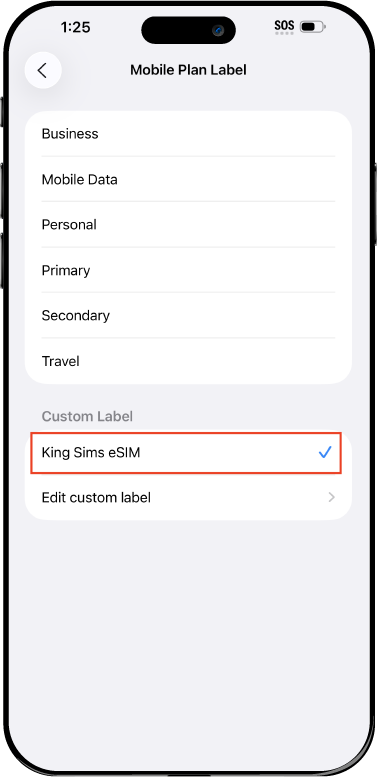
Name Your eSIM ✍️
Once you pass the last step, look for your newly activated eSIM and tap its "Name".

Mobile Plan Label:
Select "Custom Label"
Name it: "King Sims eSIM"

QR Code
Activation Guide

Step-8-iPhone-QR-Code-Activation-Guide

Final Step 👑
Turn on your line ✅

Turn Data Roaming to 'ON'
look for the option titled "Data Roaming"
then Tap 👆the option to turn it 'ON'

For Local eSIM plans with a mobile number, this step is not necessary.

You're Ready To Go 🎉

Step-9-iPhone-QR-Code-Activation-Guide

Welcome to the Kingdom 👑
Once you see the 4G or 5G symbol, test your mobile data.

Once your mobile data starts working without Wi-Fi it means your eSIM has successfully activated

Now you can start travelling with freedom
like a King 🤴 or 👸Queen.

✅ Step 1: Activate Your SIM Card

king-sims-experience.
📅 Add Your Arrival Date:
At checkout, let us know when you're landing in your destination — whether it's 🇺🇸 USA, 🇨🇦 Canada, or 🇲🇽 Mexico. We’ll schedule your SIM for seamless activation.
👑 Have King Sims Ready:
Make sure you have your King Sims packaging ready. It has all you need to get set up.
📲 Swap Your SIM cards:
Once you land, just pop the King Sims card into your phone. Use the "King Pin" in your packaging to swap your SIMs.
🔁 Restart Your Phone:
Give your device a quick restart to kickstart the activation magic.
📩 Get the Welcome Message: Depending on our partnered mobile network and which SIM card you ordered. You’ll get a welcome SMS from the Network with your brand new mobile number — you're officially connected! 🎉
💬 Need Help?
If you see SOS only or no signal, reach out via Live Chat — our support team can sort it in under 5 minutes. 👑
💡 King Tip:
If your King SIM works across multiple countries, don’t forget to turn Data Roaming ON to stay connected in every destination it covers. 🌍📶

Does My Device Have eSIM?

👑 King Tip: If your device isn't listed here simply search google with your phone model to find out if it is 💡

  • iPhone XS
  • iPhone XS Max
  • iPhone 11
  • iPhone 11 Pro
  • iPhone 11 Pro Max
  • iPhone SE (2020)
  • iPhone 12 Mini
  • iPhone 12
  • iPhone 12 Pro
  • iPhone 12 Pro Max
  • iPhone 13 mini
  • iPhone 13
  • iPhone 13 Pro
  • iPhone 13 Pro Max
  • iPhone SE (2022)
  • iPhone 14
  • iPhone 14 Plus
  • iPhone 14 Pro
  • iPhone 14 Pro Max
  • iPhone 15
  • iPhone 15 Plus
  • iPhone 15 Pro
  • iPhone 15 Pro Max
  • iPhone 16 (All Models)
  • iPad Pro (2018 and onwards)
  • iPad Air
  • iPad
  • Watch series 3
  • Watch series 4
  • Watch series 5
  • Watch series 6
  • Watch SE
  • Galaxy Z Flip
  • Galaxy Z Flip 5G
  • Galaxy Z Flip3 5G
  • Galaxy Z Flip4
  • Galaxy Z Flip5
  • Galaxy Fold
  • Galaxy Z Fold2 5G
  • Galaxy Z Fold3 5G
  • Galaxy Z Fold4
  • Galaxy Z Fold5 5G
  • Galaxy S20
  • Galaxy S21
  • Galaxy S21+ 5G
  • Galaxy S21 Ultra 5G
  • Galaxy S22
  • Galaxy S22+
  • Galaxy S22 Ultra
  • Galaxy Note 20 Ultra 5G
  • Galaxy Note 20
  • Galaxy S23
  • Galaxy S23+
  • Galaxy S23 Ultra
  • Galaxy S24
  • Galaxy S24+
  • Galaxy S24 Ultra
  • Galaxy S20 Ultra 5G
  • Gemini PDA
  • Pixel 3
  • Pixel 3a
  • Pixel 4
  • Pixel 4a
  • Pixel 5
  • Pixel 6
  • Pixel 6a
  • Pixel 6 Pro
  • Pixel 7
  • Pixel 7 Pro
  • Pixel 8
  • Pixel 8 Pro
  • P40
  • P40 Pro (not including the P40 Pro +)
  • Mate 40 Pro
  • Razr 2019
  • Razr 5G
  • Motorola Razr 40
  • Motorola Razr 40 Ultra
  • Razr+
  • Edge+
  • Edge 40
  • Edge 40 Pro
  • Edge 40 Neo
  • G52J 5G
  • G52J 5G Ⅱ
  • G53J 5G
  • Find X3 Pro
  • Reno 5 A
  • Find X5
  • Find X5 Pro
  • Reno6 Pro 5G
  • A55s 5G
  • Rakuten Mini
  • Big-S
  • Big
  • Hand
  • Hand 5G
  • Xperia 10 III Lite
  • Xperia 10 IV
  • Xperia 10V
  • Xperia Xperia 1 IV
  • Xperia 5 IV
  • Xperia 1 V
  • Xperia Ace III
  • Xperia 5 V
  • Honor
  • Magic 4 Pro
  • AQUOS Sense6s
  • AQUOS wish
  • AQUOS sense4 lite
  • AQUOS sense 7
  • AQUOS sense 7plus
  • AQUOS wish 2 SHG08
  • AQUOS wish3
  • AQUOS zero 6
  • Simple Sumaho6
  • AQUOS R7
  • AQUOS R8
  • AQUOS R8 Pro
  • V30
  • 12T Pro
  • 13
  • 13 Lite
  • 13 Pro
  • 13T Pro 
  • Honor Magic 4 Pro
  • Honor Magic 5 Pro
  • Honor 90
  • Honor X8
  • Oneplus Open
  • Oneplus 11
  • Oneplus 12 
  • Nokia XR21
  • Nokia X30
  • Nokia G60 5G
  • HAMMER Blade 3
  • HAMMER Explorer PRO
  • HAMMER Blade 5G
  • Vivo X90 Pro
  • Vivo V29 Lite 5G (Europe Only)

SIM Card or eSIM for Europe in 2026? Here’s the Truth

You’ve just landed in Paris. Or Rome. Or Barcelona. You turn your phone on.

No signal.

Airport Wi-Fi crawling. Uber won’t load. Google Maps buffering like it’s 2009. Meanwhile, your home carrier is sharpening its sword, ready to charge you $10 per day for roaming.

Welcome to the Roaming Racket.

Now here’s the Royal Question:
Should you get a physical SIM card… or an eSIM for Europe in 2026?

This guide breaks down europe esim vs sim the right way — no carrier fluff, no tech confusion. Just the truth from the throne.

👑 The Basics: What’s the Difference?

Before we duel, let’s define the players.

📦 Physical SIM Card

  • Plastic card inserted into your phone
  • Must be shipped or bought locally
  • Requires swapping your current SIM

📲 eSIM

  • Built into your phone
  • Activated digitally
  • Installed via QR code or app
  • No physical swapping

Both connect you to European networks. But how they do it — and how easy it is — changes everything.

⚔️ Europe eSIM vs SIM: The Showdown

Let’s break it down by what actually matters.

1️⃣ Activation: Who Wins?

Physical SIM

  • Wait for shipping
  • Or stand in airport lines
  • Swap your SIM tray
  • Risk losing your home SIM

eSIM

  • Buy online
  • Install via the King Sims App (iOS & Android)
  • Activate in minutes
  • Land connected

👑 The King’s Decree:
If you value convenience, eSIM wins.

And with King Sims, activation is instant. You install before departure. Plane lands. Signal appears. Royal smooth.

2️⃣ Coverage: UK + EU Compatibility

This is where rookies get confused.

Europe isn’t just one country. It’s:

  • France 🇫🇷
  • Italy 🇮🇹
  • Spain 🇪🇸
  • Germany 🇩🇪
  • Netherlands 🇳🇱
  • And yes… the UK 🇬🇧

Post-Brexit, some providers treat the UK differently.

With King Sims’ Europe Travel SIM 100GB (Orange network), you get:

  • EU-wide coverage
  • UK compatibility
  • Seamless cross-border roaming

No switching plans when you hop from Paris to London.

No surprise charges when you cross borders by train.

That’s Kingdom-level planning.

3️⃣ Data Speeds & Network Quality

Not all providers are created equal.

We don’t use mystery networks.

King Sims partners with:

  • Orange (major EU carrier)
  • SoftBank
  • T-Mobile

Translation?
Strong infrastructure. Real towers. Reliable speeds.

Whether you choose SIM or eSIM, you’re riding premium networks — not budget backbones.

4️⃣ Calls & Texts: The Hidden Advantage 👀

Here’s where many competitors fall apart.

A lot of Europe eSIMs are data-only.

That means:

  • No local phone number
  • No SMS
  • No traditional calls

Sounds fine… until:

  • Your bank needs SMS verification
  • A hotel calls you
  • You need to book a local restaurant
  • A delivery driver can’t reach you

Many King Sims plans include:

  • A real phone number
  • Call capability
  • SMS functionality

You’re not just online. You’re reachable.

That’s a major win in the europe esim vs sim debate.

5️⃣ Convenience for First-Timers

If this is your first Europe trip, here’s what you care about:

  • Will it work immediately?
  • Will it work across countries?
  • Will it be easy to set up?

Physical SIM Pros:

  • Works on older phones
  • Simple if you’re used to swapping cards

Physical SIM Cons:

  • Can get lost
  • Requires physical handling
  • Airport kiosks are overpriced

eSIM Pros:

  • Instant activation
  • No shipping delays
  • No tray swapping
  • Perfect for dual SIM phones

eSIM Cons:

  • Requires compatible phone

For most modern travelers in 2026?
eSIM is the smoother ride.

🛑 The Real Enemy: Airport SIM Counters

Let’s talk traps.

You land exhausted. There’s a kiosk glowing under fluorescent lights. A salesperson waves you over.

They know you’re vulnerable.

  • Inflated pricing
  • Limited data
  • Confusing terms
  • Pressure to buy

By Royal Decree:
Buy Before You Fly.

Order your Europe SIM or eSIM before departure. Install it calmly at home. Arrive connected.

No airport ambush.

💼 Perfect for Multi-Country Europe Trips

Doing:

  • 2 weeks across Italy + France + Spain?
  • A rail tour across 6 countries?
  • A digital nomad month in Lisbon and Berlin?

You need:

  • High data allowance
  • Cross-border coverage
  • Strong speeds

The King Sims Europe Travel SIM 100GB on Orange gives you:

  • Massive data
  • Multi-country compatibility
  • Reliable EU infrastructure
  • UK support included

That’s not tourist data. That’s power-user data.

📲 Why the King Sims App Changes the Game

Let’s talk control.

With the King Sims App:

  • Activate instantly
  • Track usage
  • Manage plans
  • Switch destinations
  • Access support

No calling carrier hotlines.
No store visits.
No stress.

And yes — we’re verified by IB Times. We’re not some pop-up operation.

We run this Kingdom properly 👑

💰 What About Cost?

Let’s compare.

Home Carrier Roaming

$10 per day × 14 days = $140
For limited data.
Sometimes throttled speeds.

Local Airport SIM

Often overpriced.
Limited validity.

King Sims Europe Plan

High data.
Cross-border support.
Premium networks.
Transparent pricing.

Travel like a King.
Pay like a pauper.

🧠 Common First-Timer Mistakes

Let me save you from embarrassment.

❌ Waiting Until Landing

Install before you go.

❌ Not Checking Phone Compatibility

Make sure your phone is unlocked and supports eSIM if you’re going digital.

❌ Assuming All Europe Plans Include UK

They don’t.

Always confirm UK coverage — ours includes it.

❌ Choosing Data-Only When You Need Calls

If you need SMS verification or bookings, pick a plan with call capability.

👑 So… Europe eSIM vs SIM

What’s the Verdict?

Here’s the honest answer:

Choose eSIM if:

  • Your phone supports it
  • You want instant activation
  • You hate swapping SIM cards
  • You value convenience

Choose Physical SIM if:

  • Your phone doesn’t support eSIM
  • You prefer physical setup

Both work beautifully with King Sims.

But for most travelers in 2026?
eSIM is the modern, stress-free solution.

🏰 The Royal Wrap-Up

Europe is magical.

Roaming fees are not.

Whether you choose SIM or eSIM, the real mistake is relying on your home carrier or gambling on airport Wi-Fi.

The Kingdom solution:

  1. Visit the King Sims Europe Travel SIM page
  2. Choose your plan
  3. Install before departure
  4. Land connected

And if you’re new here?

Join the Royal Class.

Sign up and get 15% off your first order 👑

No roaming racket.
No airport traps.
No bill shock.

Just smooth European connectivity — the Royal way.

See you in Rome. Or Paris. Or Barcelona.

Signal will be strong. The throne will be waiting. 🌍👑

0