



Shipping & Handling

How To Activate Your eSIM

Countries Covered

What countries your SIM works in

About Your SIM

SIM Features

YOUR SECRET 🤫
KING SIMS APP CODE 🎁

king-sims-experience

Copy your secret 20% off King Sims app code down below. Apply it in your cart or checkout

QR Code
Activation Guide

Step-1-iPhone-QR-code-2x

Open your 'Cellular' or 'Mobile Data' settings.

Tap 👆 "Add eSIM"

QR Code
Activation Guide

Step-2-iPhone-QR-Code-Activation-Guide

You'll be directed to a screen with multiple activation options.
For QR code activation, select the option: "Use QR code"

QR Code
Activation Guide

Step-3-iPhone-QR-Code-Activation-Guide

Position your phone's camera on the QR code we emailed you and found in the King Sims App.

💡King Tip: Travelling with a friend? Simply send your QR code to a friend and scan it off their phone!

QR Code
Activation Guide

Step-4-iPhone-QR-Code-Activation-Guide

Wait a moment for the eSIM to detect the local network.

Once successful, you'll get a message saying:
"Your new eSIM is ready to activate"

👆Tap Continue

QR Code
Activation Guide

Step-5-iPhone-QR-Code-Activation-Guide

Data Only eSIMs:
If your eSIM comes only with data
👆Tap "Data Only"

eSIMs with Calls & Texts:
If your eSIM comes with calls & texts like our other eSIM ranges
👆Tap "Voice and Data"

QR Code
Activation Guide

Step-6-iPhone-QR-Code-Activation-Guide

Wait a moment ⏳
Once you see this notice pop-up, it means your activation has successfully completed.

Last Step:
Once you see this notification, we need to name and finalise your eSIM setup.
👆Tap "Done" When your ready.

QR Code
Activation Guide

Step-7-iPhone-QR-Code-Activation-Guide

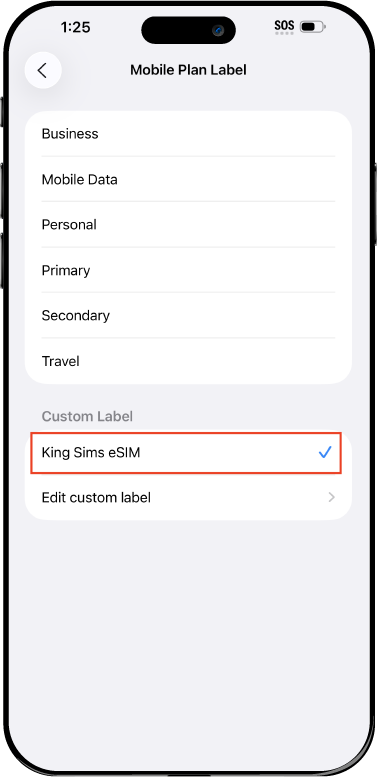
Name Your eSIM ✍️
Once you pass the last step, look for your newly activated eSIM and tap its "Name".

Mobile Plan Label:
Select "Custom Label"
Name it: "King Sims eSIM"

QR Code
Activation Guide

Step-8-iPhone-QR-Code-Activation-Guide

Final Step 👑
Turn on your line ✅

Turn Data Roaming to 'ON'
look for the option titled "Data Roaming"
then Tap 👆the option to turn it 'ON'

For Local eSIM plans with a mobile number, this step is not necessary.

You're Ready To Go 🎉

Step-9-iPhone-QR-Code-Activation-Guide

Welcome to the Kingdom 👑
Once you see the 4G or 5G symbol, test your mobile data.

Once your mobile data starts working without Wi-Fi it means your eSIM has successfully activated

Now you can start travelling with freedom
like a King 🤴 or 👸Queen.

✅ Step 1: Activate Your SIM Card

king-sims-experience.
📅 Add Your Arrival Date:
At checkout, let us know when you're landing in your destination — whether it's 🇺🇸 USA, 🇨🇦 Canada, or 🇲🇽 Mexico. We’ll schedule your SIM for seamless activation.
👑 Have King Sims Ready:
Make sure you have your King Sims packaging ready. It has all you need to get set up.
📲 Swap Your SIM cards:
Once you land, just pop the King Sims card into your phone. Use the "King Pin" in your packaging to swap your SIMs.
🔁 Restart Your Phone:
Give your device a quick restart to kickstart the activation magic.
📩 Get the Welcome Message: Depending on our partnered mobile network and which SIM card you ordered. You’ll get a welcome SMS from the Network with your brand new mobile number — you're officially connected! 🎉
💬 Need Help?
If you see SOS only or no signal, reach out via Live Chat — our support team can sort it in under 5 minutes. 👑
💡 King Tip:
If your King SIM works across multiple countries, don’t forget to turn Data Roaming ON to stay connected in every destination it covers. 🌍📶

Does My Device Have eSIM?

👑 King Tip: If your device isn't listed here simply search google with your phone model to find out if it is 💡

  • iPhone XS
  • iPhone XS Max
  • iPhone 11
  • iPhone 11 Pro
  • iPhone 11 Pro Max
  • iPhone SE (2020)
  • iPhone 12 Mini
  • iPhone 12
  • iPhone 12 Pro
  • iPhone 12 Pro Max
  • iPhone 13 mini
  • iPhone 13
  • iPhone 13 Pro
  • iPhone 13 Pro Max
  • iPhone SE (2022)
  • iPhone 14
  • iPhone 14 Plus
  • iPhone 14 Pro
  • iPhone 14 Pro Max
  • iPhone 15
  • iPhone 15 Plus
  • iPhone 15 Pro
  • iPhone 15 Pro Max
  • iPhone 16 (All Models)
  • iPad Pro (2018 and onwards)
  • iPad Air
  • iPad
  • Watch series 3
  • Watch series 4
  • Watch series 5
  • Watch series 6
  • Watch SE
  • Galaxy Z Flip
  • Galaxy Z Flip 5G
  • Galaxy Z Flip3 5G
  • Galaxy Z Flip4
  • Galaxy Z Flip5
  • Galaxy Fold
  • Galaxy Z Fold2 5G
  • Galaxy Z Fold3 5G
  • Galaxy Z Fold4
  • Galaxy Z Fold5 5G
  • Galaxy S20
  • Galaxy S21
  • Galaxy S21+ 5G
  • Galaxy S21 Ultra 5G
  • Galaxy S22
  • Galaxy S22+
  • Galaxy S22 Ultra
  • Galaxy Note 20 Ultra 5G
  • Galaxy Note 20
  • Galaxy S23
  • Galaxy S23+
  • Galaxy S23 Ultra
  • Galaxy S24
  • Galaxy S24+
  • Galaxy S24 Ultra
  • Galaxy S20 Ultra 5G
  • Gemini PDA
  • Pixel 3
  • Pixel 3a
  • Pixel 4
  • Pixel 4a
  • Pixel 5
  • Pixel 6
  • Pixel 6a
  • Pixel 6 Pro
  • Pixel 7
  • Pixel 7 Pro
  • Pixel 8
  • Pixel 8 Pro
  • P40
  • P40 Pro (not including the P40 Pro +)
  • Mate 40 Pro
  • Razr 2019
  • Razr 5G
  • Motorola Razr 40
  • Motorola Razr 40 Ultra
  • Razr+
  • Edge+
  • Edge 40
  • Edge 40 Pro
  • Edge 40 Neo
  • G52J 5G
  • G52J 5G Ⅱ
  • G53J 5G
  • Find X3 Pro
  • Reno 5 A
  • Find X5
  • Find X5 Pro
  • Reno6 Pro 5G
  • A55s 5G
  • Rakuten Mini
  • Big-S
  • Big
  • Hand
  • Hand 5G
  • Xperia 10 III Lite
  • Xperia 10 IV
  • Xperia 10V
  • Xperia Xperia 1 IV
  • Xperia 5 IV
  • Xperia 1 V
  • Xperia Ace III
  • Xperia 5 V
  • Honor
  • Magic 4 Pro
  • AQUOS Sense6s
  • AQUOS wish
  • AQUOS sense4 lite
  • AQUOS sense 7
  • AQUOS sense 7plus
  • AQUOS wish 2 SHG08
  • AQUOS wish3
  • AQUOS zero 6
  • Simple Sumaho6
  • AQUOS R7
  • AQUOS R8
  • AQUOS R8 Pro
  • V30
  • 12T Pro
  • 13
  • 13 Lite
  • 13 Pro
  • 13T Pro 
  • Honor Magic 4 Pro
  • Honor Magic 5 Pro
  • Honor 90
  • Honor X8
  • Oneplus Open
  • Oneplus 11
  • Oneplus 12 
  • Nokia XR21
  • Nokia X30
  • Nokia G60 5G
  • HAMMER Blade 3
  • HAMMER Explorer PRO
  • HAMMER Blade 5G
  • Vivo X90 Pro
  • Vivo V29 Lite 5G (Europe Only)

China – Hong Kong eSIM vs Local SIM vs Pocket Wi-Fi: What Actually Works in 2026? 👑📶

Shanghai skyline where travelers need reliable connection using china hong kong esim vs pocket wifi

The Moment Your Phone Betrays You 😵📱

You land in China or Hong Kong. You open your phone… and nothing works.

No maps. No ride apps. No messages. Just vibes—and not the good kind.

Meanwhile, your home carrier is warming up the Roaming Racket: $10/day for the privilege of barely usable data. 💸

So what’s the move in 2026?

  • Buy a local SIM at the airport?
  • Rent a pocket Wi-Fi device?
  • Or go full royalty with a china hong kong esim vs pocket wifi showdown winner?

By Royal Decree, we’re breaking it all down—no fluff, no nonsense—so you can travel like a King and pay like a pauper. 👑

The 3 Contenders: Quick Overview ⚔️
Traveler with no signal after landing highlighting china hong kong esim vs pocket wifi dilemma

Let’s meet the players:

1. 🪪 Local SIM (Buy on Arrival)

Old-school. Physical SIM. Bought at airport kiosks or stores.

2. 📡 Pocket Wi-Fi (Portable Router)

A rental device that gives Wi-Fi to your phone (and maybe your crew).

3. 👑 China • Hong Kong eSIM (King Sims)

Digital SIM. No hardware. Installed before you fly. Instant connection on arrival.

Round 1: Convenience & Setup 🚀

🪪 Local SIM: The Airport Gauntlet

  • Long queues after a long flight 😴
  • Language barriers (especially in mainland China)
  • Passport registration required
  • SIM swapping (hope you don’t lose your home SIM…)

Reality check: You’re tired, jet-lagged, and making tech decisions under pressure.

📡 Pocket Wi-Fi: The Pickup Mission

  • Must reserve in advance
  • Pickup at airport counter (if you find it)
  • Return before departure (or pay penalties)
  • Carry an extra device everywhere

Translation: You’ve added logistics to your vacation. Bold move.

👑 King Sims eSIM: Scan. Land. Rule.

  • Buy online before departure
  • Install via QR code
  • Activate instantly through the app

📱 Works on iOS & Android via the King Sims App

The King’s Decree:

If it’s not ready before takeoff, it’s already too late.

Round 2: Cost & Hidden Fees 💸
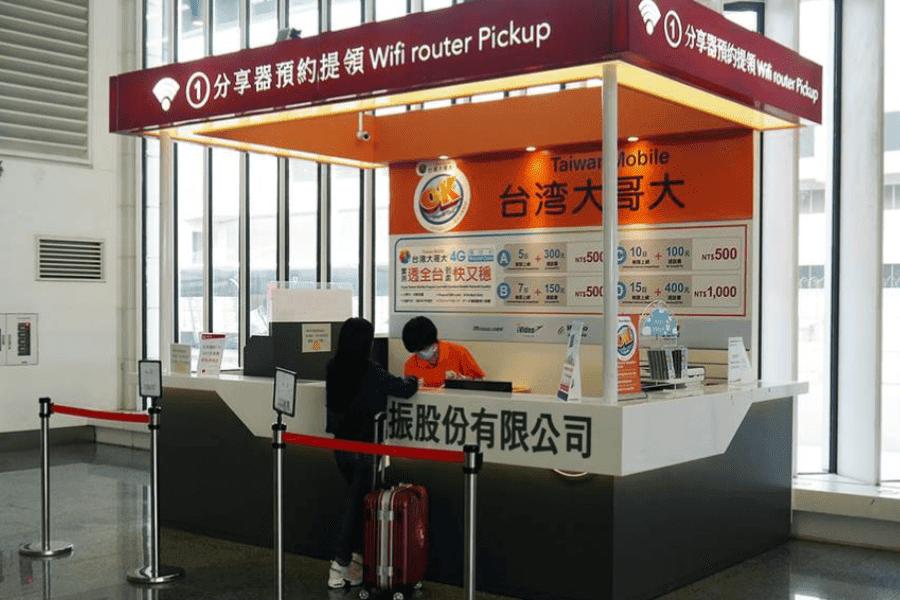
Travelers struggling at airport kiosks comparing china hong kong esim vs pocket wifi and local sim options

🪪 Local SIM

  • Cheap upfront (sometimes)
  • But: upsells, confusing plans, limited validity
  • Tourist pricing hits different

📡 Pocket Wi-Fi

  • Daily rental fees
  • Security deposit required 💀
  • Late return penalties
  • Damage fees if anything goes wrong

Sneaky total cost: Higher than it looks.

👑 King Sims eSIM

  • Transparent pricing
  • No deposits
  • No returns
  • No surprise fees

💸 Plus: Money-Back Guarantee if things don’t go to plan

Round 3: Performance & Reliability 📶

🪪 Local SIM

  • Usually good speeds
  • But depends on the carrier you randomly pick

📡 Pocket Wi-Fi

  • Shared connection (slower with more users)
  • Signal depends on device quality
  • Can drop out when moving

👑 King Sims eSIM

Powered by premium networks like Orange, SoftBank, and T-Mobile.

  • Strong, stable connections
  • Seamless switching between China & Hong Kong
  • No random “dead zones” because you chose the wrong kiosk

Verdict: Royal-level signal. No peasant problems.

Round 4: Flexibility & Real-Life Use 🧠

Traveler navigating city easily using china hong kong esim vs pocket wifi winning solution

🪪 Local SIM

  • Locked to one region or plan
  • No easy top-ups for tourists
  • No flexibility mid-trip

📡 Pocket Wi-Fi

  • Multiple devices can connect (good for groups)
  • BUT:
    • 🔋 Battery dies = everyone offline
    • 🎒 One person must carry it
    • 🚫 Lose it = chaos + fees

Battery anxiety is real.

👑 King Sims eSIM

  • Works directly on your phone
  • No extra device
  • Many plans include:
    • 📞 Calls
    • 💬 SMS
    • 📱 Real phone number

Unlike most competitors who offer data-only, King Sims keeps you fully connected.

Round 5: Travel Stress Level 😌

Travel like a king using china hong kong esim vs pocket wifi best choice in hong kong skyline

🪪 Local SIM

Stress level: 😵😵😵

  • Lines
  • Language confusion
  • Setup issues

📡 Pocket Wi-Fi

Stress level: 😬😬

  • Pickup + return logistics
  • Charging anxiety
  • Risk of fees

👑 King Sims eSIM

Stress level: 😎

  • Already set up
  • Already working
  • Already winning

The Verdict: What Actually Works in 2026 🏆

Let’s not overcomplicate it.

🥉 Third Place: Local SIM

Too much hassle for too little control.

🥈 Second Place: Pocket Wi-Fi

Useful for groups—but comes with strings attached (and cables… and chargers…).

🥇 First Place: King Sims eSIM 👑

  • Instant activation
  • No hardware
  • No deposits
  • No returns
  • Full control

This is the modern traveler’s move.

Why King Sims Hits Different 👑🔥

Tourists navigating Beijing landmarks using china hong kong esim vs pocket wifi connectivity

This isn’t just another eSIM brand.

The Royal Advantages:

  • 🏆 Featured by IB Times
  • 📱 Dedicated app (iOS & Android)
  • 🌍 Global coverage
  • 📞 Real numbers on many plans
  • ⚡ Instant activation
  • 💸 Money-back guarantee

And most importantly:

Buy Before You Fly. Always.

Because wandering around an airport hunting for Wi-Fi or SIM cards?

That’s not how Kings travel.

Real Talk: Who Should Choose What? 🤔

Choose Local SIM if:

  • You enjoy chaos
  • You speak the local language
  • You love waiting in lines

Choose Pocket Wi-Fi if:

  • You’re traveling in a group
  • You don’t mind carrying extra gear
  • You’re okay with deposits and returns

Choose King Sims eSIM if:

  • You want instant connection on arrival
  • You hate hidden fees
  • You prefer simple, clean setups

Aussies 🇦🇺, Kiwis 🇳🇿, Europeans 🇪🇺, Americans 🇺🇸—this one’s built for you.

Pro Travel Tips for China & Hong Kong 🧠

  • 📲 Install your eSIM before departure
  • 🔋 Bring a power bank (always smart)
  • 📍 Save key locations offline just in case
  • 💬 Test your connection before takeoff

Stack the odds. Rule the trip.

Final Word: Join the Royal Class 👑

Here’s the truth:

You don’t need to juggle devices.
You don’t need to queue at kiosks.
You definitely don’t need to fund the Roaming Racket.

You just need one thing:

👉 A china hong kong esim vs pocket wifi winner—King Sims.

Scan it. Land. Run the city.

🎁 Royal Bonus:
Sign up today and get 15% OFF your first order.

Welcome to the Kingdom. 🌍👑

0